
Circuit Documentation
Summary
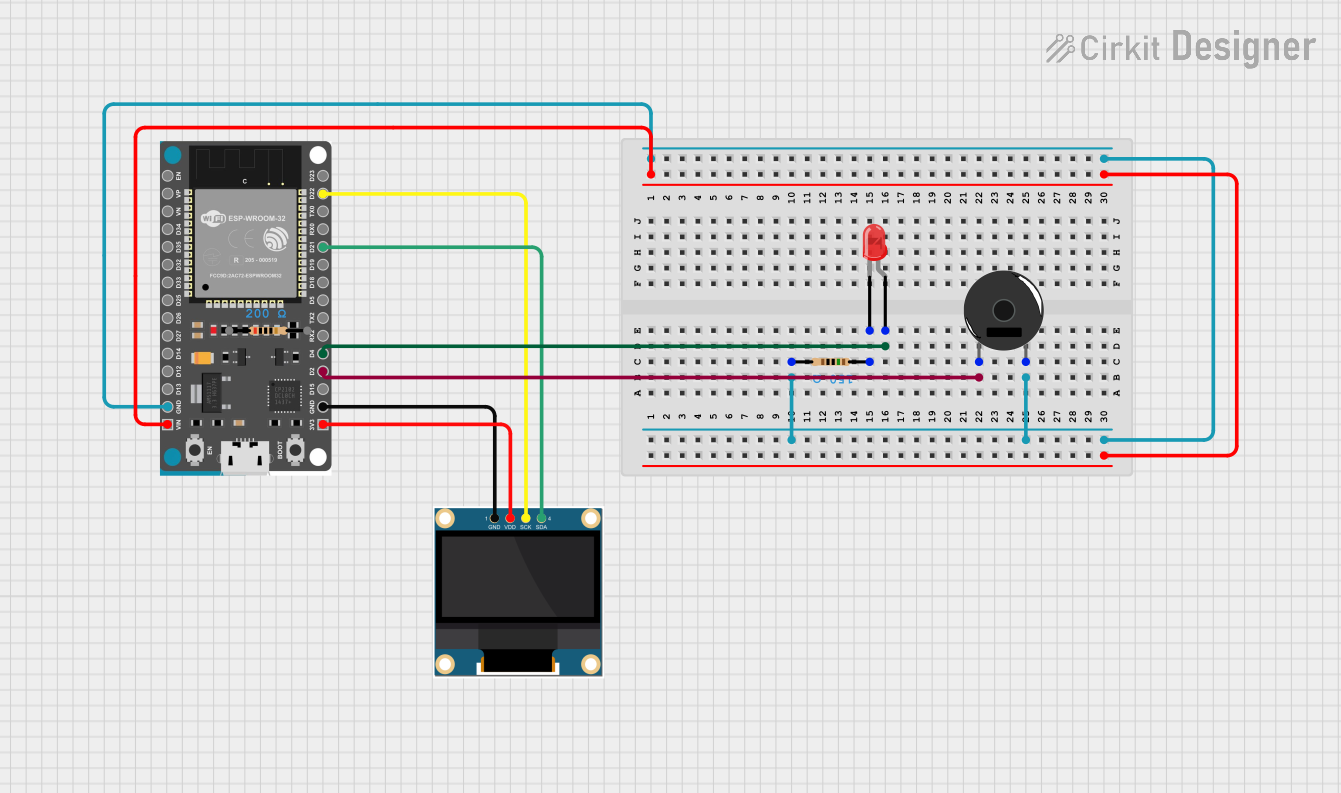
This circuit utilizes an ESP32 Devkit V1 microcontroller to control a 0.96" OLED display, a red LED, and a piezo buzzer. The ESP32 is programmed to display scrolling text and a bitmap on the OLED, blink the LED, and beep the buzzer. The circuit includes resistors to limit current to the LED and the buzzer.
Component List
ESP32 Devkit V1
- Description: A powerful microcontroller with built-in Wi-Fi and Bluetooth capabilities.
- Pins: 3V3, GND, D15, D2, D4, RX2, TX2, D5, D18, D19, D21, RX0, TX0, D22, D23, EN, VP, VN, D34, D35, D32, D33, D25, D26, D27, D14, D12, D13, VIN
0.96" OLED
- Description: A small OLED display used for showing text and graphics.
- Pins: GND, VDD, SCK, SDA
LED: Two Pin (red)
- Description: A standard red LED.
- Pins: cathode, anode
Resistor (200 Ohms)
- Description: A resistor with a resistance of 200 Ohms.
- Pins: pin1, pin2
Resistor (150 Ohms)
- Description: A resistor with a resistance of 150 Ohms.
- Pins: pin1, pin2
Piezo Buzzer
- Description: A piezoelectric buzzer used for generating sound.
- Pins: pin 1, pin 2
Wiring Details
ESP32 Devkit V1
- 3V3: Connected to VDD of the 0.96" OLED.
- GND: Connected to GND of the 0.96" OLED, pin2 of the 150 Ohms resistor, and pin 2 of the Piezo Buzzer.
- D2: Connected to pin 1 of the Piezo Buzzer.
- D4: Connected to the anode of the red LED.
- D21: Connected to SDA of the 0.96" OLED.
- D22: Connected to SCK of the 0.96" OLED.
- VIN: Not connected in this circuit.
0.96" OLED
- VDD: Connected to 3V3 of the ESP32 Devkit V1.
- GND: Connected to GND of the ESP32 Devkit V1.
- SCK: Connected to D22 of the ESP32 Devkit V1.
- SDA: Connected to D21 of the ESP32 Devkit V1.
LED: Two Pin (red)
- anode: Connected to D4 of the ESP32 Devkit V1.
- cathode: Connected to pin1 of the 150 Ohms resistor.
Resistor (200 Ohms)
- pin1: Not connected in this circuit.
- pin2: Not connected in this circuit.
Resistor (150 Ohms)
- pin1: Connected to the cathode of the red LED.
- pin2: Connected to GND of the ESP32 Devkit V1.
Piezo Buzzer
- pin 1: Connected to D2 of the ESP32 Devkit V1.
- pin 2: Connected to GND of the ESP32 Devkit V1 through the 150 Ohms resistor.
Code Documentation
Code Overview
The code for the ESP32 Devkit V1 initializes the OLED display, sets up the LED and buzzer pins, and runs a loop that displays scrolling text and a bitmap on the OLED, blinks the LED, and beeps the buzzer.
Code Listing
#include <Wire.h>
#include <Adafruit_GFX.h>
#include <Adafruit_SSD1306.h>

#define SCREEN_WIDTH 128 // OLED display width, in pixels
#define SCREEN_HEIGHT 64 // OLED display height, in pixels
#define LED_PIN 4          // Define the pin for the LED
#define BUZZER_PIN 2       // Define the pin for the buzzer

// Declaration for an SSD1306 display connected to I2C (SDA, SCL pins)
Adafruit_SSD1306 display(SCREEN_WIDTH, SCREEN_HEIGHT, &Wire, -1);

// Example bitmap (128x64 screen needs 1024 bytes for a full screen bitmap)
const uint8_t exampleBitmap[] PROGMEM = {
0x00, 0x00, 0x00, 0x00, 0xff, 0xff, 0xff, 0xff, 0xff, 0xff, 0xff, 0xff, 0x00, 0x00, 0x00, 0x00,
    0x00, 0x00, 0x00, 0x00, 0xff, 0xff, 0xff, 0xff, 0xff, 0xff, 0xff, 0xff, 0x00, 0x00, 0x00, 0x00,
    0x00, 0x00, 0x00, 0x00, 0xff, 0xff, 0xff, 0xff, 0xff, 0xff, 0xff, 0xff, 0x00, 0x00, 0x00, 0x00,
    0x00, 0x00, 0x00, 0x00, 0xff, 0xff, 0xff, 0xff, 0xff, 0xff, 0xff, 0xff, 0x00, 0x00, 0x00, 0x00,
    0x00, 0x00, 0x00, 0x00, 0xff, 0xff, 0xff, 0xff, 0xff, 0xff, 0xff, 0xff, 0x00, 0x00, 0x00, 0x00,
    0x00, 0x00, 0x00, 0x00, 0xff, 0xff, 0xff, 0xe0, 0x7f, 0xff, 0xff, 0xff, 0x00, 0x00, 0x00, 0x00,
    0x00, 0x00, 0x00, 0x00, 0xff, 0xff, 0xff, 0x80, 0x01, 0xff, 0xff, 0xff, 0x00, 0x00, 0x00, 0x00,
    0x00, 0x00, 0x00, 0x00, 0xff, 0xff, 0xff, 0x00, 0x00, 0x7f, 0xff, 0xff, 0x00, 0x00, 0x00, 0x00,
    0x00, 0x00, 0x00, 0x00, 0xff, 0xff, 0xfc, 0x00, 0x00, 0x3f, 0xff, 0xff, 0x00, 0x00, 0x00, 0x00,
    0x00, 0x00, 0x00, 0x00, 0xff, 0xff, 0xf8, 0x00, 0x00, 0x1f, 0xff, 0xff, 0x00, 0x00, 0x00, 0x00,
    0x00, 0x00, 0x00, 0x00, 0xff, 0xff, 0xf0, 0x00, 0x00, 0x0f, 0xff, 0xff, 0x00, 0x00, 0x00, 0x00,
    0x00, 0x00, 0x00, 0x00, 0xff, 0xff, 0xf0, 0x00, 0x00, 0x07, 0xff, 0xff, 0x00, 0x00, 0x00, 0x00,
    0x00, 0x00, 0x00, 0x00, 0xff, 0xff, 0xe0, 0x00, 0x00, 0x07, 0xff, 0xff, 0x00, 0x00, 0x00, 0x00,