
Arduino UNO and ESP8266 NodeMCU Controlled IR Sensor Array with LCD Display and Servo Integration
View and Edit Project In Cirkit Designer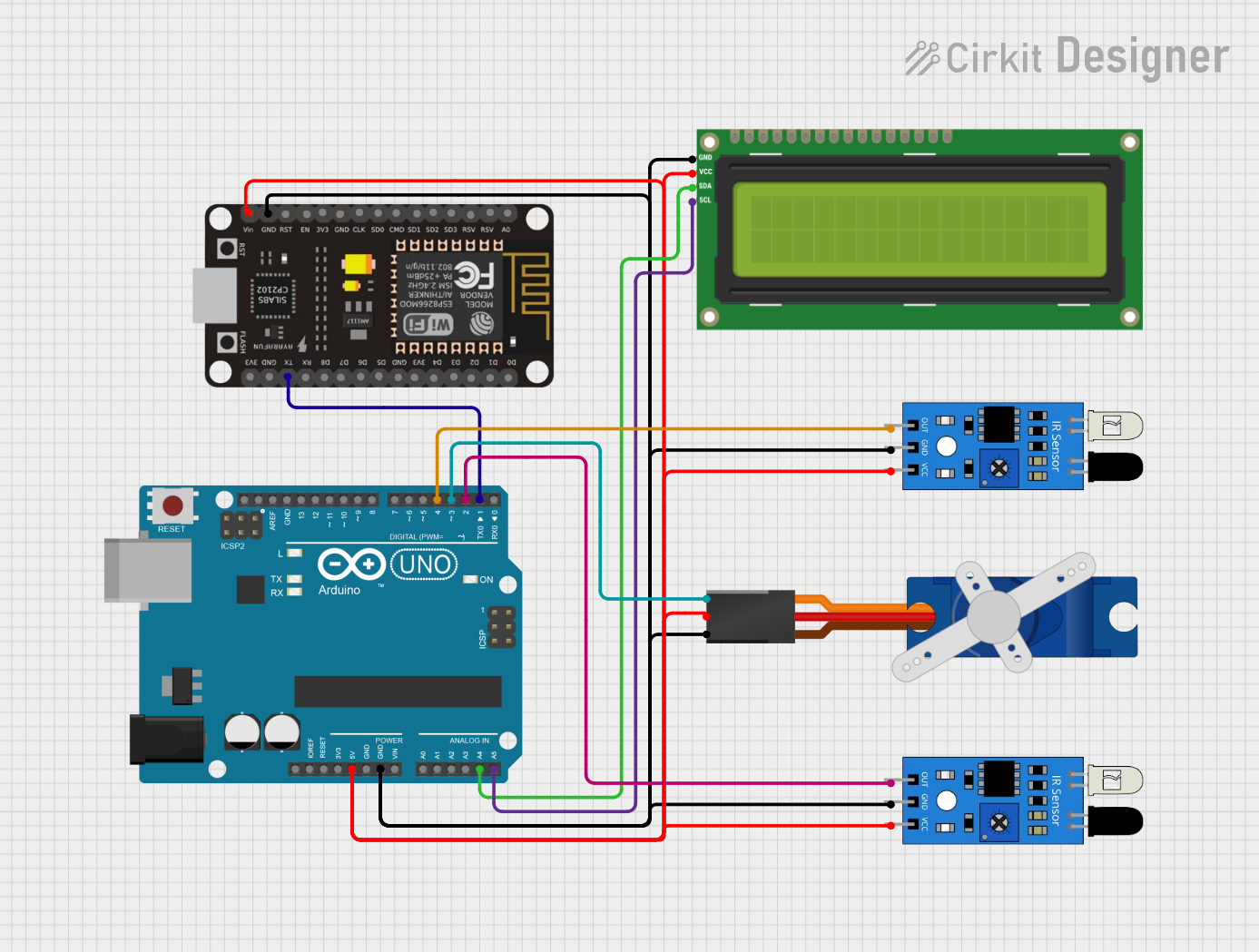
Circuit Documentation
Summary of the Circuit
This circuit integrates a variety of components including microcontrollers, sensors, a display, and a servo motor. The primary microcontroller is an Arduino UNO, which interfaces with an ESP8266 NodeMCU, two IR sensors, an I2C LCD 16x2 screen, and a Tower Pro SG90 servo motor. The Arduino UNO is responsible for processing sensor inputs and controlling the servo motor, while the ESP8266 NodeMCU may be used for adding WiFi connectivity to the circuit. The IR sensors detect the presence or absence of objects, and the LCD screen displays information or readings. The servo motor is controlled based on the inputs from the IR sensors.
Component List
ESP8266 NodeMCU
- Microcontroller with WiFi capability
- Pins: D0-D8, RX, TX, A0, RSV, SD3, SD2, SD1, CMD, SD0, CLK, EN, RST, VIN, 3V3, GND
IR Sensor
- Infrared sensor for object detection
- Pins: out, gnd, vcc
I2C LCD 16x2 Screen
- Liquid Crystal Display for showing text
- Pins: SCL, SDA, VCC (5V), GND, VDD, VO, RS, RW, E, D0-D7, BLA, BLK
Tower Pro SG90 Servo
- Servo motor for precise angular movement
- Pins: Signal, +5V, GND
Arduino UNO
- Microcontroller board based on the ATmega328P
- Pins: UNUSED, IOREF, Reset, 3.3V, 5V, GND, Vin, A0-A5, SCL, SDA, AREF, D0-D13
Wiring Details
ESP8266 NodeMCU
- VIN connected to 5V power supply net
- GND connected to ground net
- TX connected to Arduino UNO D1 (RX)
IR Sensor (Two Instances)
- vcc connected to 5V power supply net
- gnd connected to ground net
- out of one sensor connected to Arduino UNO D4
- out of the other sensor connected to Arduino UNO D2
I2C LCD 16x2 Screen
- SCL connected to Arduino UNO A5
- SDA connected to Arduino UNO A4
- VCC (5V) connected to 5V power supply net
- GND connected to ground net
Tower Pro SG90 Servo
- Signal connected to Arduino UNO D3
- +5V connected to 5V power supply net
- GND connected to ground net
Arduino UNO
- 5V pin providing power to the 5V power supply net
- GND pin providing ground to the ground net
- A4 (SDA) and A5 (SCL) used for I2C communication with the LCD screen
- D1 (RX) connected to ESP8266 NodeMCU TX
- D2, D3, and D4 used for interfacing with IR sensors and servo motor
Documented Code
Arduino UNO Code (sketch.ino)
void setup() {
  // put your setup code here, to run once:

}

void loop() {
  // put your main code here, to run repeatedly:

}
Note: The provided code for the Arduino UNO is a template with empty setup and loop functions. This code should be expanded to initialize the connected components and implement the desired functionality based on sensor inputs and actuator outputs.