
Arduino UNO-Based Obstacle-Avoiding Robot with Ultrasonic Sensor and Servo Motor
View and Edit Project In Cirkit Designer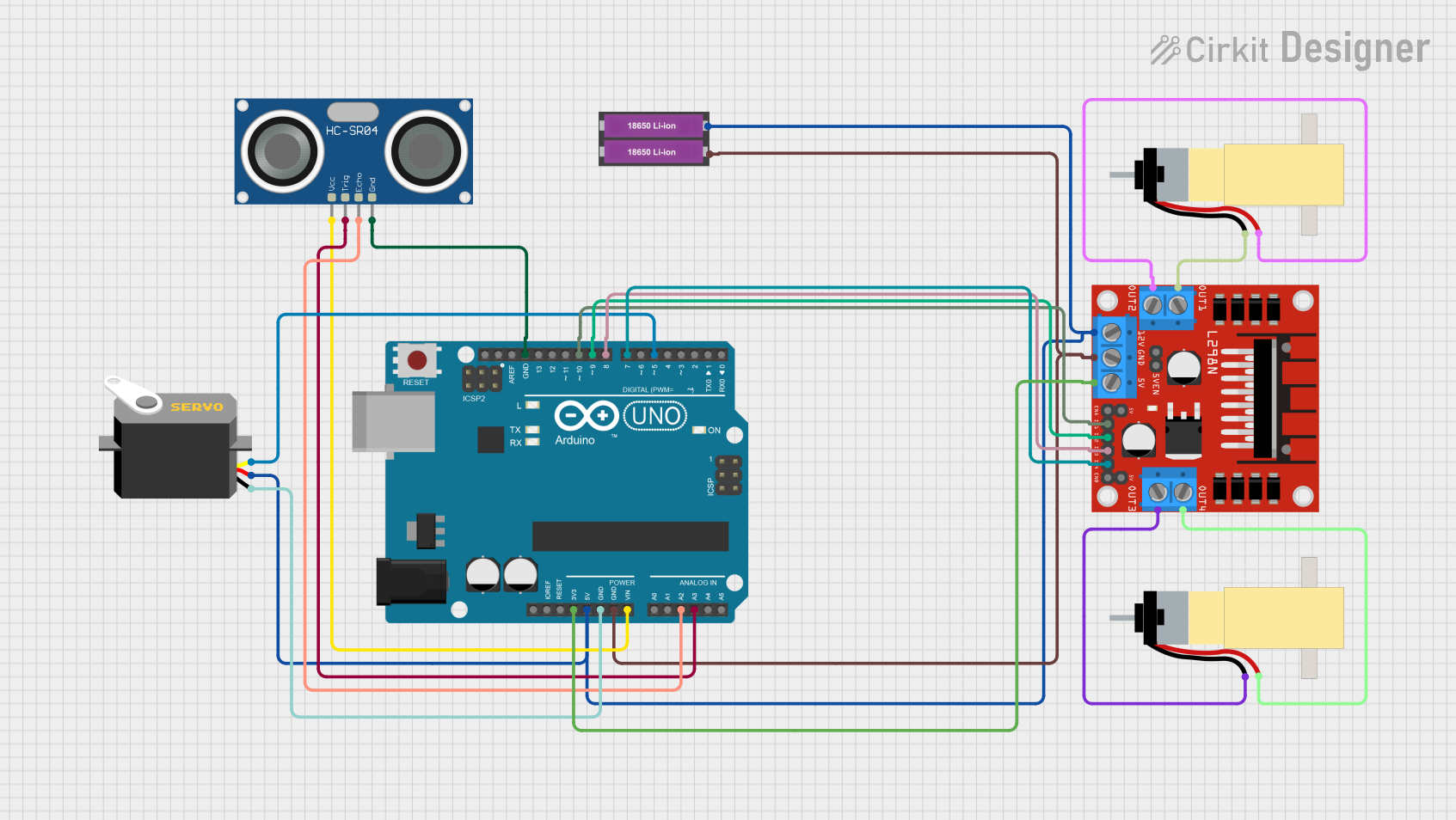
Circuit Documentation
Summary
This circuit is designed to control a robotic vehicle using an Arduino UNO microcontroller. The vehicle is equipped with an ultrasonic sensor for obstacle detection, a servo motor for directional control, and two DC motors for movement. The L298N motor driver is used to control the DC motors, and the entire system is powered by two 18650 Li-ion batteries.
Component List
Arduino UNO
- Description: A microcontroller board based on the ATmega328P.
- Pins: UNUSED, IOREF, Reset, 3.3V, 5V, GND, Vin, A0, A1, A2, A3, A4, A5, SCL, SDA, AREF, D13, D12, D11, D10, D9, D8, D7, D6, D5, D4, D3, D2, D1, D0
Servo
- Description: A standard servo motor.
- Pins: gnd, vcc, pulse
HC-SR04 Ultrasonic Sensor
- Description: An ultrasonic sensor for distance measurement.
- Pins: VCC, TRIG, ECHO, GND
L298N DC Motor Driver
- Description: A dual H-Bridge motor driver.
- Pins: OUT1, OUT2, 12V, GND, 5V, OUT3, OUT4, 5V-ENA-JMP-I, 5V-ENA-JMP-O, +5V-J1, +5V-J2, ENA, IN1, IN2, IN3, IN4, ENB
18650 Li-ion Battery x 2
- Description: Two 18650 Li-ion batteries for power supply.
- Pins: +, -
Hobby Gearmotor with 48:1 Gearbox (x2)
- Description: Two hobby gearmotors with a 48:1 gearbox.
- Pins: pin 1, pin 2
Wiring Details
Arduino UNO
- 3.3V to L298N DC Motor Driver 5V
- 5V to Servo vcc, 18650 Li-ion Battery +, L298N DC Motor Driver 12V
- GND to Servo gnd, 18650 Li-ion Battery -, L298N DC Motor Driver GND, HC-SR04 Ultrasonic Sensor GND
- Vin to HC-SR04 Ultrasonic Sensor VCC
- A2 to HC-SR04 Ultrasonic Sensor ECHO
- A3 to HC-SR04 Ultrasonic Sensor TRIG
- D10 to L298N DC Motor Driver IN1
- D9 to L298N DC Motor Driver IN2
- D8 to L298N DC Motor Driver IN3
- D7 to L298N DC Motor Driver IN4
- D5 to Servo pulse
Servo
- vcc to Arduino UNO 5V
- gnd to Arduino UNO GND
- pulse to Arduino UNO D5
HC-SR04 Ultrasonic Sensor
- VCC to Arduino UNO Vin
- TRIG to Arduino UNO A3
- ECHO to Arduino UNO A2
- GND to Arduino UNO GND
L298N DC Motor Driver
- 5V to Arduino UNO 3.3V
- 12V to Arduino UNO 5V
- GND to Arduino UNO GND
- IN1 to Arduino UNO D10
- IN2 to Arduino UNO D9
- IN3 to Arduino UNO D8
- IN4 to Arduino UNO D7
- OUT1 to Hobby Gearmotor pin 1
- OUT2 to Hobby Gearmotor pin 2
- OUT3 to Hobby Gearmotor pin 1
- OUT4 to Hobby Gearmotor pin 2
18650 Li-ion Battery x 2
- + to Arduino UNO 5V
- - to Arduino UNO GND
Hobby Gearmotor with 48:1 Gearbox (x2)
- pin 1 to L298N DC Motor Driver OUT1 (first motor), L298N DC Motor Driver OUT3 (second motor)
- pin 2 to L298N DC Motor Driver OUT2 (first motor), L298N DC Motor Driver OUT4 (second motor)
Code Documentation
#include <Servo.h>          // Servo motor library. This is standard library
#include <NewPing.h>        // Ultrasonic sensor function library. You must install this library

// our L298N control pins
const int LeftMotorForward = 9;
const int LeftMotorBackward = 10;
const int RightMotorForward = 7;
const int RightMotorBackward = 8;

// sensor pins
#define trig_pin A3 // analog input 1
#define echo_pin A2 // analog input 2

#define maximum_distance 200
boolean goesForward = false;
int distance = 100;

NewPing sonar(trig_pin, echo_pin, maximum_distance); // sensor function
Servo servo_motor; // our servo name

void setup() {
  pinMode(RightMotorForward, OUTPUT);
  pinMode(LeftMotorForward, OUTPUT);
  pinMode(LeftMotorBackward, OUTPUT);
  pinMode(RightMotorBackward, OUTPUT);

  servo_motor.attach(5); // our servo pin

  servo_motor.write(90);
  delay(2000);
  distance = readPing();
  delay(100);
  distance = readPing();
  delay(100);
  distance = readPing();
  delay(100);
  distance = readPing();
  delay(100);
}

void loop() {
  int distanceRight = 0;
  int distanceLeft = 0;
  delay(50);

  if (distance <= 10) {
    moveStop();
    delay(300);
    moveBackward();
    delay(400);
    moveStop();
    delay(300);
    distanceRight = lookRight();
    delay(300);
    distanceLeft = lookLeft();
    delay(300);

    if (distance >= distanceLeft) {
      turnRight();
      moveStop();
    } else {
      turnLeft();
      moveStop();
    }
  } else {
    moveForward();
  }
  distance = readPing();
}

int lookRight() {
  servo_motor.write(10);
  delay(500);
  int distance = readPing();
  delay(100);
  servo_motor.write(90);
  return distance;
}

int lookLeft() {
  servo_motor.write(170);
  delay(500);
  int distance = readPing();
  delay(100);
  servo_motor.write(90);
  return distance;
  delay(100);
}

int readPing() {
  delay(70);
  int cm = sonar.ping_cm();
  if (cm == 0) {
    cm = 250;
  }
  return cm;
}

void moveStop() {
  digitalWrite(RightMotorForward, LOW);
  digitalWrite(LeftMotorForward, LOW);
  digitalWrite(RightMotorBackward, LOW);
  digitalWrite(LeftMotorBackward, LOW);
}

void moveForward() {
  if (!goesForward) {
    goesForward = true;
    digitalWrite(LeftMotorForward, HIGH);
    digitalWrite(RightMotorForward, HIGH);
    digitalWrite(LeftMotorBackward, LOW);
    digitalWrite(RightMotorBackward, LOW);
  }
}

void moveBackward() {
  goesForward = false;
  digitalWrite(LeftMotorBackward, HIGH);
  digitalWrite(RightMotorBackward, HIGH);
  digitalWrite(LeftMotorForward, LOW);
  digitalWrite(RightMotorForward, LOW);
}

void turnRight() {
  digitalWrite(LeftMotorForward, HIGH);
  digitalWrite(RightMotorBackward, HIGH);
  digitalWrite(LeftMotorBackward, LOW);
  digitalWrite(RightMotorForward, LOW);
  delay(500);
  digitalWrite(LeftMotorForward, HIGH);
  digitalWrite(RightMotorForward, HIGH);
  digitalWrite(LeftMotorBackward, LOW);
  digitalWrite(RightMotorBackward, LOW);
}

void turnLeft() {
  digitalWrite(LeftMotorBackward, HIGH);
  digitalWrite(RightMotorForward, HIGH);
  digitalWrite(LeftMotorForward, LOW);
  digitalWrite(RightMotorBackward, LOW);
  delay(500);
  digitalWrite(LeftMotorForward, HIGH);
  digitalWrite(RightMotorForward, HIGH);
  digitalWrite(LeftMotorBackward, LOW);
  digitalWrite(RightMotorBackward, LOW);
}
This code controls the robotic vehicle's movement and obstacle avoidance using the ultrasonic sensor and servo motor. The vehicle moves forward until an obstacle is detected within 10 cm, at which point it stops, moves backward, and then decides whether to turn left or right based on the distance measured by the ultrasonic sensor.