
Arduino-Controlled Dual Stepper Motor Driver with Boost Converter and User Input
View and Edit Project In Cirkit Designer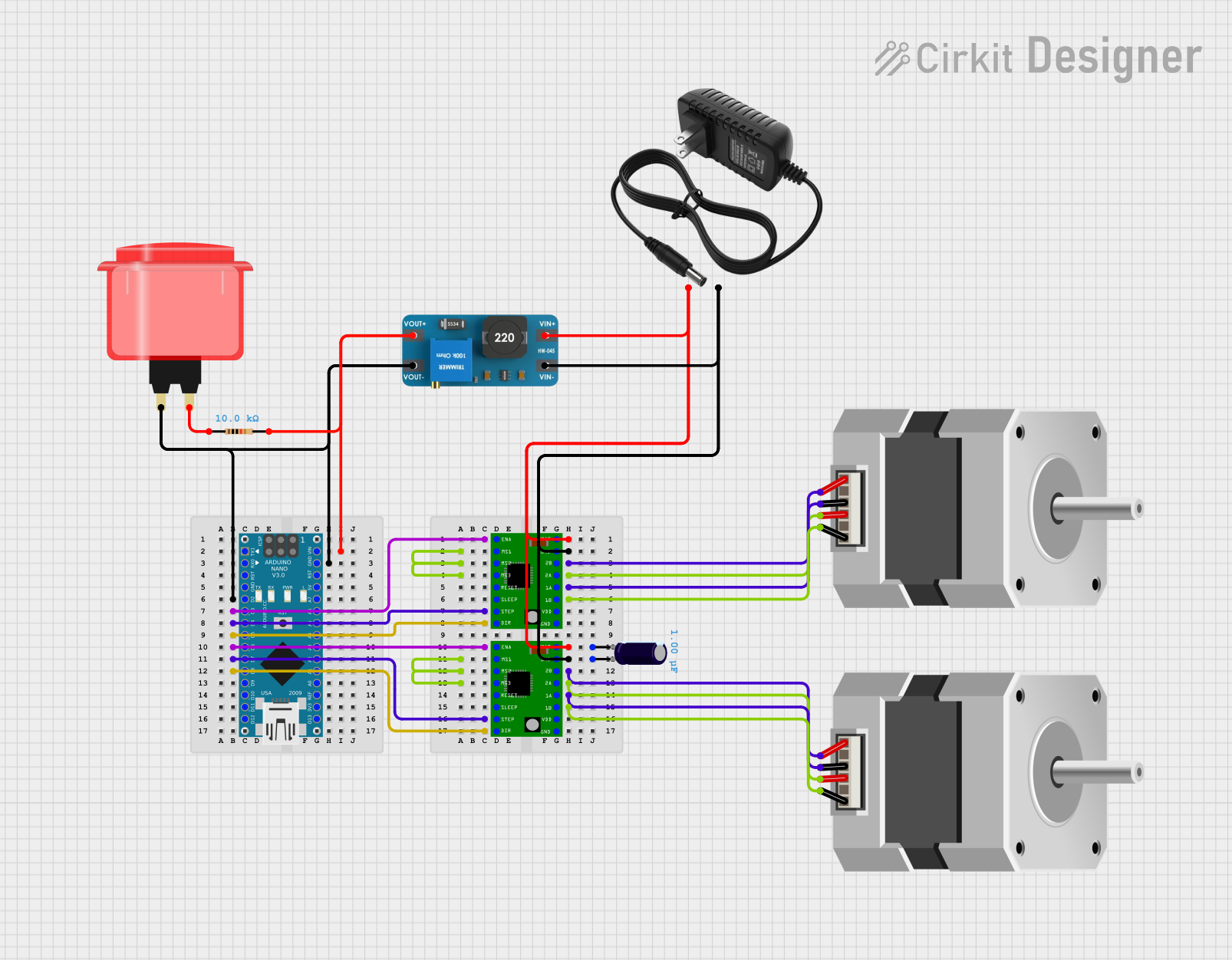
Circuit Documentation
Summary
This circuit is designed to control two bipolar stepper motors using A4988 stepper motor driver carriers, which are interfaced with an Arduino Nano microcontroller. The circuit includes a boost converter to step up the voltage, an electrolytic capacitor for voltage smoothing, a resistor for current limiting, and an arcade button for user input. The 12V power supply provides the necessary voltage for the stepper motors and the boost converter, which powers the Arduino Nano.
Component List
A4988 Stepper Motor Driver Carrier
- Description: A module to drive bipolar stepper motors.
- Pins: ENABLE, MS1, MS2, MS3, RESET, SLEEP, STEP, DIR, GND, VCC, 1B, 1A, 2A, 2B, VMOT
Electrolytic Capacitor
- Description: A capacitor used for filtering and smoothing out voltage fluctuations.
- Properties: Capacitance: 1 µF (microfarads)
Resistor
- Description: A passive two-terminal electrical component that implements electrical resistance as a circuit element.
- Properties: Resistance: 10 kΩ (kiloohms)
Stepper Motor (Bipolar)
- Description: A motor that divides a full rotation into a number of equal steps, ideal for precise control of rotation.
- Pins: D, B, C, A
Boost Converter MT3608
- Description: A module to step up the voltage from a lower voltage to a higher one.
- Pins: OUTPUT +, OUTPUT -, INPUT +, INPUT -
Arcade Button (Red)
- Description: A simple push-button switch for user input.
- Pins: No label yet
12V Power Supply
- Description: Provides a 12V voltage source for the circuit.
- Pins: +, -
Arduino Nano
- Description: A small, complete, and breadboard-friendly board based on the ATmega328 (Arduino Nano 3.x).
- Pins: D1/TX, D0/RX, RESET, GND, D2, D3, D4, D5, D6, D7, D8, D9, D10, D11/MOSI, D12/MISO, VIN, 5V, A7, A6, A5, A4, A3, A2, A1, A0, AREF, 3V3, D13/SCK
Wiring Details
A4988 Stepper Motor Driver Carrier
- ENABLE connected to Arduino Nano D3 (for one driver) and D6 (for the other driver)
- STEP connected to Arduino Nano D4 (for one driver) and D7 (for the other driver)
- DIR connected to Arduino Nano D5 (for one driver) and D8 (for the other driver)
- VMOT connected to 12V power supply (+) and Electrolytic Capacitor (-)
- GND connected to 12V power supply (-) and Electrolytic Capacitor (+)
- MS1, MS2, MS3 are interconnected (for micro-stepping configuration)
- 1A, 1B, 2A, 2B connected to corresponding pins on the Stepper Motor (Bipolar)
Electrolytic Capacitor
- "+" connected to GND of A4988 Stepper Motor Driver Carrier
- "-" connected to VMOT of A4988 Stepper Motor Driver Carrier
Resistor
- Pin1 connected to Arcade Button (Red)
- Pin2 connected to Arduino Nano VIN and Boost Converter MT3608 OUTPUT +
Stepper Motor (Bipolar)
- A, B, C, D connected to corresponding 1B, 1A, 2A, 2B on A4988 Stepper Motor Driver Carrier
Boost Converter MT3608
- OUTPUT + connected to Arduino Nano VIN and Resistor Pin2
- OUTPUT - connected to Arduino Nano GND
- INPUT + connected to 12V power supply (+)
- INPUT - connected to 12V power supply (-)
Arcade Button (Red)
- Pin connected to Resistor Pin1 and Arduino Nano D2
12V Power Supply
- "+" connected to VMOT of A4988 Stepper Motor Driver Carrier and INPUT + of Boost Converter MT3608
- "-" connected to GND of A4988 Stepper Motor Driver Carrier and INPUT - of Boost Converter MT3608
Arduino Nano
- VIN connected to Resistor Pin2 and Boost Converter MT3608 OUTPUT +
- GND connected to Boost Converter MT3608 OUTPUT -
- D2 connected to Arcade Button (Red)
- D3, D4, D5 connected to ENABLE, STEP, DIR of one A4988 Stepper Motor Driver Carrier
- D6, D7, D8 connected to ENABLE, STEP, DIR of the other A4988 Stepper Motor Driver Carrier
Documented Code
Arduino Nano Code (sketch.ino)
void setup() {
  // put your setup code here, to run once:

}

void loop() {
  // put your main code here, to run repeatedly:

}
Note: The provided code is a template and does not contain any functional code to control the stepper motors or read the button state. The user should implement the necessary code to initialize the stepper motor drivers and handle the button press events to control the stepper motors accordingly.