
Circuit Documentation
Summary of the Circuit
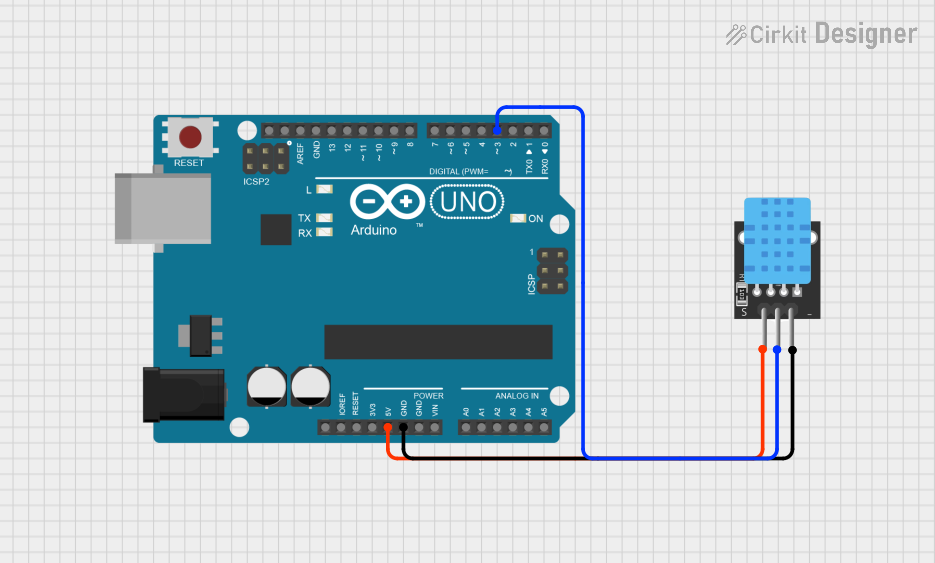
This circuit consists of an Arduino UNO microcontroller board interfaced with a KY-015 DHT11 temperature and humidity sensor module. The Arduino UNO is responsible for reading the environmental data captured by the DHT11 sensor and processing this information. The data is then output through the Arduino's serial communication interface, which can be monitored on a connected computer's serial monitor.
Component List
Arduino UNO
- Description: A microcontroller board based on the ATmega328P.
- Pins: UNUSED, IOREF, Reset, 3.3V, 5V, GND, Vin, A0-A5, SCL, SDA, AREF, D0-D13.
- Purpose: Acts as the central processing unit of the circuit, reads sensor data, and handles serial communication.
KY-015 DHT11
- Description: A basic, ultra low-cost digital temperature and humidity sensor.
- Pins: 5V, S (Signal), GND.
- Purpose: Measures the ambient temperature and humidity.
Wiring Details
Arduino UNO
- 5V: Provides power to the KY-015 DHT11 sensor.
- GND: Common ground with the KY-015 DHT11 sensor.
- D3: Receives the signal from the KY-015 DHT11 sensor's data pin.
KY-015 DHT11
- 5V: Connected to the 5V output of the Arduino UNO.
- S (Signal): Connected to digital pin D3 of the Arduino UNO.
- GND: Connected to the ground (GND) on the Arduino UNO.
Documented Code
The following code is written for the Arduino UNO and is used to interface with the KY-015 DHT11 temperature and humidity sensor. The code initializes the sensor and reads the temperature and humidity values, which are then printed to the serial monitor.
#include<dht.h> // dht library

// Define the pin connected to the DHT11 data pin
int tempPin = 3;

// Create an instance of the dht library
dht MyDHT;

void setup() {
  // Initialize the temperature pin as input
  pinMode(tempPin, INPUT);

  // Start serial communication at 9600 baud rate
  Serial.begin(9600);
}

void loop() {
  // Read the data from the DHT11 sensor
  int chk = MyDHT.read11(tempPin);

  // Retrieve the temperature and humidity from the DHT11 sensor
  int temperature = MyDHT.temperature;
  int humidity = MyDHT.humidity;

  // Print the temperature and humidity values to the serial monitor
  Serial.print("Temperature: ");
  Serial.print(temperature);
  Serial.print("°C, Humidity: ");
  Serial.print(humidity);
  Serial.println("%");

  // Wait a bit before reading the values again
  delay(2000);
}
The code includes the dht.h library, which provides the necessary functions to communicate with the DHT11 sensor. The tempPin variable is defined to represent the digital pin D3 on the Arduino UNO, which is connected to the sensor's data pin. In the setup() function, the pin mode is set to INPUT, and serial communication is started. The loop() function continuously reads the temperature and humidity values from the sensor and prints them to the serial monitor every 2 seconds.