
Arduino UNO RFID-Controlled Traffic Light and Barrier System
View and Edit Project In Cirkit Designer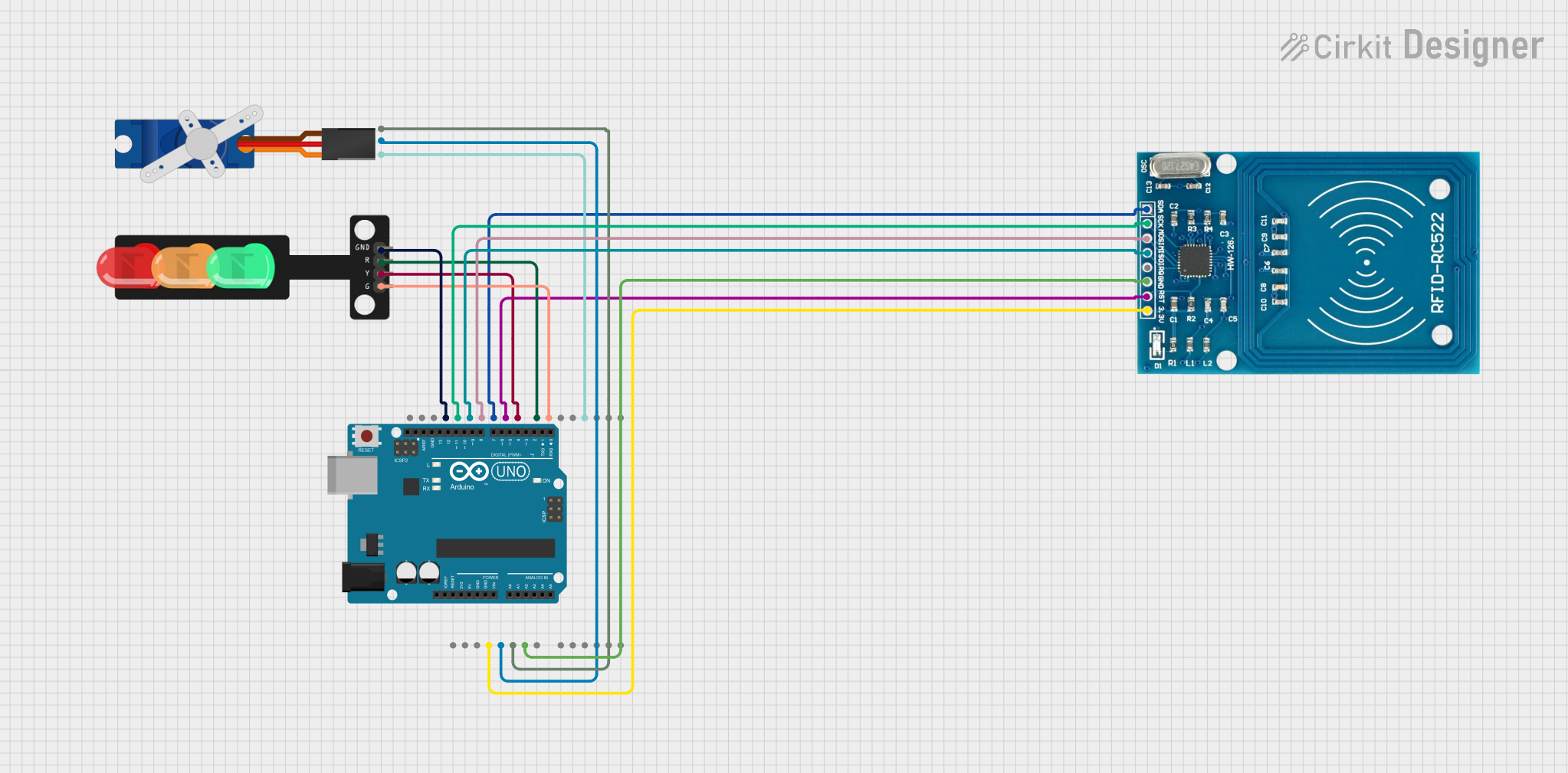
Circuit Documentation
Summary
This document provides a detailed overview of a circuit designed to control a barrier system using an RFID reader, a servo motor, and a traffic light. The system is managed by an Arduino UNO microcontroller. The RFID reader is used to grant access, the servo motor operates the barrier, and the traffic light indicates the status of the barrier.
Component List
RFID-RC522
- Description: RFID reader module
- Pins: VCC (3.3V), RST, GND, IRQ, MISO, MOSI, SCK, SDA
Tower Pro SG90 Servo
- Description: Servo motor for barrier control
- Pins: Signal, +5V, GND
Arduino UNO
- Description: Microcontroller board
- Pins: UNUSED, IOREF, Reset, 3.3V, 5V, GND, Vin, A0, A1, A2, A3, A4, A5, SCL, SDA, AREF, D13, D12, D11, D10, D9, D8, D7, D6, D5, D4, D3, D2, D1, D0
Traffic Light
- Description: Traffic light module with three LEDs
- Pins: Green, Yellow, Red, GND
Wiring Details
RFID-RC522
- VCC (3.3V) connected to Arduino UNO 3.3V
- GND connected to Arduino UNO GND
- SCK connected to Arduino UNO D13
- MISO connected to Arduino UNO D12
- MOSI connected to Arduino UNO D11
- SDA connected to Arduino UNO D10
- RST connected to Arduino UNO D9
Tower Pro SG90 Servo
- Signal connected to Arduino UNO D3
- +5V connected to Arduino UNO 5V
- GND connected to Arduino UNO GND
Arduino UNO
- 3.3V connected to RFID-RC522 VCC (3.3V)
- 5V connected to Tower Pro SG90 Servo +5V
- GND connected to RFID-RC522 GND, Tower Pro SG90 Servo GND, and Traffic Light GND
- D13 connected to RFID-RC522 SCK
- D12 connected to RFID-RC522 MISO
- D11 connected to RFID-RC522 MOSI
- D10 connected to RFID-RC522 SDA
- D9 connected to RFID-RC522 RST
- D8 connected to Traffic Light Yellow
- D7 connected to Traffic Light Red
- D6 connected to Traffic Light Green
- D3 connected to Tower Pro SG90 Servo Signal
Traffic Light
- Green connected to Arduino UNO D6
- Yellow connected to Arduino UNO D8
- Red connected to Arduino UNO D7
- GND connected to Arduino UNO GND
Documented Code
#include <SPI.h>
#include <MFRC522.h>
#include <Servo.h>

// Define pins
#define RST_PIN 9
#define SS_PIN 10
#define RED_LED 7
#define GREEN_LED 6
#define YELLOW_LED 8
#define SERVO_PIN 3
#define VEHICLE_SENSOR_PIN 2 // Sensor to detect vehicle crossing

// RFID setup
MFRC522 rfid(SS_PIN, RST_PIN);

// Servo setup
Servo barrierServo;

// Authorized UID (modify with your RFID tag UID)
byte authorizedUID[] = {0xDE, 0xAD, 0xBE, 0xEF};

void setup() {
  // Initialize serial monitor
  Serial.begin(9600);

  // Initialize SPI and RFID module
  SPI.begin();
  rfid.PCD_Init();
  Serial.println("RFID Barrier System Initialized");

  // Setup LEDs
  pinMode(RED_LED, OUTPUT);
  pinMode(GREEN_LED, OUTPUT);
  pinMode(YELLOW_LED, OUTPUT);
  digitalWrite(RED_LED, HIGH);  // Red light on initially
  digitalWrite(GREEN_LED, LOW);
  digitalWrite(YELLOW_LED, LOW);

  // Setup vehicle sensor
  pinMode(VEHICLE_SENSOR_PIN, INPUT);

  // Setup servo
  barrierServo.attach(SERVO_PIN);
  barrierServo.write(0); // Barrier initially closed
}

void loop() {
  // Look for RFID cards
  if (rfid.PICC_IsNewCardPresent() && rfid.PICC_ReadCardSerial()) {
    // Check if the scanned card UID matches the authorized UID
    if (isAuthorized(rfid.uid.uidByte, rfid.uid.size)) {
      Serial.println("Access Granted");

      // Yellow light on to indicate processing
      digitalWrite(YELLOW_LED, HIGH);
      delay(1000);

      // Green light on, red light off
      digitalWrite(YELLOW_LED, LOW);
      digitalWrite(GREEN_LED, HIGH);
      digitalWrite(RED_LED, LOW);

      // Open the barrier
      barrierServo.write(90); // Adjust angle as needed

      // Wait for vehicle to cross
      while (digitalRead(VEHICLE_SENSOR_PIN) == LOW) {
        delay(100); // Polling vehicle sensor
      }

      // Close the barrier after vehicle crosses
      delay(1000); // Optional delay to ensure complete crossing
      barrierServo.write(0);

      // Restore light status
      digitalWrite(GREEN_LED, LOW);
      digitalWrite(RED_LED, HIGH);
    } else {
      Serial.println("Access Denied");

      // Flash red light
      for (int i = 0; i < 3; i++) {
        digitalWrite(RED_LED, LOW);
        delay(200);
        digitalWrite(RED_LED, HIGH);
        delay(200);
      }
    }

    // Halt communication with RFID card
    rfid.PICC_HaltA();
  }
}

// Function to check if UID matches the authorized UID
bool isAuthorized(byte *uid, byte uidSize) {
  if (uidSize != sizeof(authorizedUID)) {
    return false;
  }

  for (byte i = 0; i < uidSize; i++) {
    if (uid[i] != authorizedUID[i]) {
      return false;
    }
  }

  return true;
}
This code initializes the RFID reader, servo motor, and traffic light. It continuously checks for RFID cards and grants access if the card UID matches the authorized UID. The traffic light and servo motor are used to control the barrier and indicate the status of the system.