
Arduino-Controlled Dual DC Motor Driver with Ultrasonic Sensor
View and Edit Project In Cirkit Designer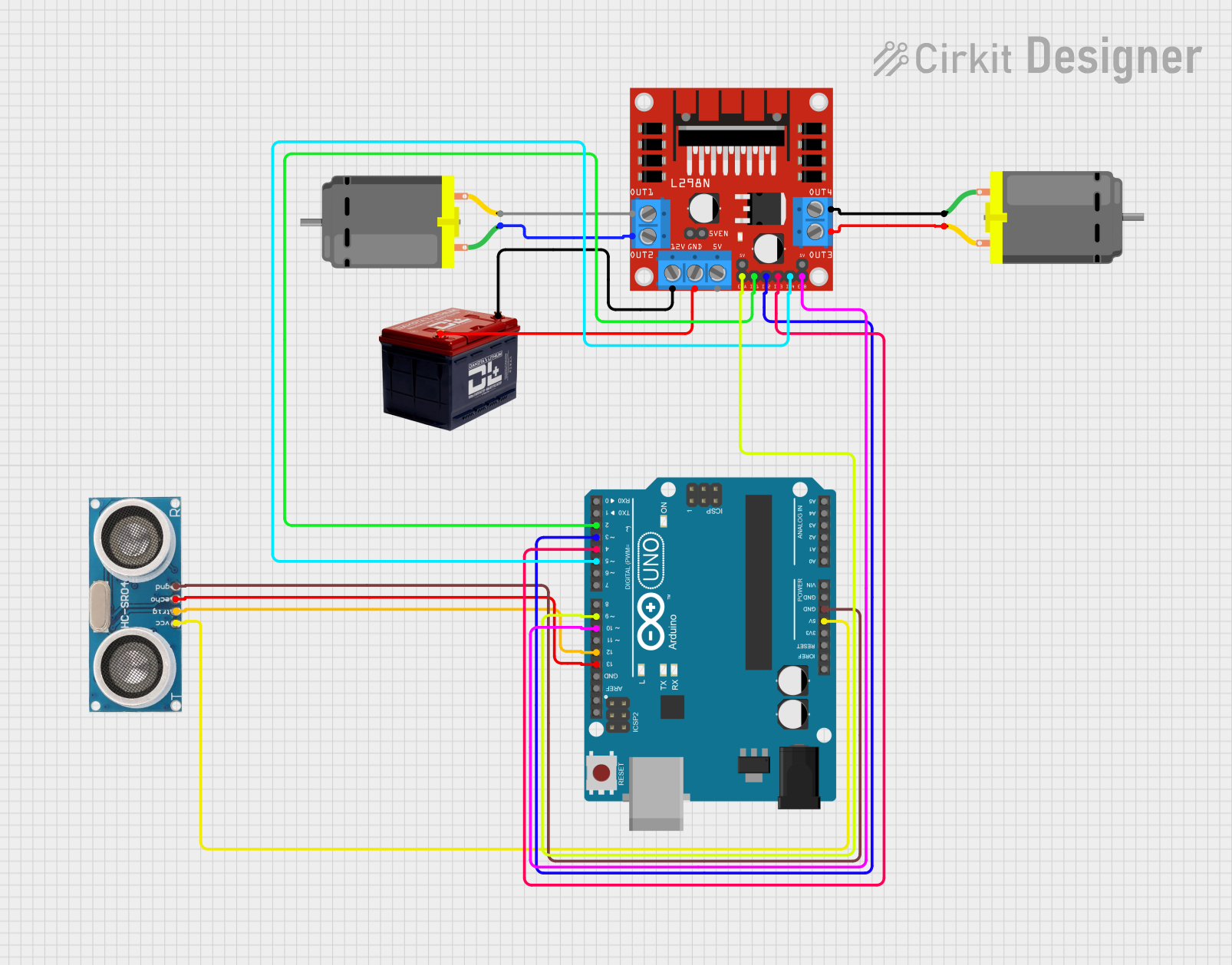
Circuit Documentation
Summary
This circuit is designed to control two DC motors using an L298N DC motor driver, which is interfaced with an Arduino UNO microcontroller. The Arduino UNO also interfaces with an Ultrasonic Sensor for distance measurement. The motors are powered by a 12V battery, which also supplies power to the L298N motor driver. The Arduino UNO controls the motor driver by sending signals to the driver's input pins, enabling or disabling the motors and controlling their direction.
Component List
L298N DC Motor Driver
- Description: A motor driver module capable of driving two DC motors.
- Pins: OUT1, OUT2, 12V, GND, 5V, OUT3, OUT4, 5V-ENA-JMP-I, 5V-ENA-JMP-O, +5V-J1, +5V-J2, ENA, IN1, IN2, IN3, IN4, ENB
Arduino UNO
- Description: A microcontroller board based on the ATmega328P.
- Pins: UNUSED, IOREF, Reset, 3.3V, 5V, GND, Vin, A0, A1, A2, A3, A4, A5, SCL, SDA, AREF, D13, D12, D11, D10, D9, D8, D7, D6, D5, D4, D3, D2, D1, D0
Ultrasonic Sensor
- Description: A sensor for measuring distance via ultrasonic waves.
- Pins: +VCC, Trigger, Echo, GND
DC Motor
- Description: An electric motor that runs on direct current (DC) electricity.
- Pins: pin 1, pin 2
Battery 12v
- Description: A 12-volt battery providing power to the circuit.
- Pins: -, +
Wiring Details
L298N DC Motor Driver
- OUT1, OUT2 connected to DC Motor 1
- OUT3, OUT4 connected to DC Motor 2
- 12V connected to the positive terminal of the 12V Battery
- GND connected to the negative terminal of the 12V Battery
- ENA, IN1, IN2 controlled by Arduino UNO (D9, D2, D3)
- ENB, IN3, IN4 controlled by Arduino UNO (D10, D4, D5)
Arduino UNO
- D9, D2, D3, D4, D5 connected to L298N DC motor driver for motor control
- D10 connected to L298N DC motor driver for motor enable
- D12 (Trigger), D13 (Echo) connected to Ultrasonic Sensor
- 5V, GND connected to Ultrasonic Sensor for power
Ultrasonic Sensor
- +VCC connected to 5V on Arduino UNO
- GND connected to GND on Arduino UNO
- Trigger connected to D12 on Arduino UNO
- Echo connected to D13 on Arduino UNO
DC Motor 1
- pin 1 connected to OUT2 on L298N DC motor driver
- pin 2 connected to OUT1 on L298N DC motor driver
DC Motor 2
- pin 1 connected to OUT4 on L298N DC motor driver
- pin 2 connected to OUT3 on L298N DC motor driver
Battery 12v
-
- connected to 12V on L298N DC motor driver
-
- connected to GND on L298N DC motor driver
Documented Code
Arduino UNO Code (sketch.ino)
void setup() {
  // put your setup code here, to run once:

}

void loop() {
  // put your main code here, to run repeatedly:

}
Note: The provided code is a template and does not contain any functional code to control the motors or read from the ultrasonic sensor. The user must implement the control logic within the setup() and loop() functions.