
ESP32-Based Smart Soil and Rain Monitoring System with Buzzer Alert
View and Edit Project In Cirkit Designer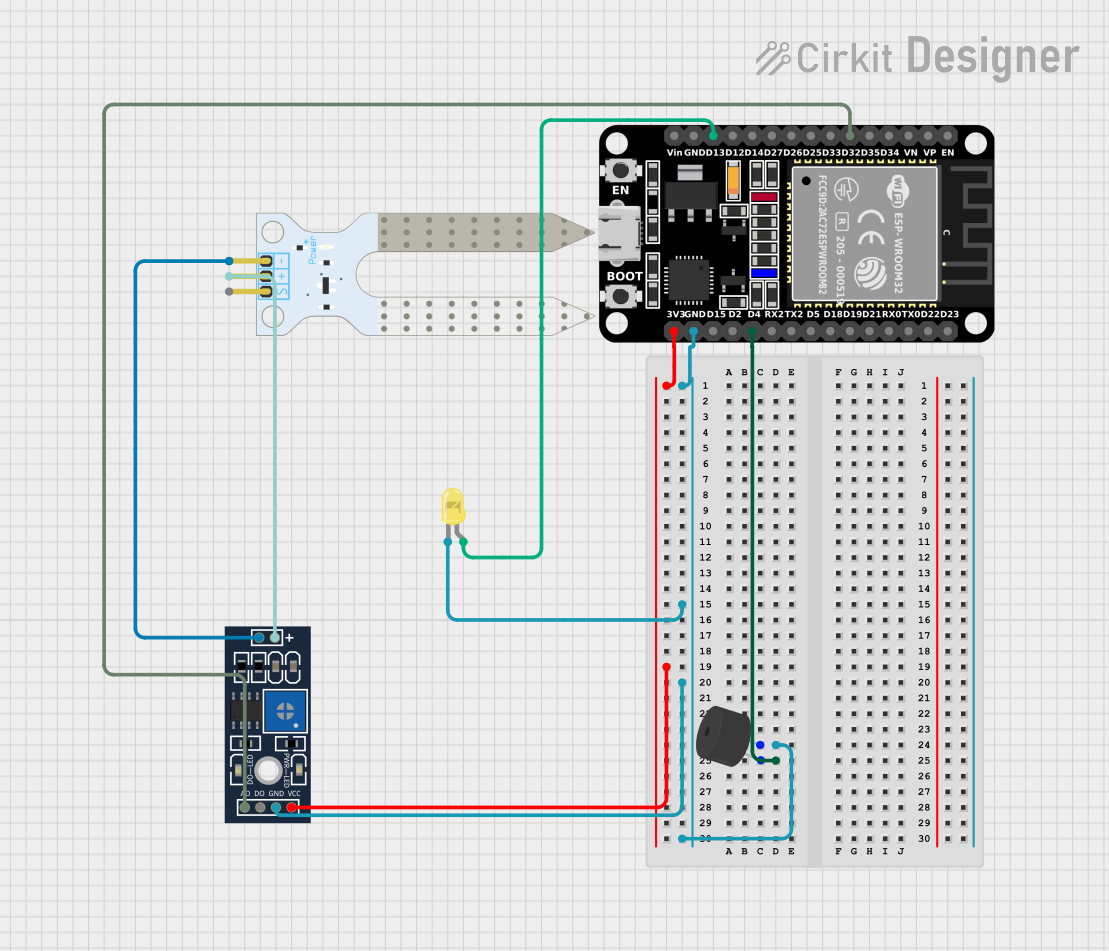
Circuit Documentation
Summary
This document provides a detailed overview of a circuit that includes an ESP32 microcontroller, a piezo buzzer, a soil moisture sensor, a rain sensor control board, and a yellow LED. The circuit is designed to monitor environmental conditions such as soil moisture and rain, and it provides visual and auditory alerts based on these conditions.
Component List
ESP32 (30 pin)
- Description: A powerful microcontroller with built-in Wi-Fi and Bluetooth capabilities.
- Pins: EN, VP, VN, D34, D35, D32, D33, D25, D26, D27, D14, D12, D13, GND, Vin, D23, D22, TX0, RX0, D21, D19, D18, D5, TX2, RX2, D4, D2, D15, 3V3
Piezo Buzzer
- Description: An electronic device that produces a tone when a voltage is applied.
- Pins: Negative pin, Positive pin
Soil Moisture Sensor
- Description: A sensor used to measure the volumetric water content in the soil.
- Pins: VCC, GND, SIG
YL-83 Rain Sensor - Control Board
- Description: A control board for the YL-83 rain sensor, used to detect rain.
- Pins: VCC, GND, DO, AO, POS, NEG
LED: Two Pin (yellow)
- Description: A yellow light-emitting diode used for visual indication.
- Pins: Cathode, Anode
Wiring Details
ESP32 (30 pin)
GND is connected to:
- Negative pin of the Piezo Buzzer
- Cathode of the Yellow LED
- GND of the YL-83 Rain Sensor - Control Board
D4 is connected to:
- Positive pin of the Piezo Buzzer
3V3 is connected to:
- VCC of the YL-83 Rain Sensor - Control Board
D32 is connected to:
- AO of the YL-83 Rain Sensor - Control Board
D13 is connected to:
- Anode of the Yellow LED
Piezo Buzzer
Negative pin is connected to:
- GND of the ESP32
- Cathode of the Yellow LED
- GND of the YL-83 Rain Sensor - Control Board
Positive pin is connected to:
- D4 of the ESP32
Soil Moisture Sensor
VCC is connected to:
- POS of the YL-83 Rain Sensor - Control Board
GND is connected to:
- NEG of the YL-83 Rain Sensor - Control Board
YL-83 Rain Sensor - Control Board
GND is connected to:
- GND of the ESP32
- Negative pin of the Piezo Buzzer
- Cathode of the Yellow LED
VCC is connected to:
- 3V3 of the ESP32
AO is connected to:
- D32 of the ESP32
POS is connected to:
- VCC of the Soil Moisture Sensor
NEG is connected to:
- GND of the Soil Moisture Sensor
LED: Two Pin (yellow)
Cathode is connected to:
- GND of the ESP32
- Negative pin of the Piezo Buzzer
- GND of the YL-83 Rain Sensor - Control Board
Anode is connected to:
- D13 of the ESP32
Code Documentation
sketch.ino
#include <DHT.h>

#define DHTPIN 5 // Pin where the DHT11 data pin is connected
#define DHTTYPE DHT11
const int tempLedPin = 14; // LED pin for Temperature
const int humidityLedPin = 2; // LED pin for Humidity
const int buzzerPin = 4; // Buzzer pin
const float HUMIDITY_HIGH_THRESHOLD = 85.0; // High humidity threshold
const float HUMIDITY_LOW_THRESHOLD = 65.0; // Low humidity threshold
const float TEMP_HIGH_THRESHOLD = 20.0; // High temperature threshold
const float TEMP_LOW_THRESHOLD = 18.0; // Low temperature threshold

DHT dht(DHTPIN, DHTTYPE);

void setup() {
    Serial.begin(115200);
    dht.begin();
    pinMode(tempLedPin, OUTPUT);
    pinMode(humidityLedPin, OUTPUT);
    pinMode(buzzerPin, OUTPUT);
}

void loop() {
    float humidity = dht.readHumidity();
    float temperatureC = dht.readTemperature();

    if (humidity > HUMIDITY_HIGH_THRESHOLD || humidity < HUMIDITY_LOW_THRESHOLD) {
        digitalWrite(humidityLedPin, HIGH);
        tone(buzzerPin, 3000);
    } else {
        digitalWrite(humidityLedPin, LOW);
        noTone(buzzerPin);
    }

    if (temperatureC > TEMP_HIGH_THRESHOLD || temperatureC < TEMP_LOW_THRESHOLD) {
        digitalWrite(tempLedPin, HIGH);
        tone(buzzerPin, 3000);
    } else {
        digitalWrite(tempLedPin, LOW);
        noTone(buzzerPin);
    }

    Serial.print("Temperature (°C): ");
    Serial.print(temperatureC);
    Serial.print(" , Humidity (RH %): ");
    Serial.println(humidity);
    delay(30000); // Wait for 30 seconds
}
This code is designed to read temperature and humidity values from a DHT11 sensor connected to the ESP32. Based on the readings, it controls an LED and a piezo buzzer to provide visual and auditory alerts when the temperature or humidity goes beyond predefined thresholds. The data is also printed to the serial monitor every 30 seconds.