
Arduino Nano Controlled Dual DC Motor System with L298N Driver
View and Edit Project In Cirkit Designer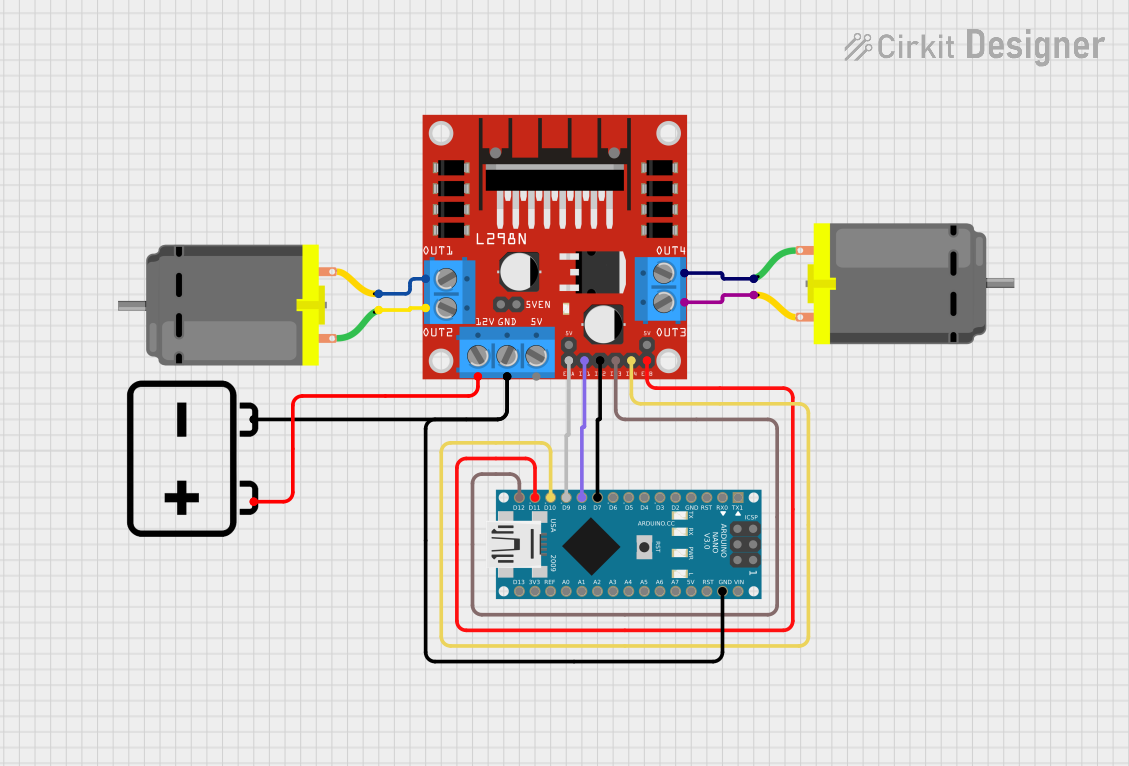
Circuit Documentation
Summary
This circuit is designed to control two DC motors using an Arduino Nano and an L298N DC motor driver. The Arduino Nano sends control signals to the L298N motor driver, which in turn drives the motors. A 12V battery powers the entire setup.
Component List
Arduino Nano
- Description: A small, complete, and breadboard-friendly board based on the ATmega328P.
- Pins: D1/TX, D0/RX, RESET, GND, D2, D3, D4, D5, D6, D7, D8, D9, D10, D11/MOSI, D12/MISO, VIN, 5V, A7, A6, A5, A4, A3, A2, A1, A0, AREF, 3V3, D13/SCK
L298N DC Motor Driver
- Description: A dual H-Bridge motor driver that allows speed and direction control of two DC motors.
- Pins: OUT1, OUT2, 12V, GND, 5V, OUT3, OUT4, 5V-ENA-JMP-I, 5V-ENA-JMP-O, +5V-J1, +5V-J2, ENA, IN1, IN2, IN3, IN4, ENB
DC Motor (Motor A)
- Description: A simple DC motor.
- Pins: pin 1, pin 2
DC Motor (Motor B)
- Description: A simple DC motor.
- Pins: pin 1, pin 2
12V Battery
- Description: A battery providing 12V power supply.
- Pins: -, +
Wiring Details
Arduino Nano
- D7 connected to IN2 of L298N DC Motor Driver
- D8 connected to IN1 of L298N DC Motor Driver
- D9 connected to ENA of L298N DC Motor Driver
- D10 connected to IN4 of L298N DC Motor Driver
- D11/MOSI connected to ENB of L298N DC Motor Driver
- D12/MISO connected to IN3 of L298N DC Motor Driver
- GND connected to GND of L298N DC Motor Driver and - of 12V Battery
L298N DC Motor Driver
- IN2 connected to D7 of Arduino Nano
- IN1 connected to D8 of Arduino Nano
- ENA connected to D9 of Arduino Nano
- IN4 connected to D10 of Arduino Nano
- ENB connected to D11/MOSI of Arduino Nano
- IN3 connected to D12/MISO of Arduino Nano
- GND connected to GND of Arduino Nano and - of 12V Battery
- OUT1 connected to pin 2 of DC Motor (Motor A)
- OUT2 connected to pin 1 of DC Motor (Motor A)
- 12V connected to + of 12V Battery
- OUT3 connected to pin 2 of DC Motor (Motor B)
- OUT4 connected to pin 1 of DC Motor (Motor B)
DC Motor (Motor A)
- pin 2 connected to OUT1 of L298N DC Motor Driver
- pin 1 connected to OUT2 of L298N DC Motor Driver
DC Motor (Motor B)
- pin 2 connected to OUT3 of L298N DC Motor Driver
- pin 1 connected to OUT4 of L298N DC Motor Driver
12V Battery
- - connected to GND of L298N DC Motor Driver and GND of Arduino Nano
- + connected to 12V of L298N DC Motor Driver
Code Documentation
// #include <Arduino.h>

#define ENA_PIN 9
#define IN1_PIN 8
#define IN2_PIN 7
#define ENB_PIN 11
#define IN3_PIN 12
#define IN4_PIN 10

void setup() {
    // Initialize motor pins as outputs
    pinMode(ENA_PIN, OUTPUT);
    pinMode(IN1_PIN, OUTPUT);
    pinMode(IN2_PIN, OUTPUT);
    pinMode(ENB_PIN, OUTPUT);
    pinMode(IN3_PIN, OUTPUT);
    pinMode(IN4_PIN, OUTPUT);
}

void loop() {
    // Motor A Clockwise
    digitalWrite(IN1_PIN, HIGH);
    digitalWrite(IN2_PIN, LOW);

    for (int speed = 0; speed <= 255; speed++) {
        analogWrite(ENA_PIN, speed);
        delay(10);
    }

    delay(1000); // Full speed for 1 second

    // Motor A Counter-Clockwise
    digitalWrite(IN1_PIN, LOW);
    digitalWrite(IN2_PIN, HIGH);

    for (int speed = 255; speed >= 0; speed--) {
        analogWrite(ENA_PIN, speed);
        delay(10);
    }

    delay(1000); // Stop for 1 second

    // Motor B Clockwise
    digitalWrite(IN3_PIN, HIGH);
    digitalWrite(IN4_PIN, LOW);

    for (int speed = 0; speed <= 255; speed++) {
        analogWrite(ENB_PIN, speed);
        delay(10);
    }

    delay(1000); // Full speed for 1 second

    // Motor B Counter-Clockwise
    digitalWrite(IN3_PIN, LOW);
    digitalWrite(IN4_PIN, HIGH);

    for (int speed = 255; speed >= 0; speed--) {
        analogWrite(ENB_PIN, speed);
        delay(10);
    }

    delay(1000); // Stop for 1 second
}
This code initializes the motor control pins on the Arduino Nano and then runs a loop to control the speed and direction of two DC motors connected to the L298N motor driver. The motors are driven in both clockwise and counter-clockwise directions with varying speeds.