
Arduino UNO-Based Turn Counter with Ultrasonic Sensor and LCD Display
View and Edit Project In Cirkit Designer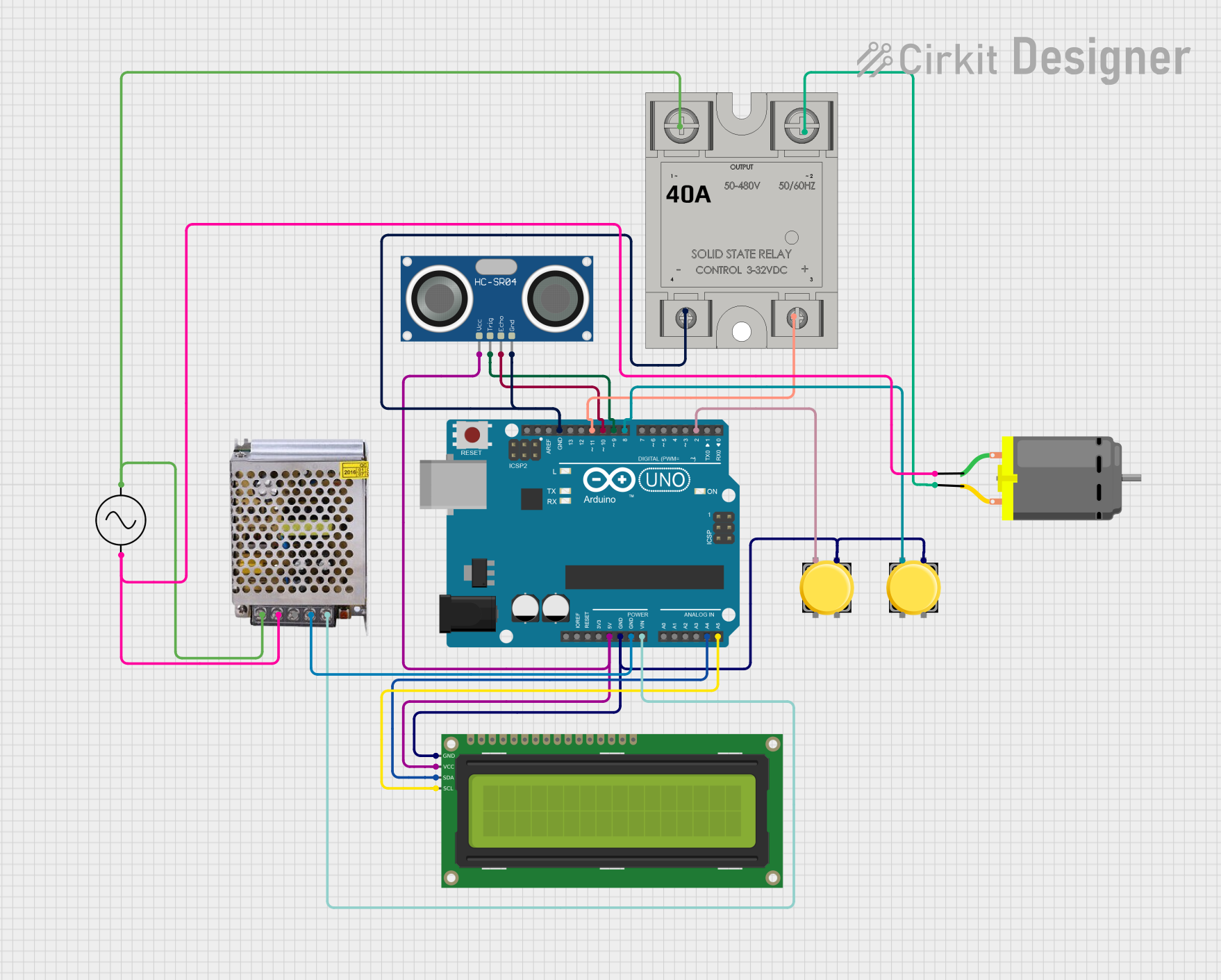
Circuit Documentation
Summary
This circuit is designed to count the number of turns made by an object using an ultrasonic sensor and display the count on a 16x2 I2C LCD. The circuit also includes a pushbutton to reset the count and a solid-state relay (SSR) to control a DC motor. The Arduino UNO microcontroller is used to control the entire system.
Component List
DC Motor
- Description: A motor that converts electrical energy into mechanical energy.
- Pins: pin 1, pin 2
Arduino UNO
- Description: A microcontroller board based on the ATmega328P.
- Pins: UNUSED, IOREF, Reset, 3.3V, 5V, GND, Vin, A0, A1, A2, A3, A4, A5, SCL, SDA, AREF, D13, D12, D11, D10, D9, D8, D7, D6, D5, D4, D3, D2, D1, D0
HC-SR04 Ultrasonic Sensor
- Description: A sensor that measures distance by using ultrasonic waves.
- Pins: VCC, TRIG, ECHO, GND
SSR-40A
- Description: A solid-state relay used to control high-power devices.
- Pins: -, +, Lin, Lout
POWER SUPPLY 12V 5AMP
- Description: A power supply that provides 12V DC output.
- Pins: 220V Positive Pole (AC), 220V Negative Pole (AC), GND, GND (DC), 12V-24V Output (DC)
Pushbutton
- Description: A simple pushbutton switch.
- Pins: Pin 2, Pin 1, Pin 3, Pin 4
16x2 I2C LCD
- Description: A 16x2 character LCD with I2C interface.
- Pins: GND, VCC, SDA, SCL
Ac Supply
- Description: An AC power supply.
- Pins: +ve, -ve
Wiring Details
DC Motor
- pin 1 connected to Ac Supply -ve and POWER SUPPLY 12V 5AMP 220V Negative Pole (AC)
- pin 2 connected to SSR-40A Lout
Arduino UNO
- 5V connected to HC-SR04 Ultrasonic Sensor VCC and 16x2 I2C LCD VCC
- GND connected to 16x2 I2C LCD GND, Pushbutton Pin 3 (both instances), POWER SUPPLY 12V 5AMP GND (DC), HC-SR04 Ultrasonic Sensor GND, and SSR-40A -
- Vin connected to POWER SUPPLY 12V 5AMP 12V-24V Output (DC)
- A4 connected to 16x2 I2C LCD SDA
- A5 connected to 16x2 I2C LCD SCL
- D11 connected to SSR-40A +
- D10 connected to HC-SR04 Ultrasonic Sensor ECHO
- D9 connected to HC-SR04 Ultrasonic Sensor TRIG
- D8 connected to Pushbutton Pin 1 (first instance)
- D2 connected to Pushbutton Pin 1 (second instance)
HC-SR04 Ultrasonic Sensor
- VCC connected to Arduino UNO 5V
- TRIG connected to Arduino UNO D9
- ECHO connected to Arduino UNO D10
- GND connected to Arduino UNO GND
SSR-40A
- - connected to Arduino UNO GND
- + connected to Arduino UNO D11
- Lin connected to Ac Supply +ve and POWER SUPPLY 12V 5AMP 220V Positive Pole (AC)
- Lout connected to DC Motor pin 2
POWER SUPPLY 12V 5AMP
- 220V Positive Pole (AC) connected to Ac Supply +ve and SSR-40A Lin
- 220V Negative Pole (AC) connected to DC Motor pin 1 and Ac Supply -ve
- GND (DC) connected to Arduino UNO GND
- 12V-24V Output (DC) connected to Arduino UNO Vin
Pushbutton (first instance)
- Pin 1 connected to Arduino UNO D8
- Pin 3 connected to Arduino UNO GND
Pushbutton (second instance)
- Pin 1 connected to Arduino UNO D2
- Pin 3 connected to Arduino UNO GND
16x2 I2C LCD
- GND connected to Arduino UNO GND
- VCC connected to Arduino UNO 5V
- SDA connected to Arduino UNO A4
- SCL connected to Arduino UNO A5
Ac Supply
- +ve connected to POWER SUPPLY 12V 5AMP 220V Positive Pole (AC) and SSR-40A Lin
- -ve connected to DC Motor pin 1 and POWER SUPPLY 12V 5AMP 220V Negative Pole (AC)
Code Documentation
#include <Wire.h>
#include <LiquidCrystal_I2C.h>

// Pin definitions for Ultrasonic Sensor and LCD
const int trigPin = 9;       // Ultrasonic sensor trigger pin
const int echoPin = 10;      // Ultrasonic sensor echo pin
const int resetButton = 8;   // Reset button pin

// Pin definitions for the Relay and Button
const int buttonPin = 2;     // Button Pin
const int relayPin = 11;      // Relay Pin (Solid State Relay)

const int maxTurns = 10;      // Maximum number of turns before stopping
int turnCount = 0;            // Counter for the number of turns
bool objectDetected = false;   // Flag to track if an object is currently detected

long duration;                 // Duration of the ultrasonic pulse
int distance;                  // Distance measurement
int buttonState = 0;          // To store the state of the reset button

// States for button and relay control
bool lightON = false;         // Relay State
bool pushed = false;          // Button Toggle State

// Setup LCD (16 columns, 2 rows)
LiquidCrystal_I2C lcd(0x27, 16, 2);

void setup() {
    // Pin Modes
    pinMode(trigPin, OUTPUT);          // Set the trigger pin as output
    pinMode(echoPin, INPUT);           // Set the echo pin as input
    pinMode(resetButton, INPUT_PULLUP); // Set the reset button as input with an internal pull-up resistor
    pinMode(buttonPin, INPUT_PULLUP);   // Set button as input with pull-up
    pinMode(relayPin, OUTPUT);          // Set relay as output

    // LCD Initialization
    lcd.init();                         // Initialize the LCD
    lcd.backlight();
    lcd.setCursor(0, 0);
    lcd.print("Turn Counter");
    lcd.setCursor(0, 1);
    lcd.print("Turns: ");
    lcd.print(turnCount);

    Serial.begin(9600);                // For debugging purposes
}

void loop() {
    // Check the reset button state
    buttonState = digitalRead(resetButton);
    if (buttonState == LOW) {
        // Reset the turn counter when the button is pressed
        turnCount = 0;
        objectDetected = false; // Reset object detection flag

        // Update the LCD display after reset
        lcd.clear();
        lcd.setCursor(0, 0);
        lcd.print("Turn Counter");
        lcd.setCursor(0, 1);
        lcd.print("Turns: ");
        lcd.print(turnCount);

        delay(500); // Debounce delay for button press

        // Turn off the relay when the reset button is pressed
        digitalWrite(relayPin, LOW); // Relay OFF (SSR is on with HIGH)
        lightON = false;
    }

    // Only count if turnCount is less than maxTurns
    if (turnCount < maxTurns) {
        // Measure distance using the ultrasonic sensor
        digitalWrite(trigPin, LOW);
        delayMicroseconds(2);
        digitalWrite(trigPin, HIGH);
        delayMicroseconds(10);
        digitalWrite(trigPin, LOW);

        // Calculate the distance
        duration = pulseIn(echoPin, HIGH);
        distance = duration * 0.034 / 2;

        Serial.print("Distance: ");
        Serial.print(distance);
        Serial.println(" cm");

        // If an object is detected within a certain range (less than 10 cm) and hasn't been counted yet
        if (distance < 10 && !objectDetected) {