
Circuit Documentation
Summary
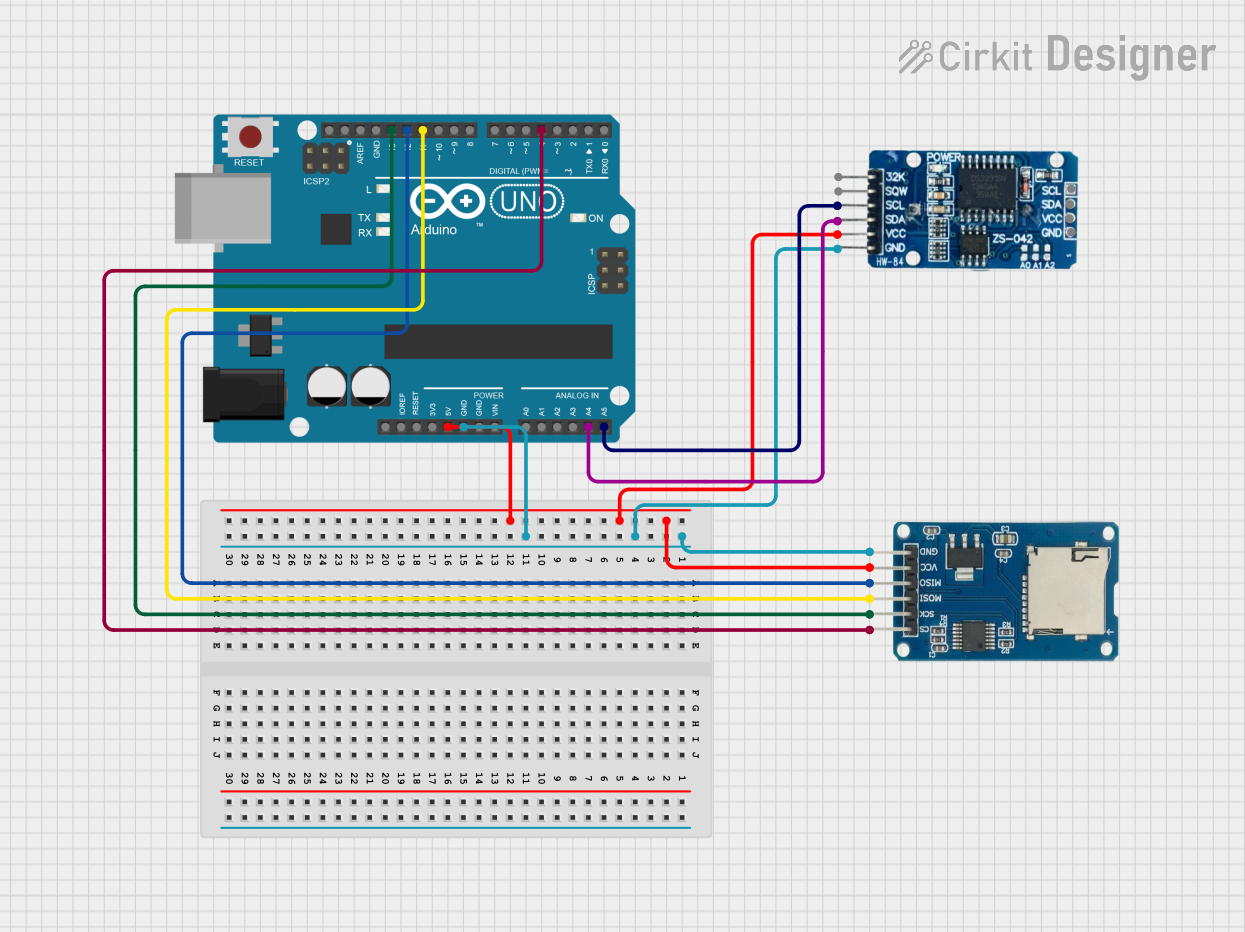
This circuit is a data logging system that uses an Arduino UNO to interface with an RTC DS3231 module and a Micro SD Card Module. The RTC DS3231 provides real-time clock functionality, while the Micro SD Card Module is used to store logged data. The Arduino UNO reads the time and date from the RTC and logs this information to the SD card at regular intervals.
Component List
Arduino UNO
- Description: A microcontroller board based on the ATmega328P.
- Pins: UNUSED, IOREF, Reset, 3.3V, 5V, GND, Vin, A0, A1, A2, A3, A4, A5, SCL, SDA, AREF, D13, D12, D11, D10, D9, D8, D7, D6, D5, D4, D3, D2, D1, D0
RTC DS3231
- Description: A real-time clock module with an integrated temperature-compensated crystal oscillator.
- Pins: 32K, SQW, SCL, SDA, VCC, GND
Micro SD Card Module
- Description: A module for interfacing with micro SD cards.
- Pins: cs, sck, mosi, miso, vcc, gnd
Wiring Details
Arduino UNO
- GND: Connected to GND of RTC DS3231 and Micro SD Card Module
- 5V: Connected to VCC of RTC DS3231 and Micro SD Card Module
- A4: Connected to SDA of RTC DS3231
- A5: Connected to SCL of RTC DS3231
- D13: Connected to sck of Micro SD Card Module
- D12: Connected to miso of Micro SD Card Module
- D11: Connected to mosi of Micro SD Card Module
- D4: Connected to cs of Micro SD Card Module
RTC DS3231
- GND: Connected to GND of Arduino UNO and Micro SD Card Module
- VCC: Connected to 5V of Arduino UNO and Micro SD Card Module
- SDA: Connected to A4 of Arduino UNO
- SCL: Connected to A5 of Arduino UNO
Micro SD Card Module
- gnd: Connected to GND of Arduino UNO and RTC DS3231
- vcc: Connected to 5V of Arduino UNO and RTC DS3231
- sck: Connected to D13 of Arduino UNO
- miso: Connected to D12 of Arduino UNO
- mosi: Connected to D11 of Arduino UNO
- cs: Connected to D4 of Arduino UNO
Code Documentation
Arduino UNO Code
#include <Wire.h>
#include <DS3231.h>
#include <SPI.h>
#include <SD.h>

// Initialize DS3231 RTC
DS3231 rtc;
const int SD_CS_PIN = 4;  // SD card CS pin
File dataFile;

// Function to convert Day of Week to string
String getDayOfWeek(byte dow) {
  switch(dow) {
    case 1: return "Monday";
    case 2: return "Tuesday";
    case 3: return "Wednesday";
    case 4: return "Thursday";
    case 5: return "Friday";
    case 6: return "Saturday";
    case 7: return "Sunday";
    default: return "Unknown";
  }
}

// Function to format date as string
String getDateString() {
  bool century = false;
  bool h12Flag;
  bool pmFlag;
  String dateStr = String(rtc.getDate()) + "/" +
                  String(rtc.getMonth(century)) + "/" +
                  String(rtc.getYear());
  return dateStr;
}

// Function to format time as string
String getTimeString() {
  bool h12Flag;
  bool pmFlag;
  String timeStr = String(rtc.getHour(h12Flag, pmFlag)) + ":" +
                  String(rtc.getMinute()) + ":" +
                  String(rtc.getSecond());
  return timeStr;
}

void setup() {
  // Initialize serial communication
  Serial.begin(9600);
  Serial.println(F("Data Logger Initialization"));

  // Initialize I2C
  Wire.begin();

  // Only set the time once during first upload
  // Comment out after first upload
  /*
  rtc.setClockMode(false);  // Set to 24h mode
  rtc.setYear(18);
  rtc.setMonth(4);
  rtc.setDate(30);
  rtc.setDoW(3);
  rtc.setHour(12);
  rtc.setMinute(0);
  rtc.setSecond(0);
  */

  // Initialize SD card
  Serial.print(F("Initializing SD card..."));

  if (!SD.begin(SD_CS_PIN)) {
    Serial.println(F("Failed to initialize SD card!"));
    while (1);  // Don't proceed if SD card initialization failed
  }
  Serial.println(F("SD card initialized successfully."));

  // Write header to file if it's new
  if (!SD.exists("datalog.txt")) {
    dataFile = SD.open("datalog.txt", FILE_WRITE);
    if (dataFile) {
      dataFile.println(F("Day,Date,Time,Temperature(C)"));
      dataFile.close();
    }
  }
}

void loop() {
  // Open file for writing
  dataFile = SD.open("datalog.txt", FILE_WRITE);

  if (dataFile) {
    // Get current time and date
    String dayStr = getDayOfWeek(rtc.getDoW());
    String dateStr = getDateString();
    String timeStr = getTimeString();

    // Create data string
    String dataString = dayStr + "," + dateStr + "," + timeStr;

    // Write to SD card
    dataFile.println(dataString);
    dataFile.close();

    // Also print to Serial for debugging
    Serial.println(dataString);
  } else {
    Serial.println(F("Error opening datalog.txt"));
  }

  // Wait before next reading
  delay(5000);  // Log data every 5 seconds
}
This code initializes the RTC and SD card, reads the current date and time from the RTC, and logs this information to the SD card every 5 seconds. The logged data includes the day of the week, date, and time.