
Battery-Powered ESP32 and MPU9250 Sensor Hub with Wi-Fi Connectivity
View and Edit Project In Cirkit Designer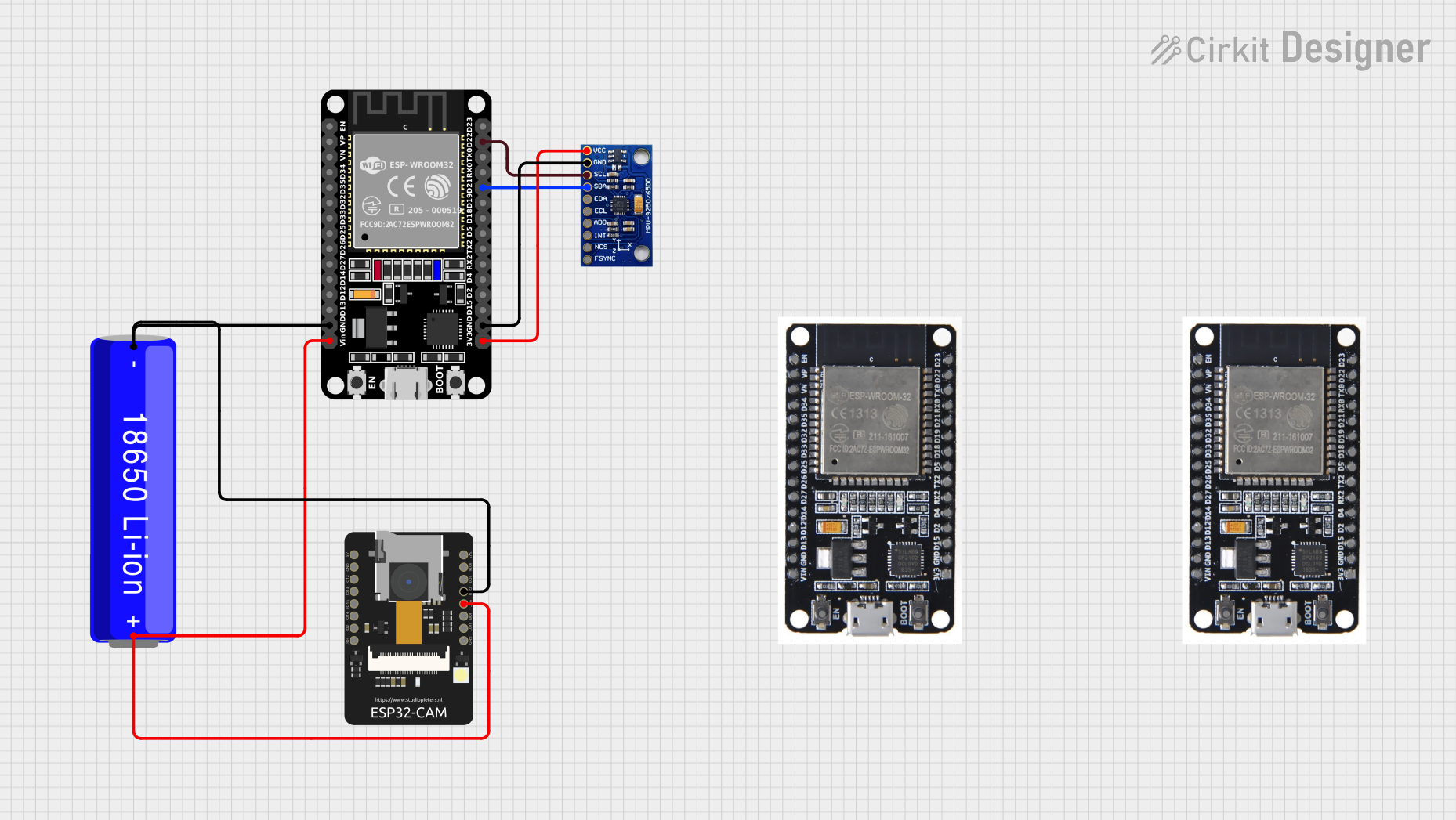
Circuit Documentation
Summary
This document provides a detailed overview of a circuit that includes an MPU-9250/6500/9255 sensor, an 18650 Li-ion Battery, an ESP32-CAM, and an ESP32 (30 pin) microcontroller. The circuit is designed to interface the MPU-9250/6500/9255 sensor with the ESP32 microcontroller, powered by the 18650 Li-ion Battery. The ESP32-CAM is also included in the circuit for additional functionality. The document includes a component list, wiring details, and the embedded code used in the microcontroller.
Component List
MPU-9250/6500/9255
- Description: 9-axis motion tracking device
- Pins: VCC, GND, SCL/SCLK, SDA/SDI, EDA, ECL, ADO/SDO, INT, NCS, FSYNC
18650 Li-ion Battery
- Description: Rechargeable lithium-ion battery
- Pins: -, +
ESP32 - CAM
- Description: ESP32-based camera module
- Pins: 5V, GND, IO12, IO13, IO15, IO14, IO2, IO4, VOT, VOR, VCC, IO0, IO16, 3V3
ESP32 (30 pin)
- Description: ESP32 microcontroller with 30 pins
- Pins: EN, VP, VN, D34, D35, D32, D33, D25, D26, D27, D14, D12, D13, GND, Vin, D23, D22, TX0, RX0, D21, D19, D18, D5, TX2, RX2, D4, D2, D15, 3V3
Wiring Details
18650 Li-ion Battery
- connected to:
- ESP32 - CAM: GND
- ESP32 (30 pin): GND
+ connected to:
- ESP32 - CAM: VCC
- ESP32 (30 pin): Vin
MPU-9250/6500/9255
VCC connected to:
- ESP32 (30 pin): 3V3
GND connected to:
- ESP32 (30 pin): GND
SCL/SCLK connected to:
- ESP32 (30 pin): D22
SDA/SDI connected to:
- ESP32 (30 pin): D21
ESP32 - CAM
GND connected to:
- 18650 Li-ion Battery: -
VCC connected to:
- 18650 Li-ion Battery: +
ESP32 (30 pin)
GND connected to:
- 18650 Li-ion Battery: -
- MPU-9250/6500/9255: GND
Vin connected to:
- 18650 Li-ion Battery: +
3V3 connected to:
- MPU-9250/6500/9255: VCC
D22 connected to:
- MPU-9250/6500/9255: SCL/SCLK
D21 connected to:
- MPU-9250/6500/9255: SDA/SDI
Code Documentation
#include <Wire.h>
#include <Adafruit_MPU6050.h>
#include <Adafruit_Sensor.h>
#include <ClosedCube_TCA9538.h>
#include <MPU9250.h>

// Create instances for the sensors and multiplexer
ClosedCube_TCA9538 tca;
Adafruit_MPU6050 mpu[5];
MPU9250 mpu9250(Wire, 0x68);

float angleX[5] = {0};
float angleY[5] = {0};
float angleZ[5] = {0};
float alpha = 0.98;

void setup() {
  Serial.begin(115200);
  Wire.begin();

  // Initialize the TCA9538
  if (!tca.begin(0x70)) { // Default I2C address for TCA9538
    Serial.println("Couldn't find TCA9538!");
    while (1);
  }

  // Initialize the MPU6050 sensors
  for (int i = 0; i < 5; i++) {
    tca.writePort(1 << i); // Select the appropriate channel
    if (!mpu[i].begin()) {
      Serial.print("Failed to find MPU6050 #");
      Serial.println(i);
      while (1);
    }
  }

  // Initialize the MPU9250 sensor
  if (mpu9250.begin() != 0) {
    Serial.println("MPU9250 connection failed!");
    while (1);
  }
}

void loop() {
  sensors_event_t a, g, temp;
  for (int i = 0; i < 5; i++) {
    tca.writePort(1 << i); // Select the appropriate channel
    mpu[i].getEvent(&a, &g, &temp);

    float accelAngleX = atan2(a.acceleration.y, a.acceleration.z) * 180 / PI;
    float accelAngleY = atan2(-a.acceleration.x, sqrt(a.acceleration.y * a.acceleration.y + a.acceleration.z * a.acceleration.z)) * 180 / PI;

    angleX[i] = alpha * (angleX[i] + g.gyro.x * 0.01) + (1 - alpha) * accelAngleX;
    angleY[i] = alpha * (angleY[i] + g.gyro.y * 0.01) + (1 - alpha) * accelAngleY;

    Serial.print("MPU6050 #");
    Serial.print(i);
    Serial.print(" Angle X: ");
    Serial.print(angleX[i]);
    Serial.print(" Angle Y: ");
    Serial.print(angleY[i]);
    Serial.println();
  }

  // Read data from MPU9250
  mpu9250.readSensor();
  float accelAngleX = atan2(mpu9250.getAccelY_mss(), mpu9250.getAccelZ_mss()) * 180 / PI;
  float accelAngleY = atan2(-mpu9250.getAccelX_mss(), sqrt(mpu9250.getAccelY_mss() * mpu9250.getAccelY_mss() + mpu9250.getAccelZ_mss() * mpu9250.getAccelZ_mss())) * 180 / PI;

  angleX[5] = alpha * (angleX[5] + mpu9250.getGyroX_rads() * 0.01) + (1 - alpha) * accelAngleX;
  angleY[5] = alpha * (angleY[5] + mpu9250.getGyroY_rads() * 0.01) + (1 - alpha) * accelAngleY;

  Serial.print("MPU9250 Angle X: ");
  Serial.print(angleX[5]);
  Serial.print(" Angle Y: ");
  Serial.print(angleY[5]);
  Serial.println();

  delay(100);
}
This code initializes and reads data from multiple MPU6050 sensors and an MPU9250 sensor, calculates angles based on accelerometer and gyroscope data, and prints the results to the serial monitor.