
Arduino UNO-Based I2C LCD Display with Op-Amp Signal Processing
View and Edit Project In Cirkit Designer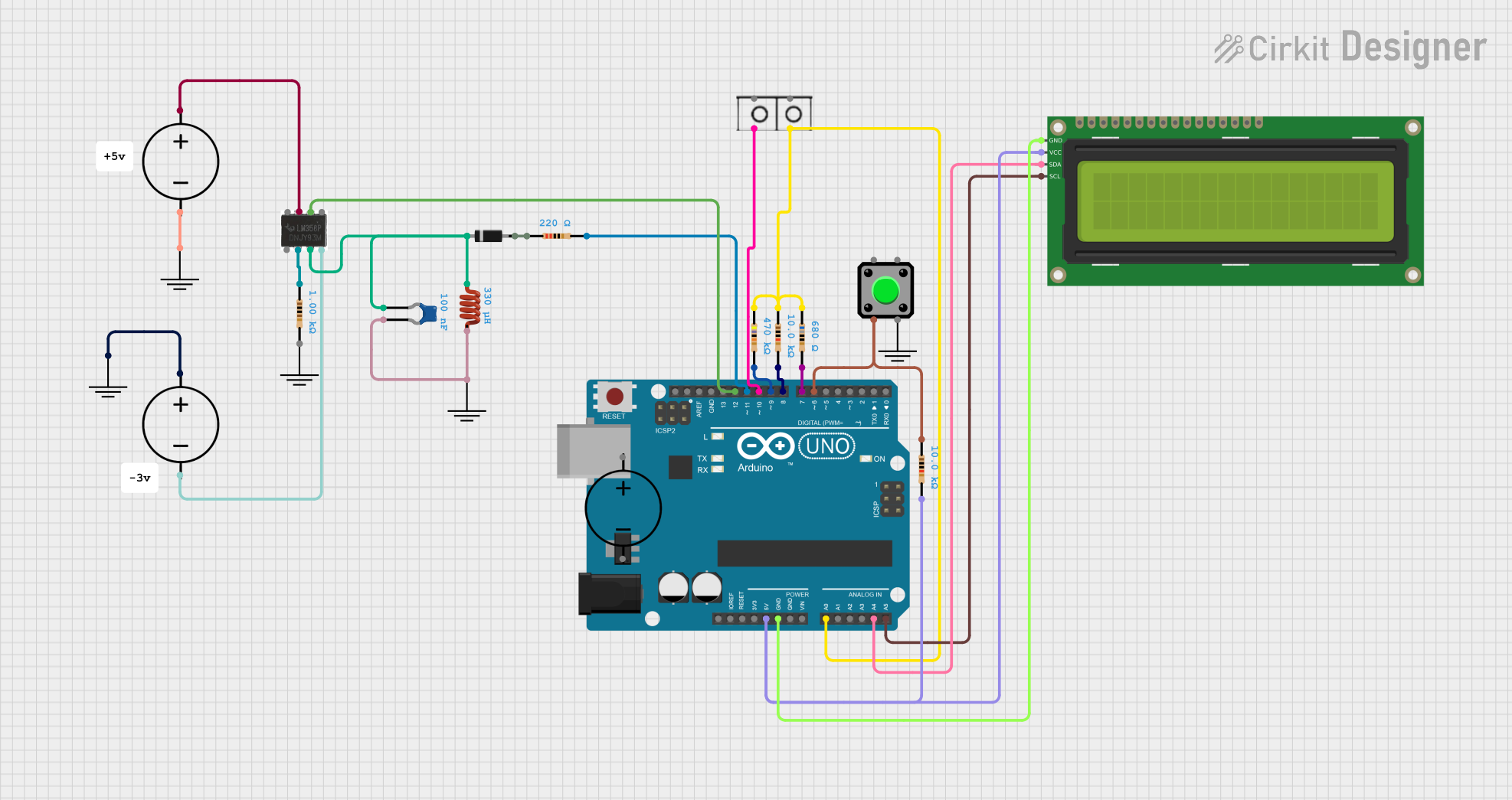
Circuit Documentation
Summary
This document provides a detailed overview of a circuit that includes various components such as resistors, an Arduino UNO, an LM358 Op-Amp, a 16x2 I2C LCD, and other passive components. The circuit is designed to interface with an Arduino UNO microcontroller, which controls the operation of the connected components. The document includes a component list, wiring details, and the embedded code used in the microcontroller.
Component List
Resistor
- Description: A passive electrical component that implements electrical resistance as a circuit element.
- Pins: pin1, pin2
- Properties:
- Resistance: 680 Ohms
- Resistance: 10000 Ohms
- Resistance: 470000 Ohms
- Resistance: 220 Ohms
- Resistance: 1000 Ohms
- Resistance: 10000 Ohms
Arduino UNO
- Description: A microcontroller board based on the ATmega328P.
- Pins: UNUSED, IOREF, Reset, 3.3V, 5V, GND, Vin, A0, A1, A2, A3, A4, A5, SCL, SDA, AREF, D13, D12, D11, D10, D9, D8, D7, D6, D5, D4, D3, D2, D1, D0
LM358 Op-Amp
- Description: A low power dual operational amplifier.
- Pins: 8, 1, 2, 3, 4, 5, 6, 7
DC Power Source
- Description: Provides a constant DC voltage.
- Pins: Ground, Positive
GND
- Description: Ground connection.
- Pins: GND
Ceramic Capacitor
- Description: A capacitor with a ceramic dielectric.
- Pins: pin0, pin1
- Properties:
- Capacitance: 0.0000001 Farads
Diode
- Description: A semiconductor device that allows current to flow in one direction.
- Pins: cathode, anode
Inductor
- Description: A passive electrical component that stores energy in a magnetic field.
- Pins: pin 0, pin 1
- Properties:
- Inductance: 0.00033 Henrys
Wire Connector
- Description: Connects wires in the circuit.
- Pins: +, -
16x2 I2C LCD
- Description: A 16x2 character LCD display with I2C interface.
- Pins: GND, VCC, SDA, SCL
Pushbutton
- Description: A simple switch mechanism for controlling some aspect of a machine or a process.
- Pins: Pin 2, Pin 1, Pin 3, Pin 4
Wiring Details
16x2 I2C LCD
- VCC: Connected to Resistor pin2 and Arduino UNO 5V
- GND: Connected to Arduino UNO GND
- SDA: Connected to Arduino UNO A4
- SCL: Connected to Arduino UNO A5
Resistor (680 Ohms)
- pin1: Connected to Resistor pin1 (10000 Ohms), Resistor pin1 (470000 Ohms), Arduino UNO A0, and Wire Connector +
- pin2: Connected to Arduino UNO D7
Resistor (10000 Ohms)
- pin1: Connected to Resistor pin1 (680 Ohms), Resistor pin1 (470000 Ohms), Arduino UNO A0, and Wire Connector +
- pin2: Connected to Arduino UNO D8
Resistor (470000 Ohms)
- pin1: Connected to Resistor pin1 (680 Ohms), Resistor pin1 (10000 Ohms), Arduino UNO A0, and Wire Connector +
- pin2: Connected to Arduino UNO D9
Resistor (220 Ohms)
- pin1: Connected to Diode anode
- pin2: Connected to Arduino UNO D11
Resistor (1000 Ohms)
- pin1: Connected to LM358 Op-Amp pin2
- pin2: Not connected
Resistor (10000 Ohms)
- pin1: Connected to Pushbutton Pin 2
- pin2: Connected to 16x2 I2C LCD VCC and Arduino UNO 5V
Arduino UNO
- 5V: Connected to 16x2 I2C LCD VCC and Resistor pin2 (10000 Ohms)
- GND: Connected to 16x2 I2C LCD GND
- A0: Connected to Resistor pin1 (680 Ohms), Resistor pin1 (10000 Ohms), Resistor pin1 (470000 Ohms), and Wire Connector +
- A4: Connected to 16x2 I2C LCD SDA
- A5: Connected to 16x2 I2C LCD SCL
- D6: Connected to Pushbutton Pin 2 and Resistor pin1 (10000 Ohms)
- D7: Connected to Resistor pin2 (680 Ohms)
- D8: Connected to Resistor pin2 (10000 Ohms)
- D9: Connected to Resistor pin2 (470000 Ohms)
- D10: Connected to Wire Connector -
- D11: Connected to Resistor pin2 (220 Ohms)
- D12: Connected to LM358 Op-Amp pin6
LM358 Op-Amp
- pin2: Connected to Resistor pin1 (1000 Ohms)
- pin3: Connected to Diode cathode, Inductor pin0, and Ceramic Capacitor pin0
- pin4: Connected to DC Power Source Ground
- pin6: Connected to Arduino UNO D12
- pin7: Connected to DC Power Source Positive
DC Power Source
- Ground: Connected to LM358 Op-Amp pin4 and GND
- Positive: Connected to LM358 Op-Amp pin7 and GND
GND
- GND: Connected to DC Power Source Ground
Ceramic Capacitor
- pin0: Connected to Diode cathode, Inductor pin0, and LM358 Op-Amp pin3
- pin1: Connected to Inductor pin1 and GND
Diode
- cathode: Connected to Inductor pin0, Ceramic Capacitor pin0, and LM358 Op-Amp pin3
- anode: Connected to Resistor pin1 (220 Ohms)
Inductor
- pin 0: Connected to Diode cathode, Ceramic Capacitor pin0, and LM358 Op-Amp pin3
- pin 1: Connected to Ceramic Capacitor pin1 and GND
Wire Connector
- +: Connected to Resistor pin1 (680 Ohms), Resistor pin1 (10000 Ohms), Resistor pin1 (470000 Ohms), and Arduino UNO A0
- -: Connected to Arduino UNO D10
Pushbutton
- Pin 2: Connected to Resistor pin1 (10000 Ohms) and Arduino UNO D6
Code Documentation
Arduino UNO Code
sketch.ino
void setup() {
  // put your setup code here, to run once:

}

void loop() {
  // put your main code here, to run repeatedly:

}
documentation.txt
This document provides a comprehensive overview of the circuit, including the components used, their connections, and the code running on the Arduino UNO microcontroller.