
Arduino UNO-Based Rain and Water Detection System with Bluetooth Control
View and Edit Project In Cirkit Designer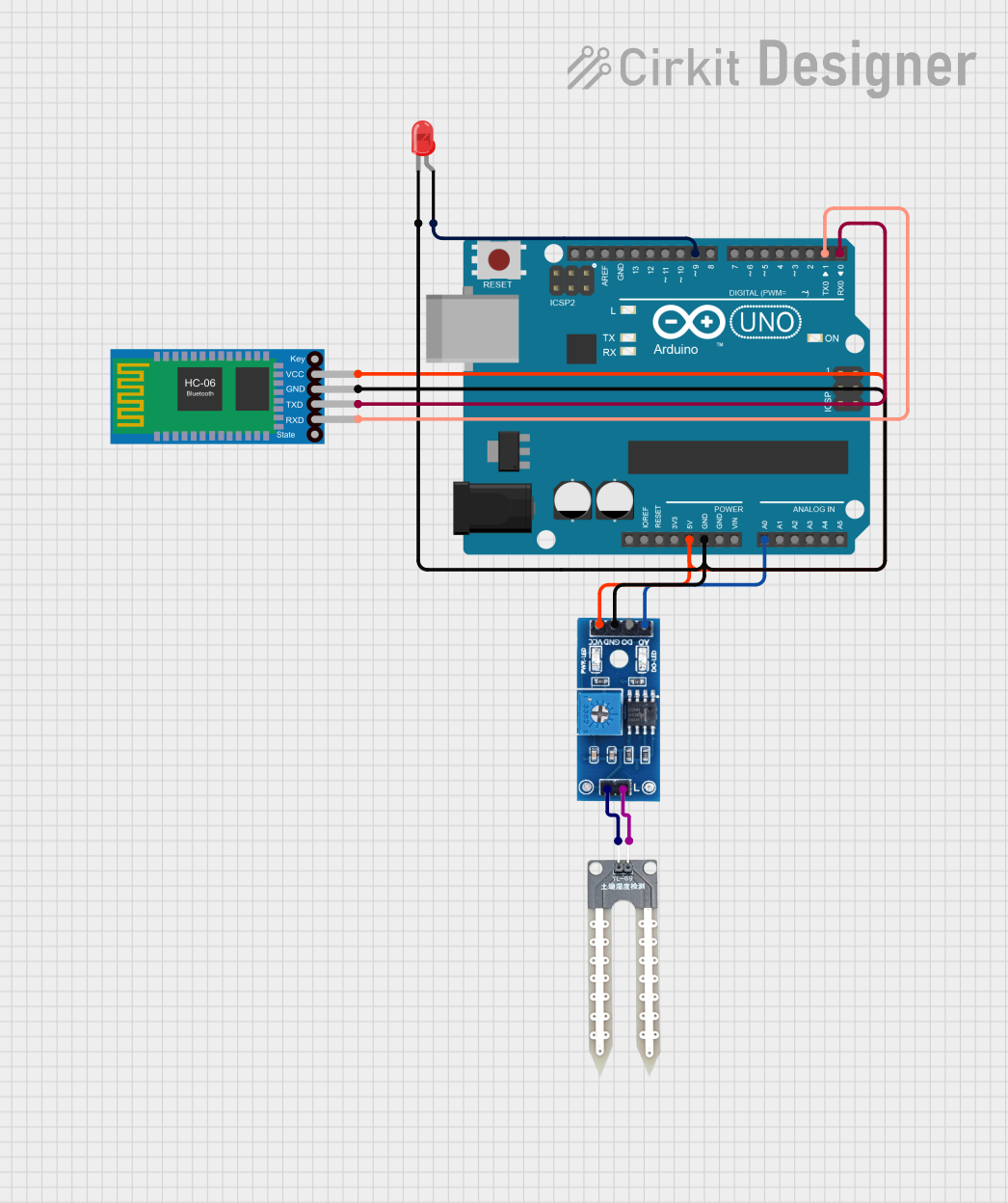
Circuit Documentation
Summary
This circuit involves an Arduino UNO microcontroller, a Bluetooth HC-06 module, a Rain/Snow Sensor, a Water Sensor, and a red LED. The circuit is designed to read data from the rain/snow sensor and water sensor, control an LED based on sensor readings, and communicate via Bluetooth.
Component List
Arduino UNO
- Description: A microcontroller board based on the ATmega328P.
- Pins: UNUSED, IOREF, Reset, 3.3V, 5V, GND, Vin, A0, A1, A2, A3, A4, A5, SCL, SDA, AREF, D13, D12, D11, D10, D9, D8, D7, D6, D5, D4, D3, D2, D1, D0
Bluetooth HC-06
- Description: A Bluetooth module used for wireless communication.
- Pins: VCC, GND, TXD, RXD
Rain/Snow Sensor - Board
- Description: A sensor board used to detect rain or snow.
- Pins: 1, 2, A0 (Analog), D0 (Digital), GND, VCC (5V)
Water Sensor
- Description: A sensor used to detect the presence of water.
- Pins: -, +
LED: Two Pin (red)
- Description: A red LED with two pins.
- Pins: cathode, anode
Wiring Details
Arduino UNO
- 5V: Connected to VCC (5V) of Rain/Snow Sensor - Board and VCC of Bluetooth HC-06.
- GND: Connected to GND of Rain/Snow Sensor - Board, GND of Bluetooth HC-06, and cathode of LED.
- A0: Connected to A0 (Analog) of Rain/Snow Sensor - Board.
- D9: Connected to anode of LED.
- D1: Connected to RXD of Bluetooth HC-06.
- D0: Connected to TXD of Bluetooth HC-06.
Bluetooth HC-06
- VCC: Connected to 5V of Arduino UNO.
- GND: Connected to GND of Arduino UNO.
- TXD: Connected to D0 of Arduino UNO.
- RXD: Connected to D1 of Arduino UNO.
Rain/Snow Sensor - Board
- VCC (5V): Connected to 5V of Arduino UNO.
- GND: Connected to GND of Arduino UNO.
- A0 (Analog): Connected to A0 of Arduino UNO.
- 1: Connected to - of Water Sensor.
- 2: Connected to + of Water Sensor.
Water Sensor
- -: Connected to 1 of Rain/Snow Sensor - Board.
- +: Connected to 2 of Rain/Snow Sensor - Board.
LED: Two Pin (red)
- cathode: Connected to GND of Arduino UNO.
- anode: Connected to D9 of Arduino UNO.
Documented Code
int rainWaterSensorPin = A0;
int ledPin = 9;
int command = 0;

void setup() {
  pinMode(ledPin, OUTPUT);
  Serial.begin(9600);
  Serial.println("Bluetooth is ready");
}

void loop() {
  if (Serial.available() > 0) {
    command = Serial.read();
  }

  if (command == '1') {
    digitalWrite(ledPin, HIGH);
  }
  else if (command == '0') {
    digitalWrite(ledPin, LOW);
  }

  int sensorValue = analogRead(rainWaterSensorPin);
  Serial.println(sensorValue);

  if (sensorValue < 500) {
    digitalWrite(ledPin, HIGH);
  } else {
    digitalWrite(ledPin, LOW);
  }

  delay(500);
}
This code initializes the rain/snow sensor on pin A0 and the LED on pin D9. It reads commands from the Bluetooth module to control the LED and also turns the LED on or off based on the sensor readings. The sensor value is printed to the serial monitor for debugging purposes.