
Circuit Documentation
Summary
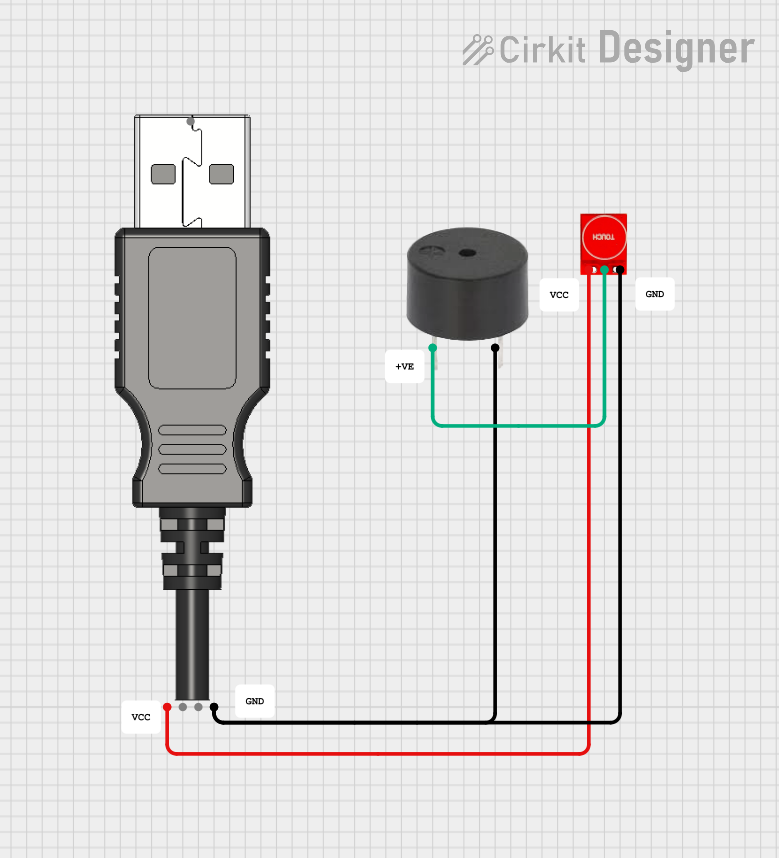
This document provides a detailed overview of a simple circuit consisting of a touch sensor, a buzzer, and a USB plug. The touch sensor is used to control the buzzer, and the entire circuit is powered via the USB plug.
Component List
Buzzer
- Description: A simple buzzer that emits sound when powered.
- Pins:
- PIN
- GND
USB Plug
- Description: A standard USB plug used to provide power to the circuit.
- Pins:
- GND
- D+
- D-
- 5V+
- Out
Touch Sensor TTP233
- Description: A touch sensor that outputs a signal when touched.
- Pins:
- GND
- I/O
- VCC
Comment
- Description: Placeholder for comments in the circuit design.
- Pins: None
Wiring Details
Buzzer
- PIN: Connected to the I/O pin of the Touch Sensor TTP233.
- GND: Connected to the GND pin of the USB Plug and the GND pin of the Touch Sensor TTP233.
USB Plug
- GND: Connected to the GND pin of the Buzzer and the GND pin of the Touch Sensor TTP233.
- 5V+: Connected to the VCC pin of the Touch Sensor TTP233.
Touch Sensor TTP233
- GND: Connected to the GND pin of the USB Plug and the GND pin of the Buzzer.
- I/O: Connected to the PIN of the Buzzer.
- VCC: Connected to the 5V+ pin of the USB Plug.
Code
There is no embedded code provided for this circuit.
This document provides a comprehensive overview of the circuit, including a summary, detailed component list, wiring details, and code documentation.