
Arduino UNO Based Smart Notification System with Bluetooth and Flex Sensors
View and Edit Project In Cirkit Designer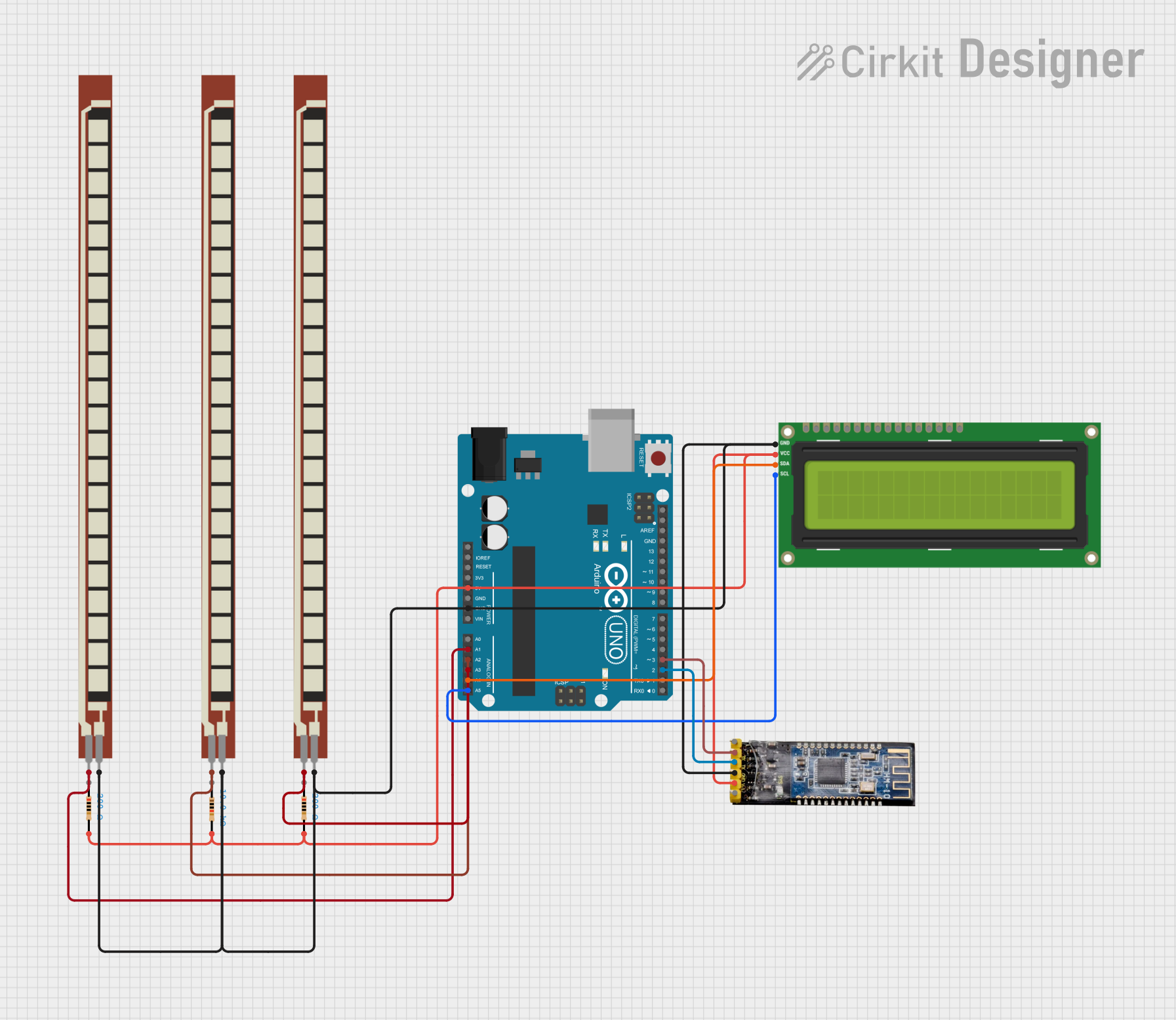
Circuit Documentation
Summary
This circuit is designed around an Arduino UNO microcontroller and includes various components such as resistors, a flex sensor, an I2C LCD screen, and a Bluetooth module. The Arduino UNO reads analog values from flex sensors and controls the output to an LCD screen and communicates via Bluetooth. The circuit is likely used for a monitoring system that provides feedback based on the flex sensor readings, displaying messages on the LCD and sending notifications through the Bluetooth module.
Component List
Arduino UNO
- Microcontroller board based on the ATmega328P
- It has 14 digital input/output pins, 6 analog inputs, a 16 MHz quartz crystal, a USB connection, a power jack, an ICSP header, and a reset button.
Basic Flex Resistor (x3)
- A sensor that changes its resistance when bent
- Used to measure the amount of deflection or bending.
Resistor (10k Ohms)
- A passive two-terminal electrical component that implements electrical resistance as a circuit element.
Resistor (200 Ohms) (x2)
- A passive two-terminal electrical component with a fixed value of 200 Ohms resistance.
I2C LCD 16x2 Screen
- An alphanumeric liquid crystal display with 16 characters per line and 2 lines.
- Uses the I2C communication protocol for interfacing with the microcontroller.
Bluetooth module HM-10
- A Bluetooth 4.0 module that allows for wireless communication.
Wiring Details
Arduino UNO
5VandGNDare used to power the circuit.- Analog pins
A1,A2, andA3are connected to the Basic Flex Resistors. - I2C pins
A4(SDA) andA5(SCL) are connected to the I2C LCD Screen. - Digital pins
D2andD3are used for RX and TX communication with the Bluetooth module.
Basic Flex Resistor
- One pin is connected to an analog input on the Arduino UNO.
- The other pin is connected to the ground.
Resistor (10k Ohms)
- One pin is connected to the
5Vpower rail. - The other pin is connected to various components requiring a pull-up resistor.
Resistor (200 Ohms) (x2)
- One pin is connected to the
5Vpower rail. - The other pin is connected to various components requiring current limiting.
I2C LCD 16x2 Screen
SCLandSDAare connected to the corresponding I2C pins on the Arduino UNO.VCC (5V)is connected to the5Vpower rail.GNDis connected to the ground.
Bluetooth module HM-10
RXis connected to pinD3on the Arduino UNO.TXis connected to pinD2on the Arduino UNO.VCCis connected to the5Vpower rail.GNDis connected to the ground.
Documented Code
#include "SoftwareSerial.h"
#include <LiquidCrystal_I2C.h>
#include <SoftwareSerial.h>
SoftwareSerial mySerial(3, 2); // RX, TX
LiquidCrystal_I2C lcd(0x27, 16, 2); // I2C address, 16 columns, 2 rows

// Define LED pins
#define blue 2
#define green 3
#define red 4

// Variables to store sensor readings
unsigned int f;
unsigned int g;
unsigned int h;

void setup() {
  // Set LED pins as outputs
  pinMode(blue, OUTPUT);
  pinMode(green, OUTPUT);
  pinMode(red, OUTPUT);

  // Start serial communication
  Serial.begin(9600);
  mySerial.begin(9600);

  // Initialize the LCD
  lcd.init();
  lcd.backlight();
  lcd.setCursor(0, 0);
  lcd.print("  Welcome To");
  lcd.setCursor(0, 1);
  lcd.print("JustDoElectronic");
  lcd.clear();
  delay(3000);
}

void loop() {
  // Read analog values from flex sensors
  f = analogRead(1);
  g = analogRead(2);
  h = analogRead(3);

  // Check sensor values and act accordingly
  if (f <= 722) {
    digitalWrite(blue, HIGH);
    digitalWrite(green, LOW);
    digitalWrite(red, LOW);
    mySerial.println("Plz Give Me Water");
    lcd.clear();
    lcd.setCursor(0, 0);
    lcd.print("  Plz Give Me");
    lcd.setCursor(0, 1);
    lcd.print("     Water   ");
    delay(3000);
    lcd.clear();
    lcd.setCursor(0, 0);
    lcd.print(" If Anything");
    lcd.setCursor(0, 1);
    lcd.print("  You Want ");
  } else if (g <= 670) {
    digitalWrite(green, HIGH);
    digitalWrite(blue, LOW);
    digitalWrite(red, LOW);
    mySerial.println("Plz Give Me Food");
    lcd.clear();
    lcd.setCursor(0, 0);
    lcd.print("  Plz Give Me ");
    lcd.setCursor(0, 1);
    lcd.print("     Food   ");
    delay(3000);
    lcd.clear();
    lcd.setCursor(0, 0);
    lcd.print(" If Anything");
    lcd.setCursor(0, 1);
    lcd.print("  You Want ");
  } else if (h <= 675) {
    digitalWrite(green, HIGH);
    digitalWrite(blue, LOW);
    digitalWrite(red, LOW);
    mySerial.println("Plz Give Me Tea");
    lcd.clear();
    lcd.setCursor(0, 0);
    lcd.print("  Plz Give Me");
    lcd.setCursor(0, 1);
    lcd.print("     Tea   ");
    delay(3000);
    lcd.clear();
    lcd.setCursor(0, 0);
    lcd.print(" If Anything");
    lcd.setCursor(0, 1);
    lcd.print("  You Want ");
  } else {
    delay(200);
  }
}
This code is designed to read sensor data from three flex sensors and display messages on an LCD screen as well as send notifications via Bluetooth depending on the sensor readings. It uses the SoftwareSerial library to communicate with the Bluetooth module and the LiquidCrystal_I2C library to control the LCD.