
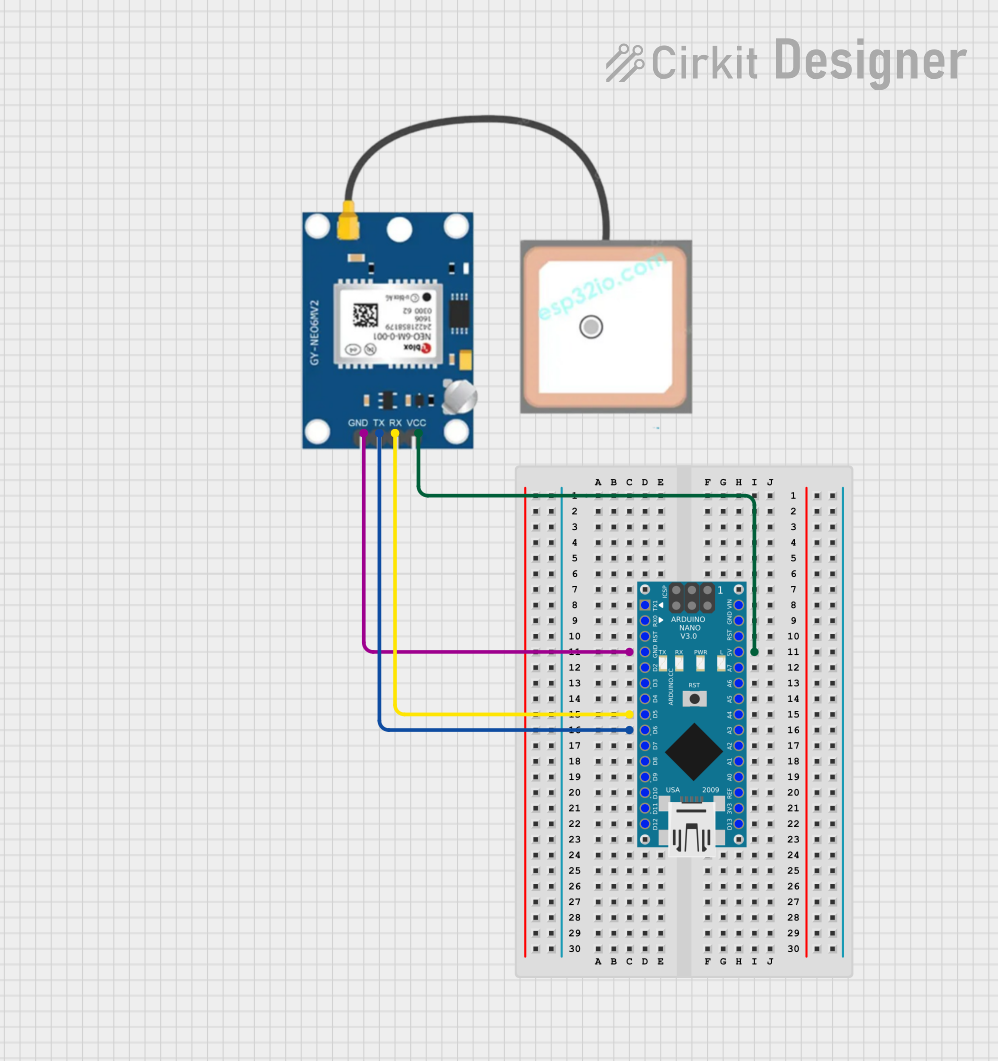
Circuit Documentation
Summary
This circuit is designed to track GPS data using an Arduino Nano and a NEO-6M GPS module. The GPS module communicates with the Arduino Nano via serial communication, and the GPS data is read and displayed on the Serial Monitor.
Component List
Arduino Nano
- Description: A small, complete, and breadboard-friendly board based on the ATmega328P.
- Pins: D1/TX, D0/RX, RESET, GND, D2, D3, D4, D5, D6, D7, D8, D9, D10, D11/MOSI, D12/MISO, VIN, 5V, A7, A6, A5, A4, A3, A2, A1, A0, AREF, 3V3, D13/SCK
NEO-6M (GPS Module)
- Description: A GPS module that provides location data.
- Pins: GND, TX, RX, VCC
Wiring Details
Arduino Nano
- GND: Connected to GND of the NEO-6M GPS module.
- 5V: Connected to VCC of the NEO-6M GPS module.
- D5: Connected to RX of the NEO-6M GPS module.
- D6: Connected to TX of the NEO-6M GPS module.
NEO-6M (GPS Module)
- GND: Connected to GND of the Arduino Nano.
- VCC: Connected to 5V of the Arduino Nano.
- RX: Connected to D5 of the Arduino Nano.
- TX: Connected to D6 of the Arduino Nano.
Code
/*
 * GPS Tracking using Arduino Nano
 * This code reads GPS data from a NEO-6M GPS module connected to the Arduino Nano.
 * The GPS module's TX pin is connected to D6 and RX pin to D5 of the Arduino Nano.
 * The GPS data is read and the latitude and longitude are printed to the Serial Monitor.
 */

#include <SoftwareSerial.h>
#include <TinyGPS++.h>

TinyGPSPlus gps;
SoftwareSerial gpsSerial(6, 5); // RX, TX

void setup() {
  Serial.begin(9600);
  gpsSerial.begin(9600);
}

void loop() {
  while (gpsSerial.available() > 0) {
    if (gps.encode(gpsSerial.read())) {
      if (gps.location.isValid()) {
        Serial.print("Latitude: ");
        Serial.println(gps.location.lat(), 6);
        Serial.print("Longitude: ");
        Serial.println(gps.location.lng(), 6);
      }
    }
  }
}
This code initializes the serial communication for both the Arduino Nano and the GPS module. It reads the GPS data and prints the latitude and longitude to the Serial Monitor if the location data is valid.