
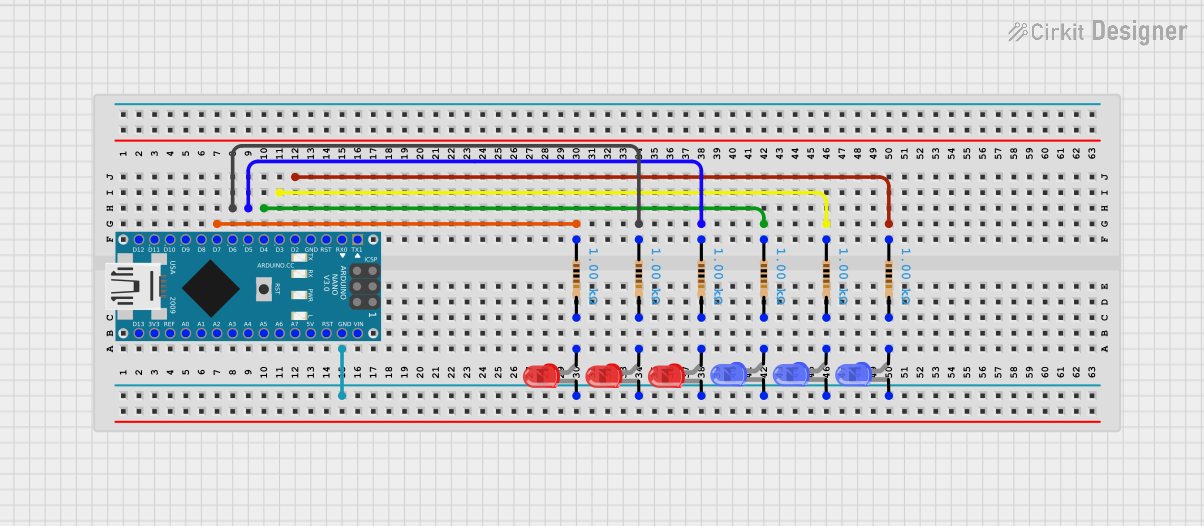
Circuit Documentation
Summary
This circuit consists of an Arduino Nano microcontroller connected to multiple LEDs (both blue and red) through resistors. The resistors are used to limit the current flowing through the LEDs to prevent damage. The Arduino Nano controls the LEDs by driving its digital output pins.
Component List
Arduino Nano
- Description: A small, complete, and breadboard-friendly board based on the ATmega328P.
- Pins: D1/TX, D0/RX, RESET, GND, D2, D3, D4, D5, D6, D7, D8, D9, D10, D11/MOSI, D12/MISO, VIN, 5V, A7, A6, A5, A4, A3, A2, A1, A0, AREF, 3V3, D13/SCK
LED: Two Pin (blue)
- Description: A blue LED with two pins: cathode and anode.
- Pins: cathode, anode
LED: Two Pin (red)
- Description: A red LED with two pins: cathode and anode.
- Pins: cathode, anode
Resistor
- Description: A resistor used to limit the current through the LEDs.
- Pins: pin1, pin2
- Properties:
- Resistance: 1000 Ohms
Wiring Details
Arduino Nano
- D7: Connected to pin1 of a resistor.
- D6: Connected to pin1 of a resistor.
- D5: Connected to pin1 of a resistor.
- D4: Connected to pin1 of a resistor.
- D3: Connected to pin1 of a resistor.
- D2: Connected to pin1 of a resistor.
- GND: Connected to the cathodes of all LEDs (both blue and red).
LED: Two Pin (blue)
- Cathode: Connected to GND of Arduino Nano.
- Anode:
- Connected to pin2 of a resistor (for one instance).
- Connected to pin2 of another resistor (for another instance).
- Connected to pin2 of another resistor (for another instance).
LED: Two Pin (red)
- Cathode: Connected to GND of Arduino Nano.
- Anode:
- Connected to pin2 of a resistor (for one instance).
- Connected to pin2 of another resistor (for another instance).
- Connected to pin2 of another resistor (for another instance).
Resistor
- Pin1:
- Connected to D7 of Arduino Nano (for one instance).
- Connected to D6 of Arduino Nano (for another instance).
- Connected to D5 of Arduino Nano (for another instance).
- Connected to D4 of Arduino Nano (for another instance).
- Connected to D3 of Arduino Nano (for another instance).
- Connected to D2 of Arduino Nano (for another instance).
- Pin2:
- Connected to the anode of a blue LED (for one instance).
- Connected to the anode of another blue LED (for another instance).
- Connected to the anode of another blue LED (for another instance).
- Connected to the anode of a red LED (for one instance).
- Connected to the anode of another red LED (for another instance).
- Connected to the anode of another red LED (for another instance).
Code Documentation
Arduino Nano Code
sketch.ino
void setup() {
  // put your setup code here, to run once:

}

void loop() {
  // put your main code here, to run repeatedly:

}
documentation.txt
This document provides a comprehensive overview of the circuit, including a summary, detailed component list, wiring details, and the code used in the Arduino Nano.