
Arduino UNO-Based Obstacle Avoidance Robot with Ultrasonic Sensor and Servo Control
View and Edit Project In Cirkit Designer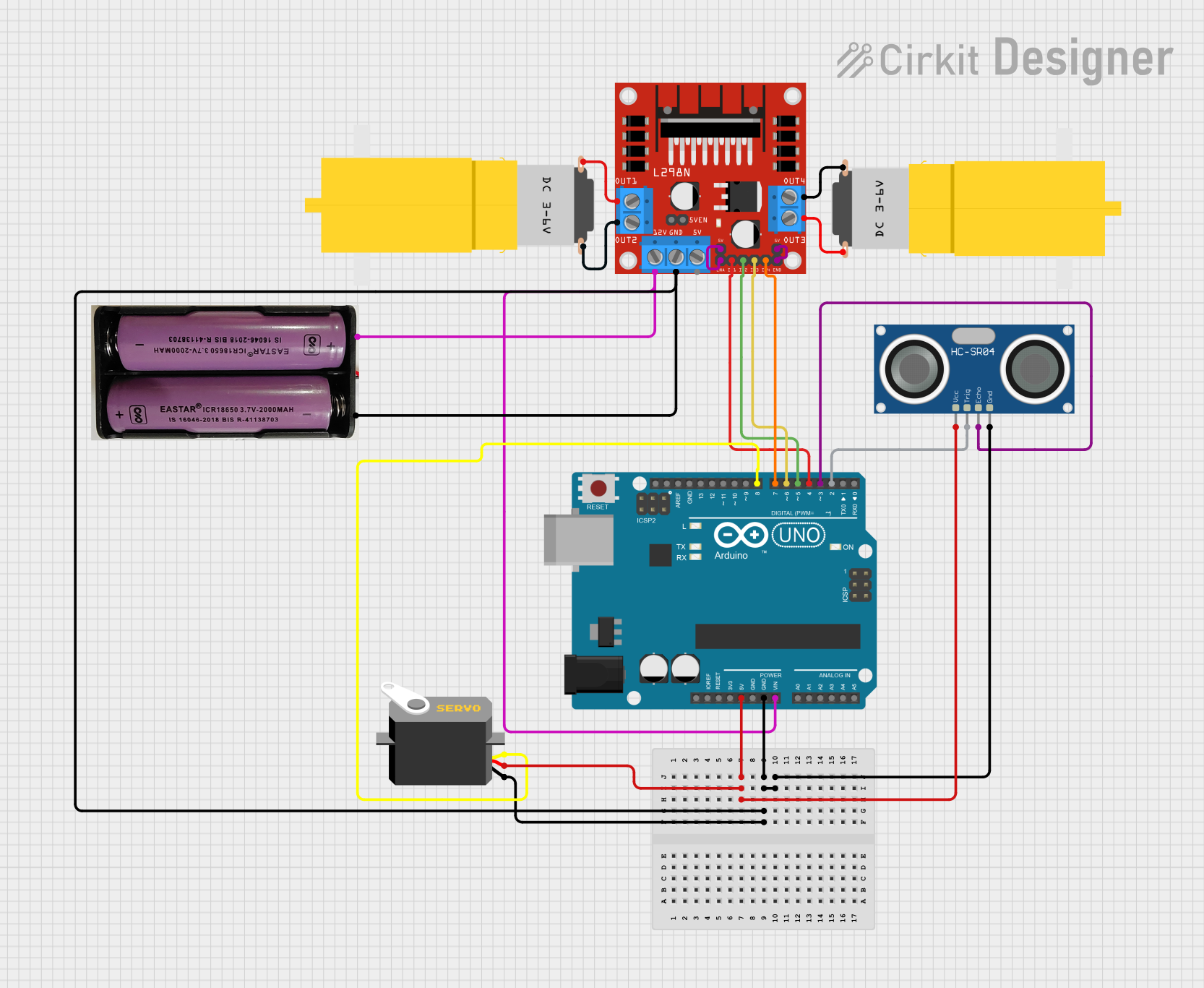
Circuit Documentation
Summary
This document provides a detailed overview of a circuit designed to control a robotic vehicle using an Arduino UNO microcontroller. The circuit includes an L298N DC motor driver, an HC-SR04 ultrasonic sensor, two hobby motors, a servo motor, and a 7.4V power supply. The Arduino UNO is programmed to control the motors and read distance measurements from the ultrasonic sensor to navigate the vehicle.
Component List
Arduino UNO
- Description: Microcontroller board based on the ATmega328P.
- Pins: UNUSED, IOREF, Reset, 3.3V, 5V, GND, Vin, A0, A1, A2, A3, A4, A5, SCL, SDA, AREF, D13, D12, D11, D10, D9, D8, D7, D6, D5, D4, D3, D2, D1, D0
L298N DC Motor Driver
- Description: Dual H-Bridge motor driver.
- Pins: OUT1, OUT2, 12V, GND, 5V, OUT3, OUT4, 5V-ENA-JMP-I, 5V-ENA-JMP-O, +5V-J1, +5V-J2, ENA, IN1, IN2, IN3, IN4, ENB
HC-SR04 Ultrasonic Sensor
- Description: Ultrasonic distance sensor.
- Pins: VCC, TRIG, ECHO, GND
Motor amarillo motorreductor hobby
- Description: Hobby motor with gearbox.
- Pins: vcc, GND
Servo
- Description: Servo motor for precise control.
- Pins: gnd, vcc, pulse
7.4V Power Supply
- Description: Power supply for the circuit.
- Pins: +, -
Wiring Details
Arduino UNO
5V connected to:
- Servo (vcc)
- HC-SR04 Ultrasonic Sensor (VCC)
GND connected to:
- L298N DC Motor Driver (GND)
- 7.4V Power Supply (-)
- Servo (gnd)
- HC-SR04 Ultrasonic Sensor (GND)
Vin connected to:
- L298N DC Motor Driver (12V)
- 7.4V Power Supply (+)
D8 connected to:
- Servo (pulse)
D7 connected to:
- L298N DC Motor Driver (IN4)
D6 connected to:
- L298N DC Motor Driver (IN3)
D5 connected to:
- L298N DC Motor Driver (IN2)
D4 connected to:
- L298N DC Motor Driver (IN1)
D3 connected to:
- HC-SR04 Ultrasonic Sensor (ECHO)
D2 connected to:
- HC-SR04 Ultrasonic Sensor (TRIG)
L298N DC Motor Driver
GND connected to:
- Arduino UNO (GND)
- 7.4V Power Supply (-)
- Servo (gnd)
- HC-SR04 Ultrasonic Sensor (GND)
12V connected to:
- Arduino UNO (Vin)
- 7.4V Power Supply (+)
OUT1 connected to:
- Motor amarillo motorreductor hobby (GND)
OUT2 connected to:
- Motor amarillo motorreductor hobby (vcc)
OUT3 connected to:
- Motor amarillo motorreductor hobby (GND)
OUT4 connected to:
- Motor amarillo motorreductor hobby (vcc)
ENA connected to:
- +5V-J1
ENB connected to:
- +5V-J2
HC-SR04 Ultrasonic Sensor
VCC connected to:
- Arduino UNO (5V)
GND connected to:
- Arduino UNO (GND)
- L298N DC Motor Driver (GND)
- 7.4V Power Supply (-)
- Servo (gnd)
TRIG connected to:
- Arduino UNO (D2)
ECHO connected to:
- Arduino UNO (D3)
Motor amarillo motorreductor hobby
vcc connected to:
- L298N DC Motor Driver (OUT2)
- L298N DC Motor Driver (OUT4)
GND connected to:
- L298N DC Motor Driver (OUT1)
- L298N DC Motor Driver (OUT3)
Servo
vcc connected to:
- Arduino UNO (5V)
gnd connected to:
- Arduino UNO (GND)
- L298N DC Motor Driver (GND)
- 7.4V Power Supply (-)
- HC-SR04 Ultrasonic Sensor (GND)
pulse connected to:
- Arduino UNO (D8)
7.4V Power Supply
+ connected to:
- L298N DC Motor Driver (12V)
- Arduino UNO (Vin)
- connected to:
- Arduino UNO (GND)
- L298N DC Motor Driver (GND)
- Servo (gnd)
- HC-SR04 Ultrasonic Sensor (GND)
Code Documentation
#include <Servo.h>

Servo myServo;

const int trigPin = 2;
const int echoPin = 3;
const int RVS1 = 4;
const int RVS2 = 5;
const int FWD1 = 6;
const int FWD2 = 7;

int leftDistance;
int middleDistance;
int rightDistance;

void setup() {
  Serial.begin(9600);
  pinMode(trigPin, OUTPUT);
  pinMode(echoPin, INPUT);
  pinMode(RVS1, OUTPUT);
  pinMode(RVS2, OUTPUT);
  pinMode(FWD1, OUTPUT);
  pinMode(FWD2, OUTPUT);

  myServo.attach(8);
  myServo.write(90);
  delay(200);
}

void loop() {
  leftDistance = checkDirection(30); // Check left
  Serial.print("Left Distance: ");
  Serial.print(leftDistance);
  Serial.println(" cm");
  delay(2000);

  middleDistance = checkDirection(90); // Check middle
  Serial.print("Middle Distance: ");
  Serial.print(middleDistance);
  Serial.println(" cm");
  delay(2000);

  rightDistance = checkDirection(150); // Check right
  Serial.print("Right Distance: ");
  Serial.print(rightDistance);
  Serial.println(" cm");
  delay(2000);

  myServo.write(90);
}

int measureDistance() {
  digitalWrite(trigPin, LOW);
  delayMicroseconds(2);
  digitalWrite(trigPin, HIGH);
  delayMicroseconds(10);
  digitalWrite(trigPin, LOW);
  long duration = pulseIn(echoPin, HIGH);
  int distance = duration * 0.034 / 2;
  return distance;
}

int checkDirection(int angle) {
  myServo.write(angle);
  delay(500);
  return measureDistance();
}

void moveForward() { // Forward
  digitalWrite(RVS1, HIGH);
  digitalWrite(RVS2, LOW);
  digitalWrite(FWD1, HIGH);
  digitalWrite(FWD2, LOW);
}

void moveReverse() { // Reverse
  digitalWrite(RVS1, LOW);
  digitalWrite(RVS2, HIGH);
  digitalWrite(FWD1, LOW);
  digitalWrite(FWD2, HIGH);
  delay(200);
  stopCar();
}

void stopCar() { // Stop
  digitalWrite(RVS1, LOW);
  digitalWrite(RVS2, LOW);
  digitalWrite(FWD1, LOW);
  digitalWrite(FWD2, LOW);
}

void turnLeft() { // Left turn
  digitalWrite(RVS1, LOW);
  digitalWrite(RVS2, HIGH);
  digitalWrite(FWD1, HIGH);
  digitalWrite(FWD2, LOW);
  delay(200);
  stopCar();
}

void turnRight() { // Right turn
  digitalWrite(RVS1, HIGH);
  digitalWrite(RVS2, LOW);
  digitalWrite(FWD1, LOW);
  digitalWrite(FWD2, HIGH);
  delay(200);
  stopCar();
}
This code is designed to control the robotic vehicle. It uses the ultrasonic sensor to measure distances in different directions and the servo motor to rotate the sensor. The motor driver is used to control the movement of the vehicle. The code includes functions to move the vehicle forward, reverse, stop, and turn left or right.