
Arduino UNO-Based Smart Car Parking System with IR Sensors and LCD Display
View and Edit Project In Cirkit Designer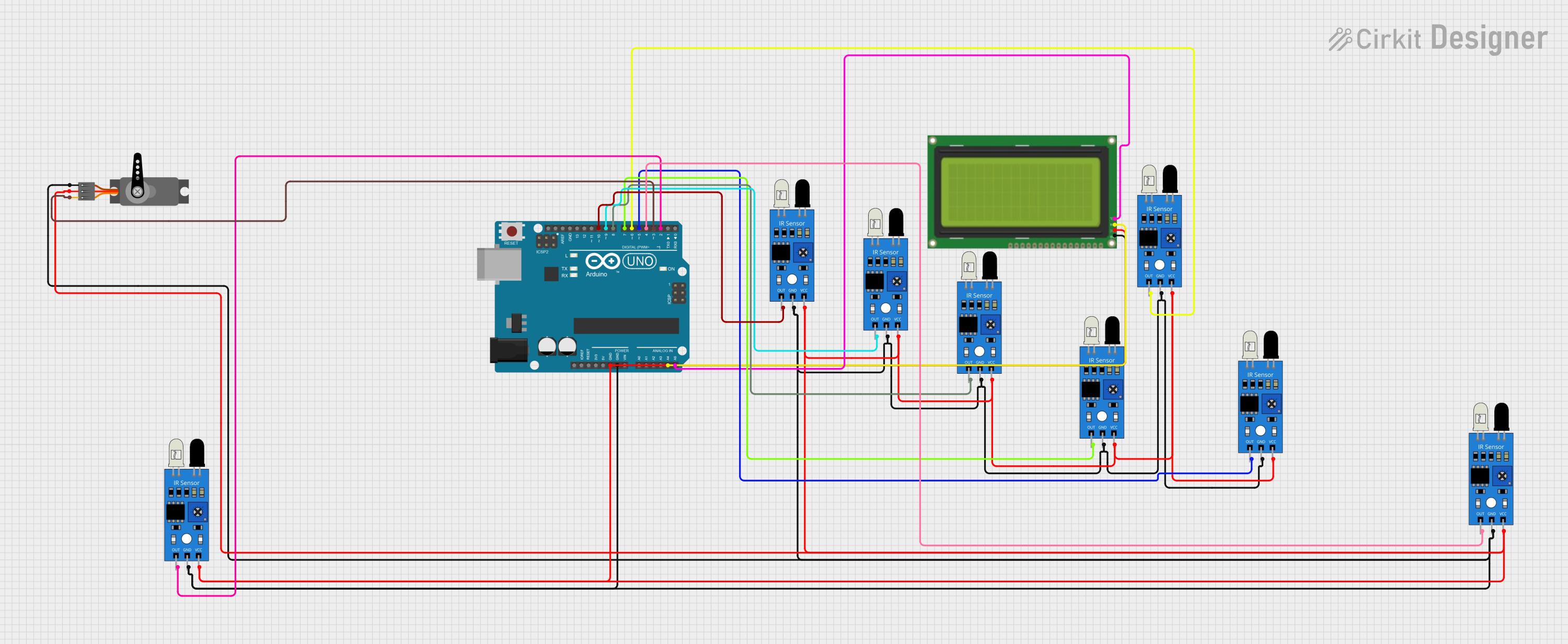
Circuit Documentation
Summary
This circuit is designed to manage a car parking system using an Arduino UNO microcontroller. The system includes multiple IR sensors to detect the presence of cars, a servo motor to control a gate, and an LCD display to show the status of parking slots. The Arduino UNO reads inputs from the IR sensors and controls the servo motor and LCD display accordingly.
Component List
IR Sensor
- Description: Infrared sensor used to detect the presence of cars.
- Pins: out, gnd, vcc
Servo
- Description: Servo motor used to control the gate.
- Pins: GND, VCC, PWM
Arduino UNO
- Description: Microcontroller used to control the entire system.
- Pins: UNUSED, IOREF, Reset, 3.3V, 5V, GND, Vin, A0, A1, A2, A3, A4, A5, SCL, SDA, AREF, D13, D12, D11, D10, D9, D8, D7, D6, D5, D4, D3, D2, D1, D0
LCD 20x4 I2C
- Description: LCD display used to show the status of parking slots.
- Pins: GND, 5v, SCA, SCL
Wiring Details
IR Sensor
- VCC: Connected to GND of Arduino UNO
- GND: Connected to GND of Arduino UNO
- out:
- IR Sensor 1: Connected to D10 of Arduino UNO
- IR Sensor 2: Connected to D9 of Arduino UNO
- IR Sensor 3: Connected to D8 of Arduino UNO
- IR Sensor 4: Connected to D7 of Arduino UNO
- IR Sensor 5: Connected to D6 of Arduino UNO
- IR Sensor 6: Connected to D5 of Arduino UNO
- IR Sensor 7: Connected to D4 of Arduino UNO
- IR Sensor 8: Connected to D2 of Arduino UNO
Servo
- VCC: Connected to GND of Arduino UNO
- GND: Connected to GND of Arduino UNO
- PWM: Connected to D3 of Arduino UNO
Arduino UNO
- GND: Connected to GND of all IR sensors, Servo, and LCD 20x4 I2C
- 5V: Connected to 5v of LCD 20x4 I2C
- A4: Connected to SCA of LCD 20x4 I2C
- A5: Connected to SCL of LCD 20x4 I2C
LCD 20x4 I2C
- GND: Connected to GND of Arduino UNO
- 5v: Connected to 5V of Arduino UNO
- SCA: Connected to A4 of Arduino UNO
- SCL: Connected to A5 of Arduino UNO
Documented Code
#include <Servo.h> // Includes the servo library
#include <Wire.h>
#include <LiquidCrystal_I2C.h>

LiquidCrystal_I2C lcd(0x27, 20, 4); // Adjust LCD address and size if necessary
Servo myservo;

#define ir_enter 2
#define ir_back  4

#define ir_car1 5
#define ir_car2 6
#define ir_car3 7
#define ir_car4 8
#define ir_car5 9
#define ir_car6 10

int S1=0, S2=0, S3=0, S4=0, S5=0, S6=0;
int flag1=0, flag2=0;
int slot = 6;

void setup(){
   Serial.begin(9600);

   pinMode(ir_car1, INPUT);
   pinMode(ir_car2, INPUT);
   pinMode(ir_car3, INPUT);
   pinMode(ir_car4, INPUT);
   pinMode(ir_car5, INPUT);
   pinMode(ir_car6, INPUT);

   pinMode(ir_enter, INPUT);
   pinMode(ir_back, INPUT);

   myservo.attach(3);
   myservo.write(90);

   lcd.begin();       // Initialize the LCD
   lcd.backlight();  // Turn on the LCD backlight
   lcd.setCursor(0,1);
   lcd.print("    Car  parking  ");
   lcd.setCursor(0,2);
   lcd.print("       System     ");
   delay(2000);
   lcd.clear();

   Read_Sensor();

   int total = S1 + S2 + S3 + S4 + S5 + S6;
   slot = slot - total;
}

void loop(){
   Read_Sensor();

   lcd.setCursor(0,0);
   lcd.print("   Have Slot: ");
   lcd.print(slot);
   lcd.print("    ");

   lcd.setCursor(0,1);
   if(S1==1){lcd.print("S1:Fill ");} else{lcd.print("S1:Empty");}

   lcd.setCursor(10,1);
   if(S2==1){lcd.print("S2:Fill ");} else{lcd.print("S2:Empty");}

   lcd.setCursor(0,2);
   if(S3==1){lcd.print("S3:Fill ");} else{lcd.print("S3:Empty");}

   lcd.setCursor(10,2);
   if(S4==1){lcd.print("S4:Fill ");} else{lcd.print("S4:Empty");}

   lcd.setCursor(0,3);
   if(S5==1){lcd.print("S5:Fill ");} else{lcd.print("S5:Empty");}

   lcd.setCursor(10,3);
   if(S6==1){lcd.print("S6:Fill ");} else{lcd.print("S6:Empty");}

   if(digitalRead(ir_enter) == 0 && flag1 == 0) {
      if(slot > 0) {
         flag1 = 1;
         if(flag2 == 0) {
            myservo.write(180);
            slot = slot - 1;
         }
      } else {
         lcd.setCursor(0,0);
         lcd.print(" Sorry Parking Full ");
         delay(1500);
      }
   }

   if(digitalRead(ir_back) == 0 && flag2 == 0) {
      flag2 = 1;
      if(flag1 == 0) {
         myservo.write(180);
         slot = slot + 1;
      }
   }

   if(flag1 == 1 && flag2 == 1) {
      delay(1000);
      myservo.write(90);
      flag1 = 0;
      flag2 = 0;
   }

   delay(1);
}

void Read_Sensor(){
   S1 = (digitalRead(ir_car1) == 0) ? 1 : 0;
   S2 = (digitalRead(ir_car2) == 0) ? 1 : 0;
   S3 = (digitalRead(ir_car3) == 0) ? 1 : 0;
   S4 = (digitalRead(ir_car4) == 0) ? 1 : 0;
   S5 = (digitalRead(ir_car5) == 0) ? 1 : 0;
   S6 = (digitalRead(ir_car6) == 0) ? 1 : 0;
}
This code initializes the IR sensors, servo motor, and LCD display. It continuously reads the status of the IR sensors to determine if a parking slot is occupied or empty. The servo motor is used to control the gate, allowing cars to enter or exit based on the availability of parking slots. The LCD display shows the status of each parking slot and the number of available slots.