
Arduino-Controlled Obstacle Avoiding Robot with Ultrasonic Sensor and Servo Motor
View and Edit Project In Cirkit Designer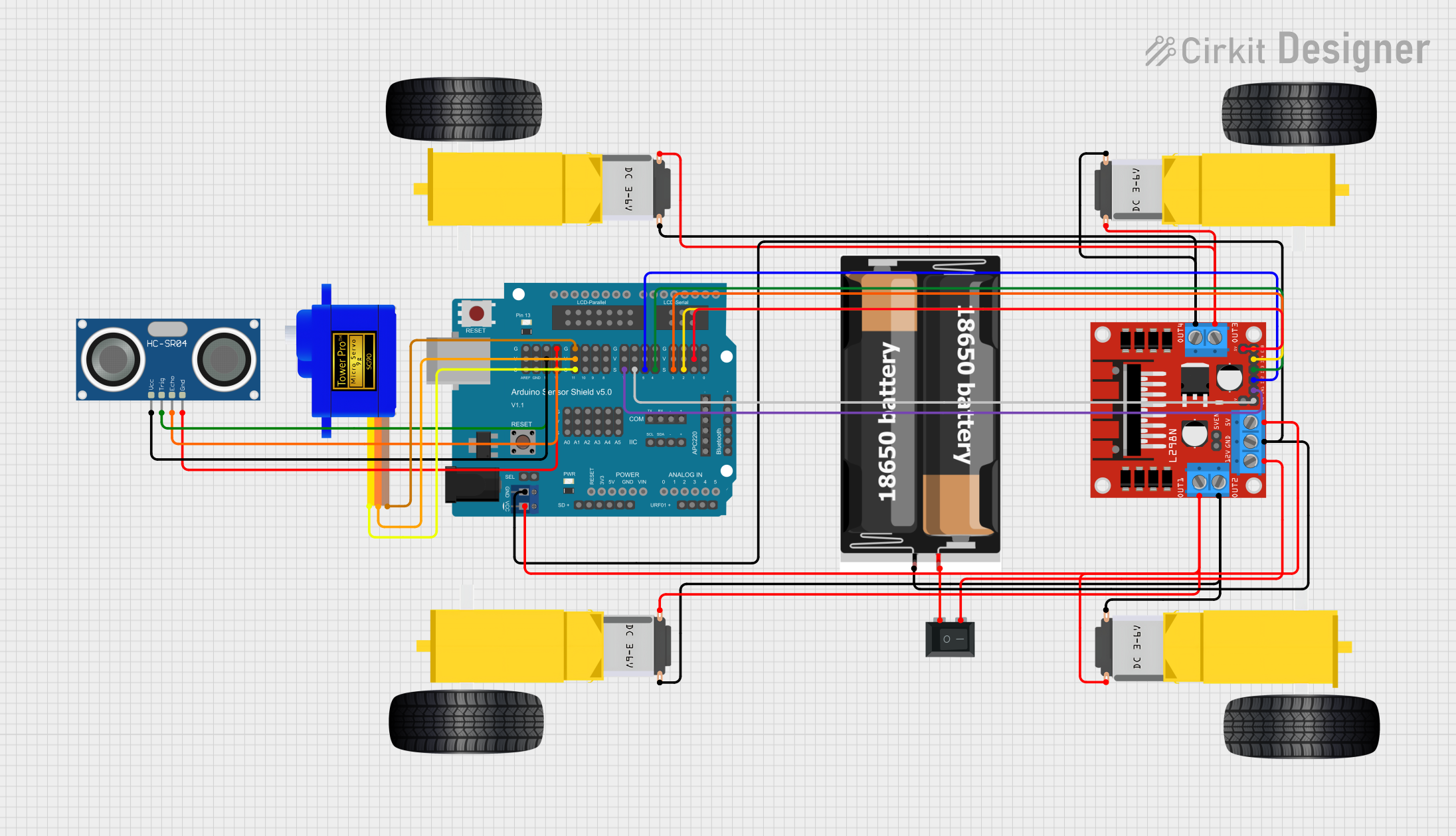
Circuit Documentation
Summary
This circuit is designed to control a mobile robot equipped with ultrasonic sensors for distance measurement, DC gearmotors for movement, and a servo motor for directional control. The brain of the robot is an Arduino UNO microcontroller, which interfaces with an Arduino Sensor Shield v5.0 for easy connection to various peripherals. The HC-SR04 Ultrasonic Sensor is used for distance sensing, while the L298N DC motor driver controls the gearmotors for the wheels. A servomotor SG90 is used for steering or other rotational control. Power management is handled by a rocker switch and a 2x 18650 battery pack. The circuit is designed for modularity and ease of use, with clear separation of power, sensor, and actuator components.
Component List
Microcontroller
- Arduino UNO: A microcontroller board based on the ATmega328P, with a variety of digital and analog I/O pins.
Sensors
- HC-SR04 Ultrasonic Sensor: A sensor for measuring distance via ultrasonic sound waves.
Actuators
- Gearmotor DC Wheels (left and right): Motors that provide movement to the robot's wheels.
- Servomotor SG90: A small rotary actuator used for precise control of angular position.
Motor Driver
- L298N DC motor driver: A module that allows for the control of up to two DC motors with direction and speed control.
Power Management
- Rocker Switch (SPST): A single-pole single-throw switch used to control the power supply to the circuit.
- 2x 18650 Battery Pack: A power source for the circuit, consisting of two 18650 lithium-ion batteries.
Expansion Board
- Arduino Sensor Shield v5.0: An expansion board that allows for easy connection of sensors and actuators to the Arduino UNO.
Wiring Details
HC-SR04 Ultrasonic Sensor
- VCC: Connected to 5V on the Arduino Sensor Shield.
- TRIG: Connected to digital pin 13 on the Arduino Sensor Shield.
- ECHO: Connected to digital pin 12 on the Arduino Sensor Shield.
- GND: Connected to GND on the Arduino Sensor Shield.
Gearmotor DC Wheels (left and right)
- PIN1 and PIN2: Connected to the L298N DC motor driver's OUT1, OUT2, OUT3, and OUT4 for control of the motors' direction and speed.
Servomotor SG90
- SIG: Connected to digital pin 11 on the Arduino Sensor Shield.
- VCC: Connected to 5V on the Arduino Sensor Shield.
- GND: Connected to GND on the Arduino Sensor Shield.
L298N DC motor driver
- OUT1, OUT2, OUT3, OUT4: Connected to the gearmotors for wheel control.
- 12V: Connected to the rocker switch for power input.
- GND: Connected to the GND of the 2x 18650 battery pack and GND on the Arduino Sensor Shield.
- 5V: Connected to 5V on the Arduino Sensor Shield.
- ENA, ENB: Connected to digital pins 6 and 3 on the Arduino Sensor Shield for enabling the motor outputs.
- IN1, IN2, IN3, IN4: Connected to digital pins 7, 5, 4, and 2 on the Arduino Sensor Shield for direction control of the motors.
Rocker Switch (SPST)
- Pin 1: Connected to the VCC of the 2x 18650 battery pack.
- Pin 2: Connected to the 12V input of the L298N DC motor driver.
2x 18650 Battery Pack
- VCC: Connected to the rocker switch.
- GND: Connected to the GND of the L298N DC motor driver and GND on the Arduino Sensor Shield.
Documented Code
#include <Servo.h>

// Define control pins for the L298N motor driver
volatile int IN1 = 11;
volatile int IN2 = 6;
volatile int IN3 = 5;
volatile int IN4 = 3;

// Variables to store distance measurements
volatile int rightDistance;
volatile int leftDistance;

// Create a servo object to control the SG90
Servo servo_4;

// Function to drive the left side of the robot forward
void left_side_forward(int speed) {
  analogWrite(IN1, speed * 0.92);
  analogWrite(IN2, 0);
}

// Function to drive the right side of the robot forward
void right_side_forward(int speed) {
  analogWrite(IN3, speed);
  analogWrite(IN4, 0);
}

// Function to drive the left side of the robot backward
void left_side_backward(int speed) {
  analogWrite(IN1, 0);
  analogWrite(IN2, speed * 0.92);
}

// Function to drive the right side of the robot backward
void right_side_backward(int speed) {
  analogWrite(IN3, 0);
  analogWrite(IN4, speed);
}

// Function to measure distance using the HC-SR04 sensor
float checkdistance_A1_A2() {
  digitalWrite(A1, LOW);
  delayMicroseconds(2);
  digitalWrite(A1, HIGH);
  delayMicroseconds(10);
  digitalWrite(A1, LOW);
  float distance = pulseIn(A2, HIGH) / 58.00;
  delay(10);
  return distance;
}

// Function to drive the robot forward
void forward(int speed) {
  left_side_forward(speed);
  right_side_forward(speed);
}

// Function to drive the robot backward
void backward(int speed) {
  left_side_backward(speed);
  right_side_backward(speed);
}

// Function to turn the robot left
void left(int speed, int time) {
  left_side_backward(speed);
  right_side_forward(speed);
  delay(time);
  stop();
}

// Function to turn the robot right
void right(int speed, int time) {
  left_side_forward(speed);
  right_side_backward(speed);
  delay(time);
  stop();
}

// Function to stop the robot's movement
void stop() {
  left_side_forward(0);
  right_side_forward(0);
}

// Setup function to initialize the robot
void setup() {
  servo_4.attach(4); // Attach the servo to pin 4
  pinMode(A1, OUTPUT); // Set the TRIG pin of the HC-SR04 as an output
  pinMode(A2, INPUT); // Set the ECHO pin of the HC-SR04 as an input
  // Set the motor driver pins as outputs
  pinMode(IN1, OUTPUT);
  pinMode(IN2, OUTPUT);
  pinMode(IN3, OUTPUT);
  pinMode(IN4, OUTPUT);
}

// Main loop function
void loop() {
  servo_4.write(90); // Set the servo to the middle position
  delay(200); // Short delay for servo to reach position

  // Measure distance and move forward if the path is clear
  float distance = checkdistance_A1_A2();
  while (distance > 15) {
    forward(150); // Drive forward at a set speed
    distance = checkdistance_A1_A2(); // Continuously update the distance
  }
  stop(); // Stop the robot if an obstacle is detected
  delay(100); // Short delay before next action

  // Check distance to the right
  servo_4.write(0); // Turn the servo to 0 degrees
  delay(200); // Short delay for servo to reach position
  rightDistance = checkdistance_A1_A2(); // Measure distance to the right

  // Check distance to the left
  servo_4.write(180); // Turn the servo to 180 degrees
  delay(200); // Short delay for servo to reach position
  leftDistance = checkdistance_A1_A2(); // Measure distance to the left

  // Decide which way to turn based on the distance measurements
  if (rightDistance >= leftDistance) {
    right(200, 300); // Turn right if the right side has more space
  } else {
    left(200, 300); // Turn left if the left side has more space
  }
}
This code controls the robot's movement based on distance measurements from the ultrasonic sensor. The robot moves forward until it detects an obstacle within 15 cm, then it stops and checks distances to the left and right before deciding which direction to turn. The servo motor is used to aim the ultrasonic sensor in different directions for these measurements. The motor driver is controlled through PWM signals to adjust the speed and direction of the gearmotors.