
ESP32-S3 and ILI9488 TFT LCD Display for Interactive Graphics
View and Edit Project In Cirkit Designer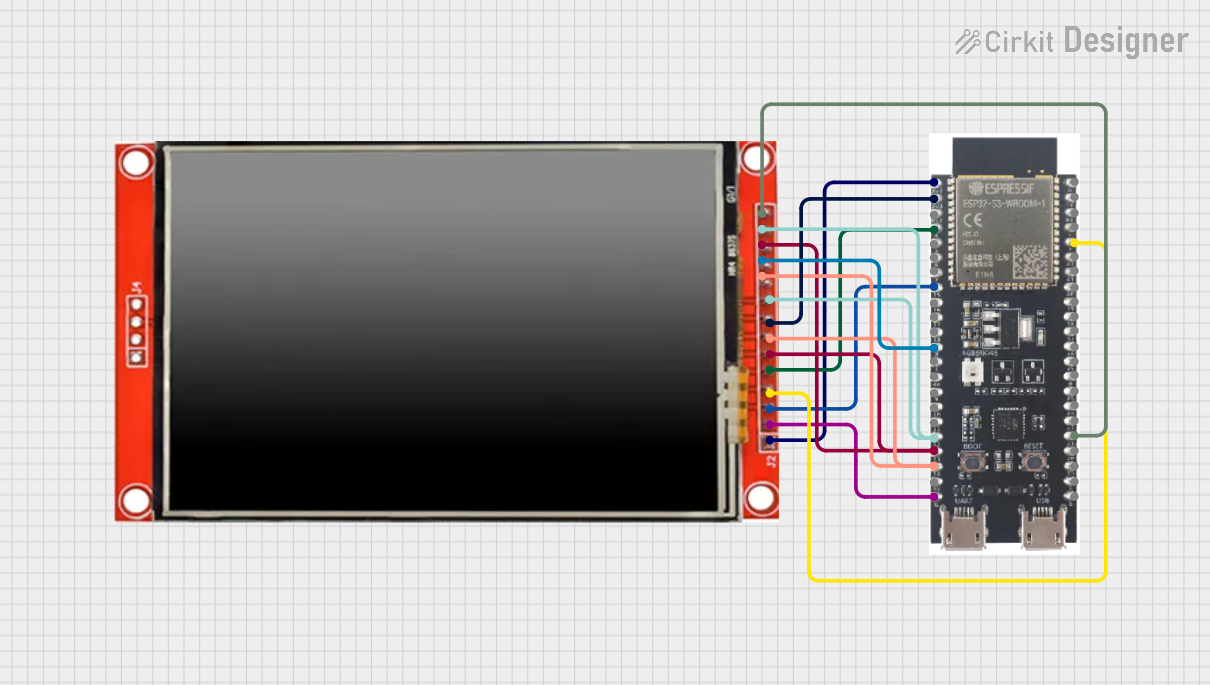
Circuit Documentation
Summary
This document provides a detailed overview of a circuit that integrates an ESP32-S3 microcontroller with an ILI9488 TFT LCD screen. The ESP32-S3 is responsible for driving the display and rendering graphics. The circuit includes power connections, data lines, and control signals to ensure proper communication between the microcontroller and the display.
Component List
LCD TFT Screen ILI9488 HD
- Description: A high-definition TFT LCD screen based on the ILI9488 driver.
- Pins: PEN, TDO, TDI, VCC (3.3~5V), GND, CS, RST, D/C, SDI(MOSI), SCK, BL, SDO(MISO), TCS, TCK
ESP32-S3
- Description: A powerful microcontroller with integrated Wi-Fi and Bluetooth, suitable for IoT applications.
- Pins: 3v3, EN, GPIO4, GPIO5, GPIO6, GPIO7, GPIO15, GPIO16, GPIO17, GPIO18, GPIO8, GPIO46, GPIO9, GPIO10, GPIO11, GPIO12, GPIO13, GPIO14, 5V, GND, GPIO43, GPIO44, GPIO1, GPIO2, GPIO42, GPIO41, GPIO40, GPIO39, GPIO38, GPIO37, GPIO36, GPIO35, GPIO0, GPIO45, GPIO48, GPIO47, GPIO21, GPIO20, GPIO19
Wiring Details
LCD TFT Screen ILI9488 HD
- PEN: Connected to ESP32-S3 GPIO21
- TDO: Connected to ESP32-S3 GPIO12
- TDI: Connected to ESP32-S3 GPIO13
- VCC (3.3~5V): Connected to ESP32-S3 3v3
- GND: Connected to ESP32-S3 GND
- CS: Connected to ESP32-S3 GPIO15
- RST: Connected to ESP32-S3 GPIO2
- D/C: Connected to ESP32-S3 GPIO4
- SDI(MOSI): Connected to ESP32-S3 GPIO13
- SCK: Connected to ESP32-S3 GPIO14
- BL: Connected to ESP32-S3 3v3
- SDO(MISO): Connected to ESP32-S3 GPIO12
- TCS: Connected to ESP32-S3 GPIO18
- TCK: Connected to ESP32-S3 GPIO14
ESP32-S3
- GPIO21: Connected to LCD TFT Screen ILI9488 HD PEN
- GPIO12: Connected to LCD TFT Screen ILI9488 HD TDO and SDO(MISO)
- GPIO13: Connected to LCD TFT Screen ILI9488 HD SDI(MOSI) and TDI
- 3v3: Connected to LCD TFT Screen ILI9488 HD VCC (3.3~5V) and BL
- GND: Connected to LCD TFT Screen ILI9488 HD GND
- GPIO15: Connected to LCD TFT Screen ILI9488 HD CS
- GPIO2: Connected to LCD TFT Screen ILI9488 HD RST
- GPIO4: Connected to LCD TFT Screen ILI9488 HD D/C
- GPIO14: Connected to LCD TFT Screen ILI9488 HD SCK and TCK
- GPIO18: Connected to LCD TFT Screen ILI9488 HD TCS
Documented Code
ESP32-S3 Code
/*
 * This Arduino Sketch is for an ESP32-S3 microcontroller connected to an ILI9488
 * TFT LCD display. The code initializes the display and demonstrates basic
 * drawing functions using the TFT_eSPI library.
 */

#include <TFT_eSPI.h> // Include the graphics library

TFT_eSPI tft = TFT_eSPI(); // Create an instance of the display

void setup() {
  tft.init(); // Initialize the display
  tft.setRotation(1); // Set the display orientation
  tft.fillScreen(TFT_BLACK); // Clear the screen with black color

  // Draw some example graphics
  tft.setTextColor(TFT_WHITE, TFT_BLACK); // Set text color to white on black
  tft.drawString("Hello, World!", 10, 10, 4); // Draw text at position (10, 10)
  tft.drawLine(0, 0, tft.width(), tft.height(), TFT_RED); // Draw a red line
  tft.drawRect(10, 30, 100, 50, TFT_GREEN); // Draw a green rectangle
  tft.fillCircle(60, 100, 30, TFT_BLUE); // Draw a filled blue circle
}

void loop() {
  // Add code here to update the display in the loop if needed
}
LCD TFT Screen ILI9488 HD Code
void setup() {
  // put your setup code here, to run once:

}

void loop() {
  // put your main code here, to run repeatedly:

}
This documentation provides a comprehensive overview of the circuit, including the components used, their wiring details, and the code required to operate the microcontroller and display.