
Arduino Nano Temperature-Controlled Heating System with OLED Display
View and Edit Project In Cirkit Designer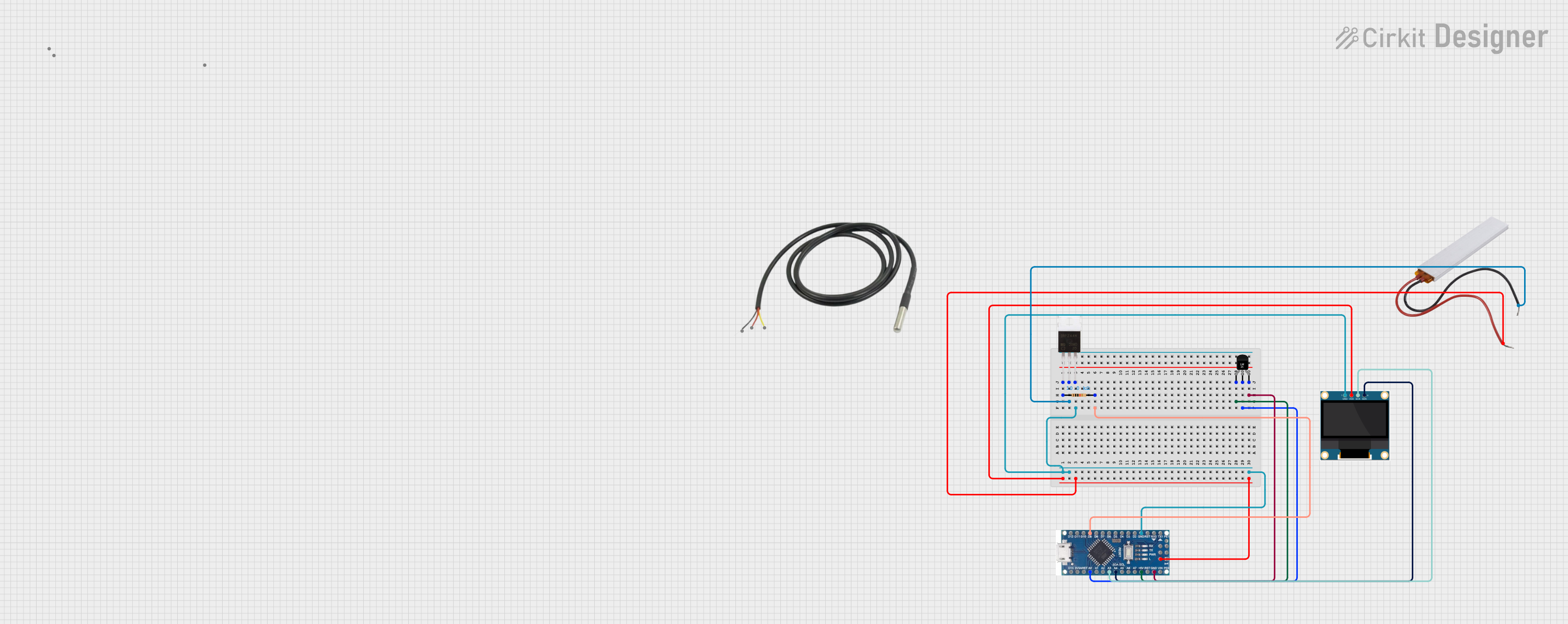
Circuit Documentation
Summary
This circuit is designed to monitor temperature using an LM35 temperature sensor and display the temperature on a 0.96" OLED display. Additionally, it controls a heating element using an IRFZ44N MOSFET. The circuit is managed by an Arduino Nano microcontroller.
Component List
Arduino Nano
- Description: A small, complete, and breadboard-friendly board based on the ATmega328P.
- Pins: D12, D11, D10, D9, D8, D7, D6, D5, D4, D3, D2, GND, D13, 3V3, AREF, A0, A1, A2, A3, A4 (SDA), A5 (SCL), A6, A7, 5V, RST, VIN, RX0, TX1, 13, 11, 12
0.96" OLED Display
- Description: A small OLED display module for displaying text and graphics.
- Pins: GND, VDD, SCK, SDA
Temperature Sensor (LM35)
- Description: An analog temperature sensor that outputs a voltage proportional to the temperature.
- Pins: +Vs, Vout, GND
Temperature Sensor
- Description: A digital temperature sensor with a single-wire interface.
- Pins: Temp GND (Black), Temp VDD (Red), Temp DQ (Data Yellow)
PTC
- Description: A positive temperature coefficient thermistor used for overcurrent protection.
- Pins: Neutral, Live
IRFZ44N MOSFET
- Description: A power MOSFET used for switching and amplifying electronic signals.
- Pins: Gate, Drain, Source
Resistor
- Description: A 10k Ohm resistor used for current limiting.
- Pins: pin1, pin2
- Properties: Resistance = 10k Ohms
Wiring Details
Arduino Nano
- D9: Connected to pin2 of the Resistor.
- GND: Connected to Source of the IRFZ44N MOSFET and GND of the 0.96" OLED Display.
- A0: Connected to Vout of the LM35 Temperature Sensor.
- A3: Connected to SCK of the 0.96" OLED Display.
- A4 (SDA): Connected to SDA of the 0.96" OLED Display.
- 5V: Connected to +Vs of the LM35 Temperature Sensor, VDD of the 0.96" OLED Display, and Live of the PTC.
0.96" OLED Display
- GND: Connected to GND of the Arduino Nano and Source of the IRFZ44N MOSFET.
- VDD: Connected to 5V of the Arduino Nano and Live of the PTC.
- SCK: Connected to A3 of the Arduino Nano.
- SDA: Connected to A4 (SDA) of the Arduino Nano.
Temperature Sensor (LM35)
- +Vs: Connected to 5V of the Arduino Nano.
- Vout: Connected to A0 of the Arduino Nano.
- GND: Connected to GND of the Arduino Nano.
Temperature Sensor
- Temp GND (Black): Not connected in this circuit.
- Temp VDD (Red): Not connected in this circuit.
- Temp DQ (Data Yellow): Not connected in this circuit.
PTC
- Neutral: Connected to Drain of the IRFZ44N MOSFET.
- Live: Connected to 5V of the Arduino Nano and VDD of the 0.96" OLED Display.
IRFZ44N MOSFET
- Gate: Connected to pin1 of the Resistor.
- Drain: Connected to Neutral of the PTC.
- Source: Connected to GND of the Arduino Nano and GND of the 0.96" OLED Display.
Resistor
- pin1: Connected to Gate of the IRFZ44N MOSFET.
- pin2: Connected to D9 of the Arduino Nano.
Code Documentation
#include <Wire.h>
#include <Adafruit_GFX.h>
#include <Adafruit_SSD1306.h>

#define SCREEN_WIDTH 128
#define SCREEN_HEIGHT 32
#define OLED_RESET    -1  // Reset pin not used
Adafruit_SSD1306 display(SCREEN_WIDTH, SCREEN_HEIGHT, &Wire, OLED_RESET);

int tempPin = A0;  // LM35 analog pin
int mosfetPin = 9; // MOSFET control pin
float temp;        // Variable to store temperature

void setup() {
  pinMode(mosfetPin, OUTPUT);
  Serial.begin(9600);

  // Initialize OLED display
  if (!display.begin(0x3C, true)) { // Default I2C address 0x3C
    Serial.println("OLED initialization failed!");
    while (true); // Stop if display isn't found
  }
  display.clearDisplay();
  display.display();
}

void loop() {
  int sensorValue = analogRead(tempPin);
  temp = sensorValue * (500.0 / 1023.0); // Convert to °C

  // Heating control
  bool heating = false;
  if (temp < 20) {
    digitalWrite(mosfetPin, HIGH); // Turn on heating
    heating = true;
  } else {
    digitalWrite(mosfetPin, LOW); // Turn off heating
    heating = false;
  }

  // Display data on OLED
  display.clearDisplay();
  display.setTextSize(1);
  display.setTextColor(SSD1306_WHITE);

  display.setCursor(0, 0);
  display.print("Temp: ");
  display.print(temp);
  display.println(" C");

  display.setCursor(0, 10);
  display.print("Heating: ");
  display.println(heating ? "ON" : "OFF");

  display.display();

  delay(1000); // 1-second delay
}
This code initializes the OLED display and reads the temperature from the LM35 sensor. It controls the heating element using the IRFZ44N MOSFET based on the temperature reading. The temperature and heating status are displayed on the OLED screen.