
Smart Solar-Powered Lighting System with Motion Detection and Bluetooth Connectivity
View and Edit Project In Cirkit Designer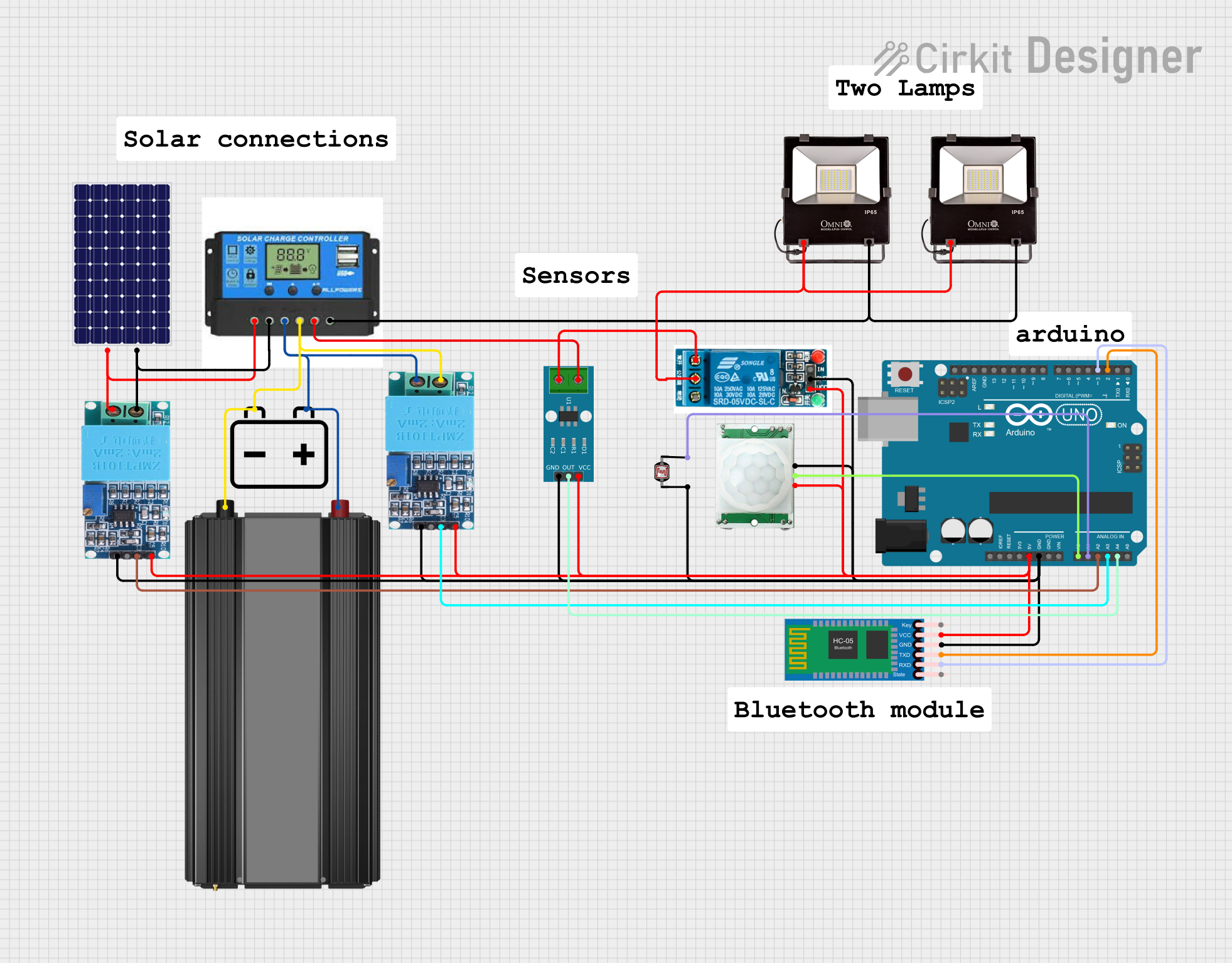
Smart Solar Light Controller Circuit Documentation
Summary
The Smart Solar Light Controller is a solar-powered lighting system designed to operate autonomously using various sensors. It is capable of monitoring solar panel voltage, battery voltage, load current, and light intensity, and it can detect motion to control floodlights. The system is designed to turn on the floodlights when motion is detected during nighttime conditions. Sensor data is collected and can be transmitted to a connected Bluetooth device, such as a smartphone.
Component List
- Solar Panel: Converts sunlight into electrical energy, providing a voltage output.
- Charge Controller: Manages the power coming from the solar panel to charge the battery and power the load.
- 12v Battery: Stores electrical energy for use by the system when solar power is not available.
- Power Inverter: Converts DC power from the battery into AC power for AC loads.
- PIR/Motion Sensor: Detects motion and provides a digital signal when motion is detected.
- Flood Lights 12v: Provides lighting when activated by the system.
- Arduino UNO: Acts as the central processing unit for the system, reading sensor data and controlling the relay.
- 5v Relay: Electromechanical switch used to control the floodlights based on the Arduino's output.
- Photocell (LDR): Measures light intensity to determine ambient light levels.
- ZMPT101B: Voltage sensor module for AC voltage measurement.
- HC-05 Bluetooth Module: Allows for wireless communication with a smartphone or other Bluetooth-enabled device.
- ACS712 Current Sensor: Measures the current flowing through the load.
Wiring Details
Solar Panel
- + to Charge Controller Solar Positive
- - to Charge Controller Solar Negative
Charge Controller
- Solar Positive/Negative to Solar Panel
- Battery Positive/Negative to 12v Battery
- Load Positive to ACS712 Current Sensor
- Load Negative to Flood Lights 12v Ground
12v Battery
- + to Charge Controller Battery Positive
- - to Charge Controller Battery Negative
Power Inverter
- + to 12v Battery +
- - to 12v Battery -
PIR/Motion Sensor
- GND to common ground
- OUTPUT to Arduino UNO A0
- VCC to common VCC
Flood Lights 12v
- 12V to 5v Relay Common terminal
- GROUND to Charge Controller Load Negative
Arduino UNO
- GND to common ground
- 5V to common VCC
- A0 to PIR/Motion Sensor OUTPUT
- A1 to Photocell (LDR) pin 1
- A2 to ZMPT101B OUT (Solar Panel Voltage)
- A3 to ZMPT101B OUT (Battery Voltage)
- A4 to ACS712 Current Sensor OUT
- D2 to HC-05 Bluetooth Module TXD
- D3 to HC-05 Bluetooth Module RXD
- D7 to 5v Relay In
5v Relay
- GND to common ground
- VCC to common VCC
- In to Arduino UNO D7
- Common terminal to Flood Lights 12v 12V
- Normally Open to ACS712 Current Sensor
Photocell (LDR)
- pin 0 to common ground
- pin 1 to Arduino UNO A1
ZMPT101B
- OUT to Arduino UNO A2/A3 (for voltage sensing)
- GND to common ground
- VCC to common VCC
HC-05 Bluetooth Module
- GND to common ground
- VCC to common VCC
- TXD to Arduino UNO D2
- RXD to Arduino UNO D3
ACS712 Current Sensor
- GND to common ground
- VCC to common VCC
- OUT to Arduino UNO A4
- 1 to Charge Controller Load Positive
- 2 to 5v Relay Normally Open
Documented Code
/*
 * Smart Solar Light Controller
 * This Arduino sketch controls a solar-powered lighting system using various sensors.
 * It monitors solar panel voltage, battery voltage, load current, light intensity,
 * and motion detection. The system turns on floodlights when motion is detected at
 * night and sends all sensor data to a connected phone via Bluetooth.
 */

// Pin definitions
const int solarVoltagePin = A2;
const int batteryVoltagePin = A3;
const int currentSensorPin = A4;
const int ldrPin = A1;
const int pirPin = A0;
const int relayPin = 7;
const int bluetoothTxPin = 2;
const int bluetoothRxPin = 3;

// Variables
float solarVoltage = 0.0;
float batteryVoltage = 0.0;
float loadCurrent = 0.0;
float powerDraw = 0.0;
int ldrValue = 0;
int pirValue = 0;
bool relayState = false;
unsigned long motionEndTime = 0;

void setup() {
  Serial.begin(9600);
  pinMode(relayPin, OUTPUT);
  pinMode(pirPin, INPUT);
  digitalWrite(relayPin, LOW);
}

void loop() {
  // Read sensor values
  solarVoltage = analogRead(solarVoltagePin) * (5.0 / 1023.0);
  batteryVoltage = analogRead(batteryVoltagePin) * (5.0 / 1023.0);
  loadCurrent = analogRead(currentSensorPin) * (5.0 / 1023.0);
  ldrValue = analogRead(ldrPin);
  pirValue = digitalRead(pirPin);

  // Calculate power draw
  powerDraw = batteryVoltage * loadCurrent;

  // Check if it's night time
  if (ldrValue < 500) { // Adjust threshold as needed
    if (pirValue == HIGH) {
      digitalWrite(relayPin, HIGH);
      relayState = true;
      motionEndTime = millis() + 3000; // 3 seconds after motion stops
    }
  }

  // Turn off relay if motion has stopped
  if (millis() > motionEndTime) {
    digitalWrite(relayPin, LOW);
    relayState = false;
  }

  // Send data to Serial Monitor and Bluetooth
  Serial.print("Solar Voltage: ");
  Serial.println(solarVoltage);
  Serial.print("Battery Voltage: ");
  Serial.println(batteryVoltage);
  Serial.print("Load Current: ");
  Serial.println(loadCurrent);
  Serial.print("Power Draw: ");
  Serial.println(powerDraw);
  Serial.print("LDR Value: ");
  Serial.println(ldrValue);
  Serial.print("PIR Value: ");
  Serial.println(pirValue);
  Serial.print("Relay State: ");
  Serial.println(relayState);
  Serial.println();

  // Send data to Bluetooth
  Serial.print("BT:Solar Voltage: ");
  Serial.println(solarVoltage);
  Serial.print("BT:Battery Voltage: ");
  Serial.println(batteryVoltage);
  Serial.print("BT:Load Current: ");
  Serial.println(loadCurrent);
  Serial.print("BT:Power Draw: ");
  Serial.println(powerDraw);
  Serial.print("BT:LDR Value: ");
  Serial.println(ldrValue);
  Serial.print("BT:PIR Value: ");
  Serial.println(pirValue);
  Serial.print("BT:Relay State: ");
  Serial.println(relayState);
  Serial.println();

  delay(1000); // Adjust delay as needed
}
This code is designed to run on an Arduino UNO and controls the Smart Solar Light Controller system. It reads inputs from the various sensors, processes the data, controls the relay based on the sensor inputs, and sends sensor data to a connected Bluetooth device.