
Circuit Documentation
Summary
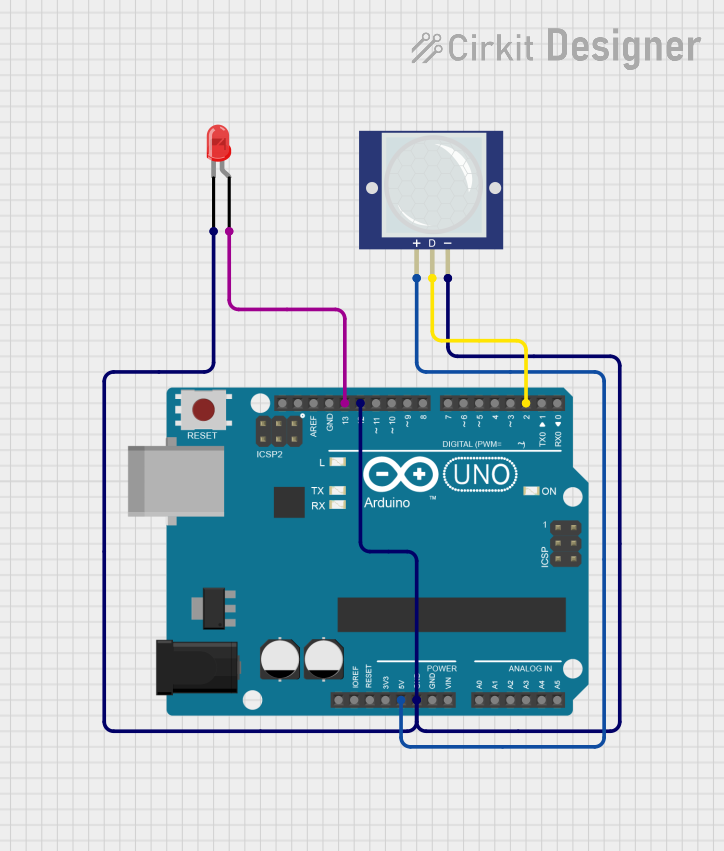
This circuit is designed to detect motion using a PIR motion sensor and indicate the detection by lighting up an LED. The circuit uses an Arduino UNO microcontroller to read the sensor data and control the LED. When motion is detected by the PIR sensor, the Arduino turns on the LED and prints a message to the serial monitor.
Component List
Arduino UNO
- Description: A microcontroller board based on the ATmega328P.
- Pins: UNUSED, IOREF, Reset, 3.3V, 5V, GND, Vin, A0, A1, A2, A3, A4, A5, SCL, SDA, AREF, D13, D12, D11, D10, D9, D8, D7, D6, D5, D4, D3, D2, D1, D0
LED: Two Pin (red)
- Description: A red LED with two pins, anode and cathode.
- Pins: cathode, anode
PIR Motion Sensor (Wokwi Compatible)
- Description: A passive infrared sensor used to detect motion.
- Pins: VCC, OUT, GND
Wiring Details
Arduino UNO
- 5V: Connected to VCC of the PIR Motion Sensor.
- GND: Connected to GND of the PIR Motion Sensor and cathode of the LED.
- D12: Connected to GND of the PIR Motion Sensor.
- D13: Connected to anode of the LED.
- D2: Connected to OUT of the PIR Motion Sensor.
LED: Two Pin (red)
- cathode: Connected to GND of the Arduino UNO.
- anode: Connected to D13 of the Arduino UNO.
PIR Motion Sensor (Wokwi Compatible)
- VCC: Connected to 5V of the Arduino UNO.
- OUT: Connected to D2 of the Arduino UNO.
- GND: Connected to GND of the Arduino UNO and D12 of the Arduino UNO.
Code Documentation
/*
   PIR sensor tester
*/

int ledPin = 13;                // choose the pin for the LED
int inputPin = 2;               // choose the input pin (for PIR sensor)
int pirState = LOW;             // we start, assuming no motion detected
int val = 0;                    // variable for reading the pin status

void setup() {
  pinMode(12, OUTPUT);
  digitalWrite(12, LOW);

  pinMode(ledPin, OUTPUT);      // declare LED as output
  pinMode(inputPin, INPUT);     // declare sensor as input

  Serial.begin(9600);
}

void loop() {
  val = digitalRead(inputPin);  // read input value
  if (val == HIGH) {            // check if the input is HIGH
    digitalWrite(ledPin, HIGH);  // turn LED ON
    if (pirState == LOW) {
      // we have just turned on
      Serial.println("Motion detected!");
      // We only want to print on the output change, not state
      pirState = HIGH;
    }
  } else {
    digitalWrite(ledPin, LOW); // turn LED OFF
    if (pirState == HIGH) {
      // we have just turned off
      Serial.println("Motion ended!");
      // We only want to print on the output change, not state
      pirState = LOW;
    }
  }
}
This code initializes the PIR sensor and LED, and continuously checks the state of the PIR sensor. When motion is detected, the LED is turned on and a message is printed to the serial monitor. When motion ends, the LED is turned off and another message is printed.