
Arduino UNO IR Sensor-Controlled Robot with L298N Motor Driver
View and Edit Project In Cirkit Designer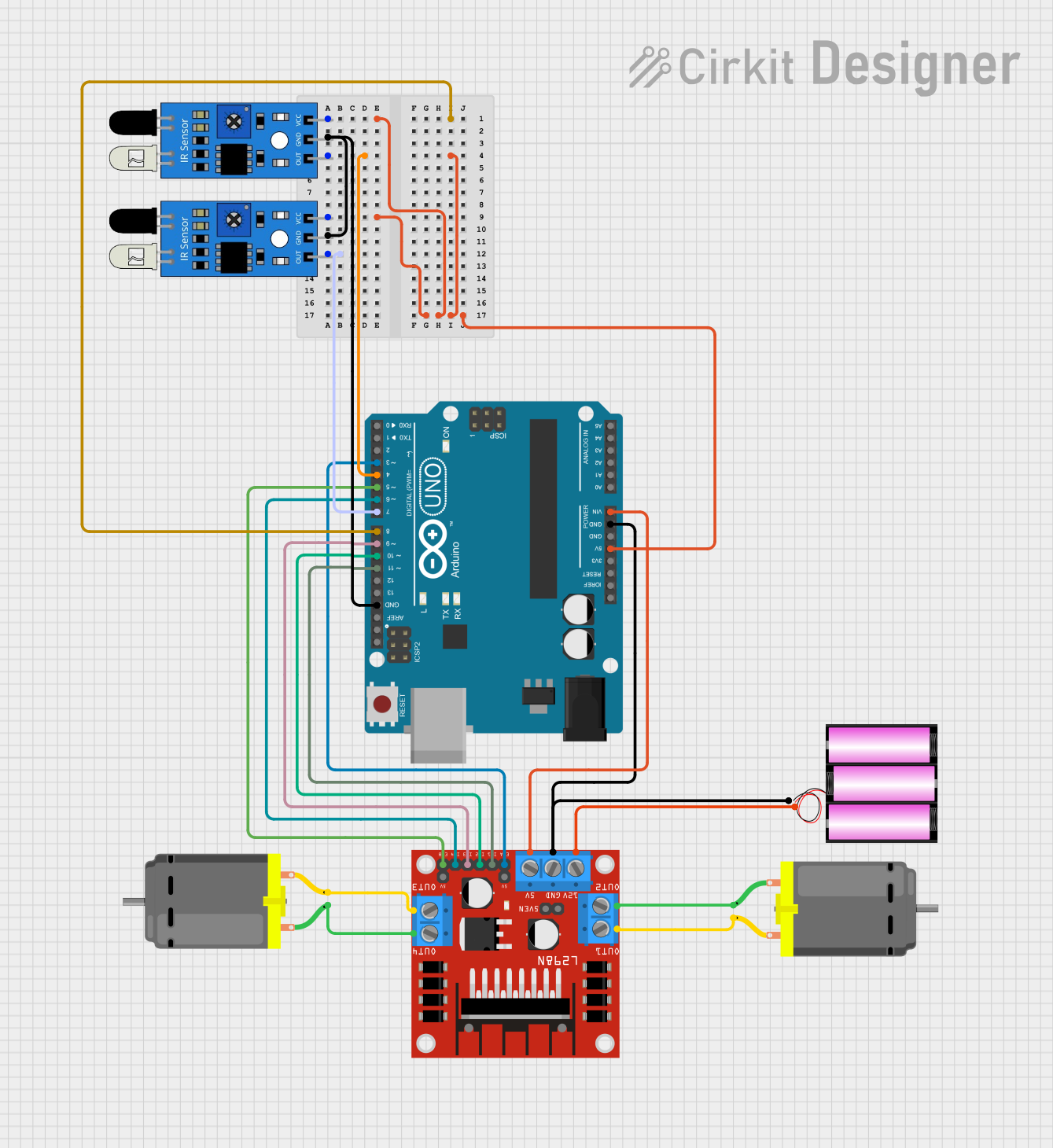
Circuit Documentation
Summary
This document describes a robot control circuit using an Arduino UNO, an L298N motor driver, two DC motors, two IR sensors, and a 12V battery. The robot moves forward when no obstacle is detected by the IR sensors. If an obstacle is detected by the left IR sensor, the robot turns right. If an obstacle is detected by the right IR sensor, the robot turns left.
Component List
Arduino UNO
- Description: Microcontroller board based on the ATmega328P.
- Pins: UNUSED, IOREF, Reset, 3.3V, 5V, GND, Vin, A0, A1, A2, A3, A4, A5, SCL, SDA, AREF, D13, D12, D11, D10, D9, D8, D7, D6, D5, D4, D3, D2, D1, D0
L298N DC Motor Driver
- Description: Dual H-Bridge motor driver for controlling DC motors.
- Pins: OUT1, OUT2, 12V, GND, 5V, OUT3, OUT4, 5V-ENA-JMP-I, 5V-ENA-JMP-O, +5V-J1, +5V-J2, ENA, IN1, IN2, IN3, IN4, ENB
DC Motor (Motor 1)
- Description: Standard DC motor.
- Pins: pin 1, pin 2
DC Motor (Motor 2)
- Description: Standard DC motor.
- Pins: pin 1, pin 2
Battery 12V
- Description: 12V power supply.
- Pins: +, -
IR Sensor (Left)
- Description: Infrared sensor for obstacle detection.
- Pins: out, gnd, vcc
IR Sensor (Right)
- Description: Infrared sensor for obstacle detection.
- Pins: out, gnd, vcc
Wiring Details
Arduino UNO
- 5V connected to vcc of both IR sensors.
- GND connected to GND of L298N motor driver, GND of both IR sensors, and - of the 12V battery.
- Vin connected to 5V of L298N motor driver.
- D4 connected to out of the left IR sensor.
- D7 connected to out of the right IR sensor.
- D11 connected to IN1 of L298N motor driver.
- D10 connected to IN2 of L298N motor driver.
- D9 connected to IN3 of L298N motor driver.
- D6 connected to IN4 of L298N motor driver.
- D5 connected to ENB of L298N motor driver.
- D3 connected to ENA of L298N motor driver.
L298N DC Motor Driver
- GND connected to GND of Arduino UNO and - of the 12V battery.
- 5V connected to Vin of Arduino UNO.
- 12V connected to + of the 12V battery.
- OUT1 connected to pin 2 of Motor 1.
- OUT2 connected to pin 1 of Motor 1.
- OUT3 connected to pin 2 of Motor 2.
- OUT4 connected to pin 1 of Motor 2.
- IN1 connected to D11 of Arduino UNO.
- IN2 connected to D10 of Arduino UNO.
- IN3 connected to D9 of Arduino UNO.
- IN4 connected to D6 of Arduino UNO.
- ENA connected to D3 of Arduino UNO.
- ENB connected to D5 of Arduino UNO.
DC Motor (Motor 1)
- pin 1 connected to OUT2 of L298N motor driver.
- pin 2 connected to OUT1 of L298N motor driver.
DC Motor (Motor 2)
- pin 1 connected to OUT4 of L298N motor driver.
- pin 2 connected to OUT3 of L298N motor driver.
Battery 12V
- + connected to 12V of L298N motor driver.
- - connected to GND of Arduino UNO and GND of L298N motor driver.
IR Sensor (Left)
- vcc connected to 5V of Arduino UNO.
- gnd connected to GND of Arduino UNO.
- out connected to D4 of Arduino UNO.
IR Sensor (Right)
- vcc connected to 5V of Arduino UNO.
- gnd connected to GND of Arduino UNO.
- out connected to D7 of Arduino UNO.
Code Documentation
/*
 * IR ROBOT
 * This Arduino sketch controls a robot using two IR sensors and an L298N motor driver.
 * The robot moves forward when no obstacle is detected by the IR sensors.
 * If an obstacle is detected by the left IR sensor, the robot turns right.
 * If an obstacle is detected by the right IR sensor, the robot turns left.
 */

// Pin definitions
const int irSensorLeft = 4;
const int irSensorRight = 7;
const int motorEnableA = 3;
const int motorEnableB = 5;
const int motorIn1 = 11;
const int motorIn2 = 10;
const int motorIn3 = 9;
const int motorIn4 = 6;

void setup() {
  // Initialize IR sensor pins as inputs
  pinMode(irSensorLeft, INPUT);
  pinMode(irSensorRight, INPUT);
  // Initialize motor control pins as outputs
  pinMode(motorEnableA, OUTPUT);
  pinMode(motorEnableB, OUTPUT);
  pinMode(motorIn1, OUTPUT);
  pinMode(motorIn2, OUTPUT);
  pinMode(motorIn3, OUTPUT);
  pinMode(motorIn4, OUTPUT);
  // Start with motors disabled
  digitalWrite(motorEnableA, LOW);
  digitalWrite(motorEnableB, LOW);
}

void loop() {
  // Read IR sensor values
  int leftSensorValue = digitalRead(irSensorLeft);
  int rightSensorValue = digitalRead(irSensorRight);
  // Determine motor actions based on sensor values
  if (leftSensorValue == HIGH && rightSensorValue == HIGH) {
    // No obstacle, move forward
    moveForward();
  } else if (leftSensorValue == LOW) {
    // Obstacle on left, turn right
    turnRight();
  } else if (rightSensorValue == LOW) {
    // Obstacle on right, turn left
    turnLeft();
  }
}

void moveForward() {
  digitalWrite(motorEnableA, HIGH);
  digitalWrite(motorEnableB, HIGH);
  digitalWrite(motorIn1, HIGH);
  digitalWrite(motorIn2, LOW);
  digitalWrite(motorIn3, HIGH);
  digitalWrite(motorIn4, LOW);
}

void turnRight() {
  digitalWrite(motorEnableA, HIGH);
  digitalWrite(motorEnableB, HIGH);
  digitalWrite(motorIn1, LOW);
  digitalWrite(motorIn2, HIGH);
  digitalWrite(motorIn3, HIGH);
  digitalWrite(motorIn4, LOW);
}

void turnLeft() {
  digitalWrite(motorEnableA, HIGH);
  digitalWrite(motorEnableB, HIGH);
  digitalWrite(motorIn1, HIGH);
  digitalWrite(motorIn2, LOW);
  digitalWrite(motorIn3, LOW);
  digitalWrite(motorIn4, HIGH);
}
This code initializes the IR sensors and motor control pins, reads the sensor values, and controls the motors to move the robot forward, turn right, or turn left based on the sensor inputs.