
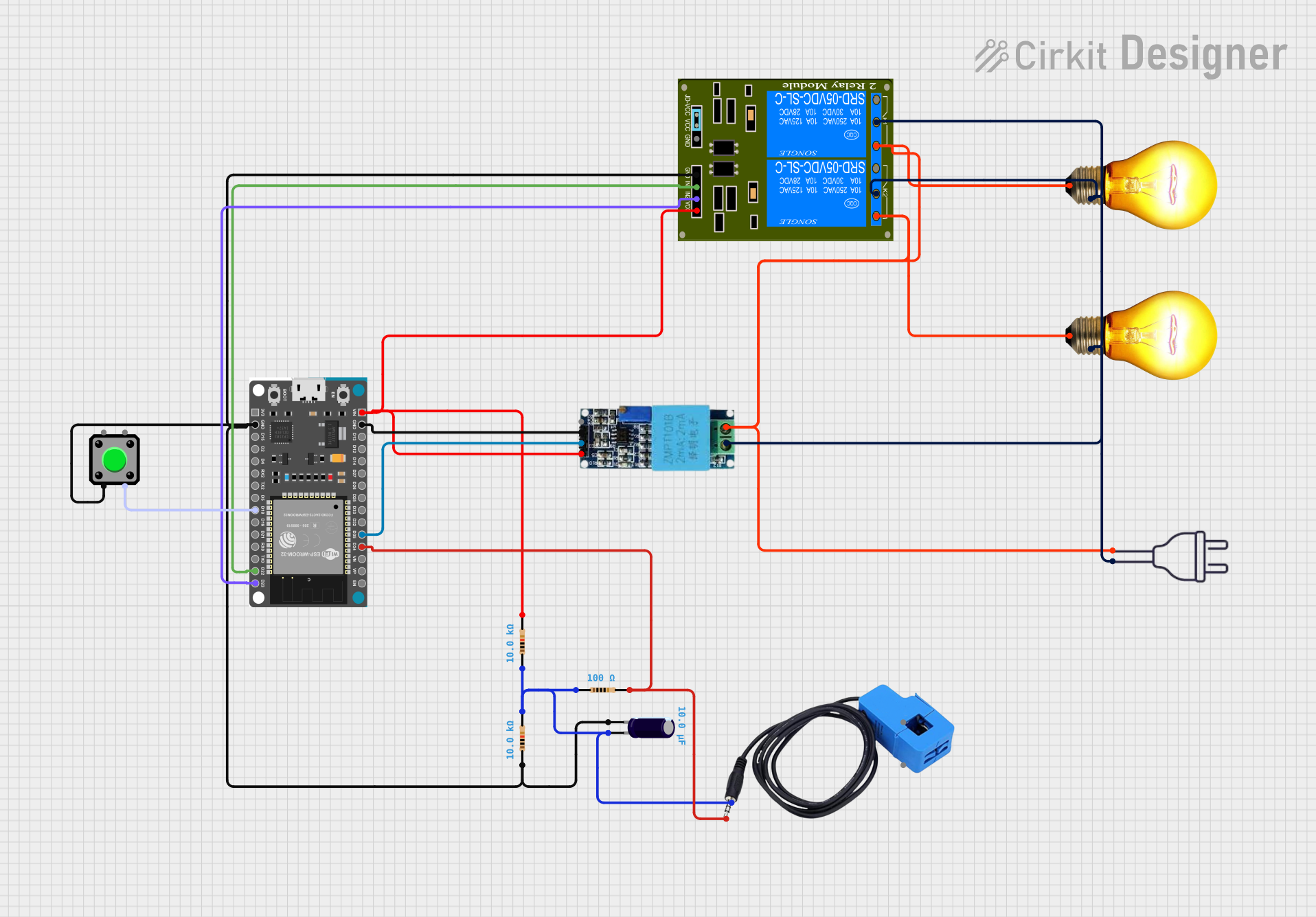
Circuit Documentation
Summary
This document provides a detailed overview of a circuit designed to interface an ESP32 Devkit V1 microcontroller with various components including a voltage sensor, a 2-channel relay module, a pushbutton, AC bulbs, a power supply, resistors, a capacitor, and a current sensor. The circuit is capable of monitoring voltage and current, controlling AC bulbs, and receiving input from a pushbutton. The ESP32 Devkit V1 serves as the central processing unit, controlling the relay module based on sensor readings and button press events.
Component List
ESP32 Devkit V1
- Microcontroller with WiFi and Bluetooth capabilities.
- Pins: 3V3, GND, D15, D2, D4, RX2, TX2, D5, D18, D19, D21, RX0, TX0, D22, D23, EN, VP, VN, D34, D35, D32, D33, D25, D26, D27, D14, D12, D13, VIN.
Voltage Sensor
- Measures the voltage of a system.
- Pins: Ground, Phase, Vcc, Out, Gnd.
2-Channel Relay (5V 10A)
- Electromechanical switch that allows control of high power devices.
- Pins: K1-Off, K1-In, K2-On, K2-In, K1-On, K2-Off, VCC, JD-GND, IN2, IN1, GND.
Pushbutton
- A simple switch mechanism for controlling some aspect of a machine or a process.
- Pins: Pin 2, Pin 1, Pin 3, Pin 4.
AC Bulb
- An electric light with a wire filament heated until it glows.
- Pins: P, N.
Power 220V
- Standard AC power supply.
- Pins: hot wire, neutral wire.
Resistor (10k Ohms)
- A passive two-terminal electrical component that implements electrical resistance as a circuit element.
- Resistance: 10,000 Ohms.
Resistor (100 Ohms)
- A passive two-terminal electrical component that implements electrical resistance as a circuit element.
- Resistance: 100 Ohms.
Electrolytic Capacitor
- A capacitor that uses an electrolyte to achieve a larger capacitance than other capacitor types.
- Capacitance: 0.00001 Farads.
- Pins: -, +.
Current Sensor
- Measures the amount of current in a wire.
- Pins: Out, Burden, In_current, Out_current.
Wiring Details
ESP32 Devkit V1
- GND connected to Pushbutton (Pin 2), 2-Channel Relay (GND), Voltage Sensor (Gnd).
- D18 connected to Pushbutton (Pin 3).
- D22 connected to 2-Channel Relay (IN1).
- D23 connected to 2-Channel Relay (IN2).
- D34 connected to Current Sensor (Out).
- D35 connected to Voltage Sensor (Out).
- VIN connected to Voltage Sensor (Vcc), 2-Channel Relay (VCC).
Voltage Sensor
- Ground connected to Power 220V (neutral wire), AC Bulb (N), 2-Channel Relay (K1-In, K2-In).
- Phase connected to Power 220V (hot wire), AC Bulb (P), 2-Channel Relay (K2-On, K1-On).
2-Channel Relay (5V 10A)
- GND connected to ESP32 Devkit V1 (GND).
- IN1 connected to ESP32 Devkit V1 (D22).
- IN2 connected to ESP32 Devkit V1 (D23).
- VCC connected to ESP32 Devkit V1 (VIN).
Pushbutton
- Pin 2 connected to ESP32 Devkit V1 (GND) through Resistor (10k Ohms) and Electrolytic Capacitor.
- Pin 3 connected to ESP32 Devkit V1 (D18).
AC Bulb
- P connected to Power 220V (hot wire) through 2-Channel Relay (K2-On, K1-On).
- N connected to Power 220V (neutral wire) through Voltage Sensor (Ground).
Resistor (10k Ohms)
- One side connected to Pushbutton (Pin 2), other side connected to ESP32 Devkit V1 (GND) and Electrolytic Capacitor (+).
Resistor (100 Ohms)
- One side connected to ESP32 Devkit V1 (D34), other side connected to Current Sensor (Out).
Electrolytic Capacitor
- (-) connected to ESP32 Devkit V1 (GND) through Resistor (10k Ohms).
- (+) connected to Resistor (10k Ohms) and Current Sensor (Burden).
Current Sensor
- Out connected to ESP32 Devkit V1 (D34) through Resistor (100 Ohms).
- Burden connected to Electrolytic Capacitor (+).
Documented Code
Microcontroller: ESP32 Devkit V1
// Code for the ESP32 Devkit V1 microcontroller
void setup() {
  // put your setup code here, to run once:

}

void loop() {
  // put your main code here, to run repeatedly:

}
Note: The provided code is a template and does not contain any functional logic. It needs to be populated with the specific instructions to control the relay based on sensor inputs and button press events.