
Circuit Documentation
Summary
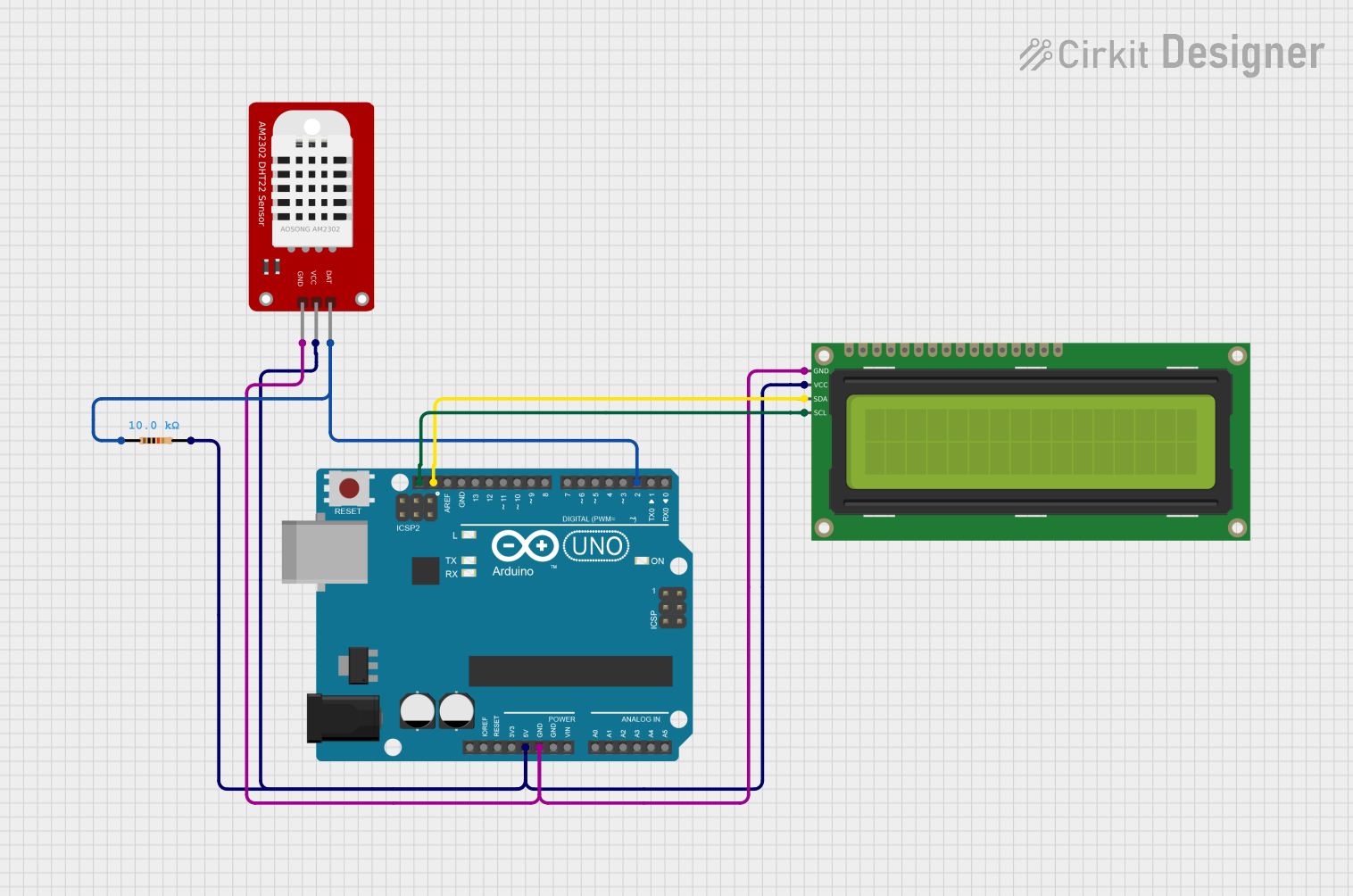
This circuit is designed to interface a DHT22 temperature and humidity sensor with an Arduino UNO microcontroller, displaying the readings on a 16x2 I2C LCD. The DHT22 sensor provides accurate temperature and humidity data, while the LCD allows for easy visualization of this information. A resistor is used in the circuit to ensure proper signal levels from the DHT22 sensor.
Component List
DHT22
- Description: A digital temperature and humidity sensor.
- Pins:
- GND: Ground connection
- VCC: Power supply (3.3V to 6V)
- DAT: Data output pin
Arduino UNO
- Description: A microcontroller board based on the ATmega328P.
- Pins:
- GND: Ground connection
- 5V: Power supply output
- D2: Digital pin used for reading data from the DHT22
- SCL: Serial Clock Line for I2C communication
- SDA: Serial Data Line for I2C communication
16x2 I2C LCD
- Description: A 16x2 character LCD with I2C interface for easy connection to microcontrollers.
- Pins:
- GND: Ground connection
- VCC: Power supply
- SCL: Serial Clock Line for I2C communication
- SDA: Serial Data Line for I2C communication
Resistor
- Description: A passive electrical component used to limit current flow.
- Pins:
- pin1: Connected to the DHT22 data pin
- pin2: Connected to the VCC of the DHT22
Wiring Details
DHT22
- GND: Connected to GND of Arduino UNO
- VCC: Connected to 5V of Arduino UNO and pin2 of the Resistor
- DAT: Connected to D2 of Arduino UNO through pin1 of the Resistor
Arduino UNO
- GND: Connected to GND of DHT22 and 16x2 I2C LCD
- 5V: Connected to VCC of DHT22 and 16x2 I2C LCD
- D2: Connected to DAT of DHT22
- SCL: Connected to SCL of 16x2 I2C LCD
- SDA: Connected to SDA of 16x2 I2C LCD
16x2 I2C LCD
- GND: Connected to GND of Arduino UNO and DHT22
- VCC: Connected to 5V of Arduino UNO and DHT22
- SCL: Connected to SCL of Arduino UNO
- SDA: Connected to SDA of Arduino UNO
Resistor
- pin1: Connected to DAT of DHT22
- pin2: Connected to VCC of DHT22 and 5V of Arduino UNO
Documented Code
#include <Wire.h>
#include <LiquidCrystal_I2C.h>
#include <Adafruit_Sensor.h>
#include <DHT.h>
#include <DHT_U.h>

#define DHTPIN 2       // DHT22 data on Arduino D2
#define DHTTYPE DHT22  // DHT 22 (AM2302)

LiquidCrystal_I2C lcd(0x27, 16, 2);  // Change 0x27 to 0x3F if your module uses that address
DHT dht(DHTPIN, DHTTYPE);

void setup() {
  // Initialize LCD
  lcd.init();
  lcd.backlight();
  lcd.clear();
  lcd.setCursor(0, 0);
  lcd.print("DHT22 Demo");
  lcd.setCursor(0, 1);
  lcd.print("Init...");

  // Start DHT
  dht.begin();

  delay(1500);
  lcd.clear();
}

void loop() {
  // DHT22 max sample rate ~0.5 Hz; wait at least 2s between reads
  float h = dht.readHumidity();
  float t = dht.readTemperature(); // Celsius

  if (isnan(h) || isnan(t)) {
    lcd.clear();
    lcd.setCursor(0, 0);
    lcd.print("Sensor error");
    lcd.setCursor(0, 1);
    lcd.print("Check wiring");
  } else {
    // Line 1: Temperature
    lcd.setCursor(0, 0);
    lcd.print("T:");
    printFixed(lcd, t, 1);  // one decimal
    lcd.print((char)223);   // degree symbol
    lcd.print("C   ");      // pad to clear remnants

    // Line 2: Humidity
    lcd.setCursor(0, 1);
    lcd.print("H:");
    printFixed(lcd, h, 1);
    lcd.print("%   ");
  }

  delay(2000);
}

// Helper to print fixed-point with trimming
void printFixed(LiquidCrystal_I2C &lcd, float val, uint8_t decimals) {
  char buf[12];
  dtostrf(val, 0, decimals, buf);
  lcd.print(buf);
}
This documentation provides a comprehensive overview of the circuit, detailing each component, its connections, and the code used to operate the system.