
Arduino UNO Obstacle Avoidance Robot with Ultrasonic Sensor and Servo Motor
View and Edit Project In Cirkit Designer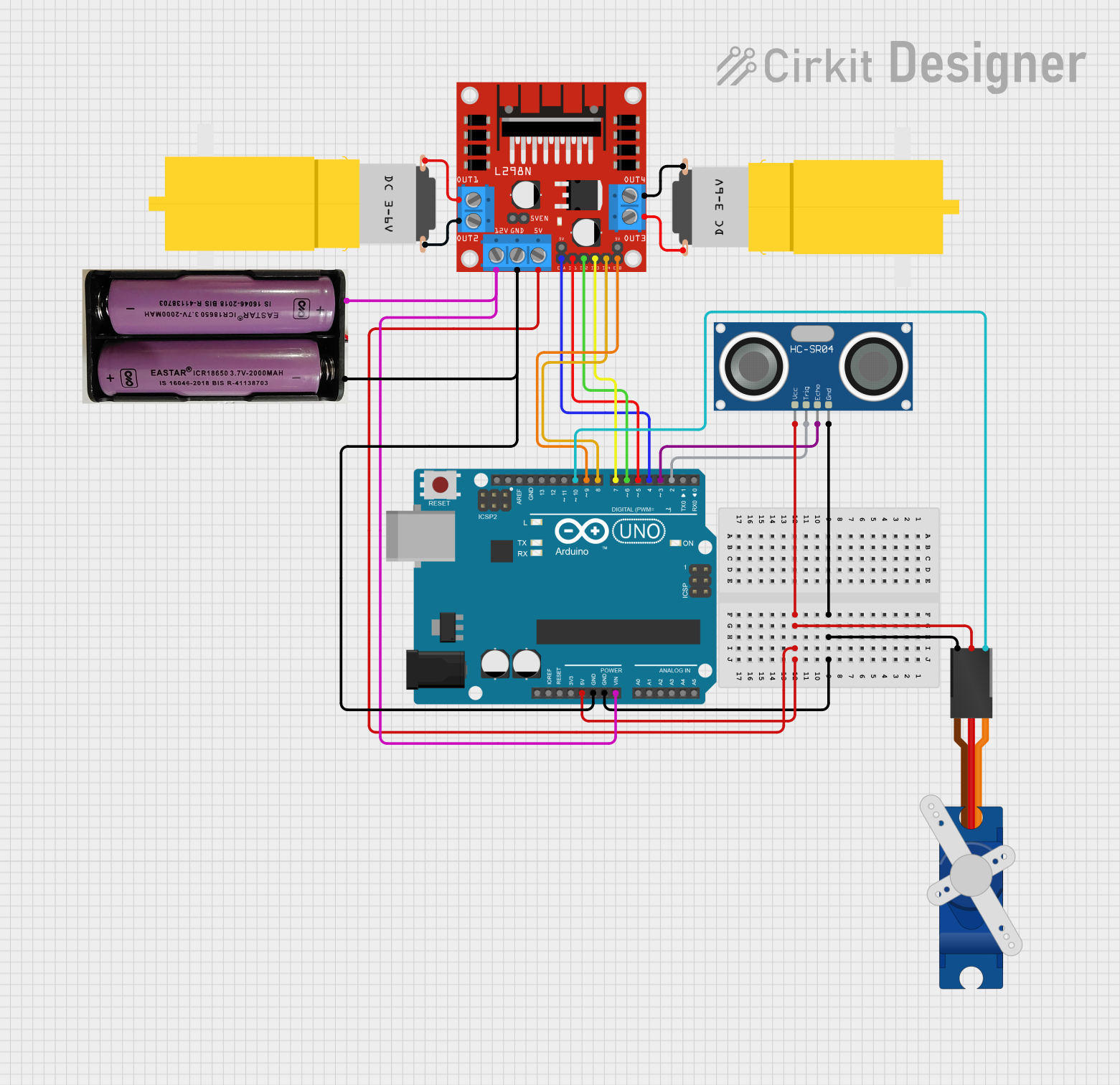
Circuit Documentation
Summary
This document provides a detailed overview of an obstacle avoidance robot circuit. The circuit includes an Arduino UNO microcontroller, a Tower Pro SG90 servo motor, an L298N DC motor driver, an HC-SR04 ultrasonic sensor, two hobby motors, and a 7.4V power supply. The robot uses the ultrasonic sensor to detect obstacles and the servo motor to scan the environment. Based on the sensor readings, the Arduino UNO controls the motors via the L298N motor driver to navigate around obstacles.
Component List
Arduino UNO
- Description: Microcontroller board based on the ATmega328P.
- Pins: UNUSED, IOREF, Reset, 3.3V, 5V, GND, Vin, A0, A1, A2, A3, A4, A5, SCL, SDA, AREF, D13, D12, D11, D10, D9, D8, D7, D6, D5, D4, D3, D2, D1, D0
Tower Pro SG90 servo
- Description: Small servo motor used for precise control of angular position.
- Pins: Signal, +5V, GND
L298N DC motor driver
- Description: Dual H-Bridge motor driver used to control the speed and direction of two DC motors.
- Pins: OUT1, OUT2, 12V, GND, 5V, OUT3, OUT4, 5V-ENA-JMP-I, 5V-ENA-JMP-O, +5V-J1, +5V-J2, ENA, IN1, IN2, IN3, IN4, ENB
HC-SR04 Ultrasonic Sensor
- Description: Ultrasonic distance sensor used to measure the distance to an object.
- Pins: VCC, TRIG, ECHO, GND
Motor amarillo motorreductor hobby
- Description: Hobby motor with a gearbox for increased torque.
- Pins: vcc, GND
7.4V Power Supply
- Description: Power supply providing 7.4V for the circuit.
- Pins: +, -
Wiring Details
Arduino UNO
GND connected to:
- HC-SR04 Ultrasonic Sensor (GND)
- Tower Pro SG90 servo (GND)
- L298N DC motor driver (GND)
- 7.4V Power Supply (-)
5V connected to:
- HC-SR04 Ultrasonic Sensor (VCC)
- L298N DC motor driver (5V)
- Tower Pro SG90 servo (+5V)
Vin connected to:
- L298N DC motor driver (12V)
- 7.4V Power Supply (+)
D10 connected to:
- Tower Pro SG90 servo (Signal)
D9 connected to:
- L298N DC motor driver (ENB)
D8 connected to:
- L298N DC motor driver (IN4)
D7 connected to:
- L298N DC motor driver (IN3)
D6 connected to:
- L298N DC motor driver (IN2)
D5 connected to:
- L298N DC motor driver (IN1)
D4 connected to:
- L298N DC motor driver (ENA)
D3 connected to:
- HC-SR04 Ultrasonic Sensor (ECHO)
D2 connected to:
- HC-SR04 Ultrasonic Sensor (TRIG)
Tower Pro SG90 servo
Signal connected to:
- Arduino UNO (D10)
+5V connected to:
- Arduino UNO (5V)
GND connected to:
- Arduino UNO (GND)
L298N DC motor driver
GND connected to:
- Arduino UNO (GND)
- 7.4V Power Supply (-)
5V connected to:
- Arduino UNO (5V)
12V connected to:
- Arduino UNO (Vin)
- 7.4V Power Supply (+)
ENA connected to:
- Arduino UNO (D4)
IN1 connected to:
- Arduino UNO (D5)
IN2 connected to:
- Arduino UNO (D6)
IN3 connected to:
- Arduino UNO (D7)
IN4 connected to:
- Arduino UNO (D8)
ENB connected to:
- Arduino UNO (D9)
OUT1 connected to:
- Motor amarillo motorreductor hobby (GND)
OUT2 connected to:
- Motor amarillo motorreductor hobby (vcc)
OUT3 connected to:
- Motor amarillo motorreductor hobby (GND)
OUT4 connected to:
- Motor amarillo motorreductor hobby (vcc)
HC-SR04 Ultrasonic Sensor
GND connected to:
- Arduino UNO (GND)
VCC connected to:
- Arduino UNO (5V)
TRIG connected to:
- Arduino UNO (D2)
ECHO connected to:
- Arduino UNO (D3)
Motor amarillo motorreductor hobby
GND connected to:
- L298N DC motor driver (OUT1)
- L298N DC motor driver (OUT3)
vcc connected to:
- L298N DC motor driver (OUT2)
- L298N DC motor driver (OUT4)
7.4V Power Supply
+ connected to:
- Arduino UNO (Vin)
- L298N DC motor driver (12V)
- connected to:
- Arduino UNO (GND)
- L298N DC motor driver (GND)
Code Documentation
#include <Servo.h>

/*
 * Obstacle Avoidance Robot
 * This code controls a robot with an ultrasonic sensor, servo motor, and
 * L298N motor driver. The robot scans for obstacles at 30, 90, and 150 degrees
 * and decides the best direction to move.
 */

Servo myServo;

const int trigPin = 2;
const int echoPin = 3;
const int ENA = 4;
const int RVS1 = 5;
const int RVS2 = 6;
const int FWD1 = 7;
const int FWD2 = 8;
const int ENB = 9;
const int servoPin = 10;

int leftDistance;
int middleDistance;
int rightDistance;

void setup() {
  Serial.begin(9600);
  pinMode(trigPin, OUTPUT);
  pinMode(echoPin, INPUT);
  pinMode(RVS1, OUTPUT);
  pinMode(RVS2, OUTPUT);
  pinMode(FWD1, OUTPUT);
  pinMode(FWD2, OUTPUT);
  pinMode(ENA, OUTPUT);
  pinMode(ENB, OUTPUT);
  myServo.attach(servoPin);
  myServo.write(90);
  delay(200);
}

void loop() {
  int currentDistance = measureDistance(); // front scan
  Serial.print("Current Distance: ");
  Serial.print(currentDistance);
  Serial.println(" cm");
  if (currentDistance < 20) {
    stopCar();
    leftDistance = checkDirection(30); // Check left
    Serial.print("Left Distance: ");
    Serial.print(leftDistance);
    Serial.println(" cm");
    delay(1500);
    middleDistance = checkDirection(90); // Check middle
    Serial.print("Middle Distance: ");
    Serial.print(middleDistance);
    Serial.println(" cm");
    delay(1500);
    rightDistance = checkDirection(150); // Check right
    Serial.print("Right Distance: ");
    Serial.print(rightDistance);
    Serial.println(" cm");
    delay(1500);
    myServo.write(90);
    if (leftDistance > middleDistance && leftDistance > rightDistance) {
      moveReverse();
      turnLeft();
    } else if (rightDistance > middleDistance) {
      moveReverse();
      turnRight();
    }
    moveForward();
  } else {
    moveForward();
  }
}

int measureDistance() {
  digitalWrite(trigPin, LOW);
  delayMicroseconds(2);
  digitalWrite(trigPin, HIGH);
  delayMicroseconds(10);
  digitalWrite(trigPin, LOW);
  long duration = pulseIn(echoPin, HIGH);
  int distance = duration * 0.034 / 2;
  return distance;
}

int checkDirection(int angle) {
  myServo.write(angle);
  delay(100);
  return measureDistance();
}

void moveForward() { // Forward
  digitalWrite(RVS1, HIGH);
  digitalWrite(RVS2, LOW);
  digitalWrite(FWD1, HIGH);
  digitalWrite(FWD2, LOW);
}

void moveReverse() { // Reverse
  digitalWrite(RVS1, LOW);
  digitalWrite(RVS2, HIGH);
  digitalWrite(FWD1, LOW);
  digitalWrite(FWD2