
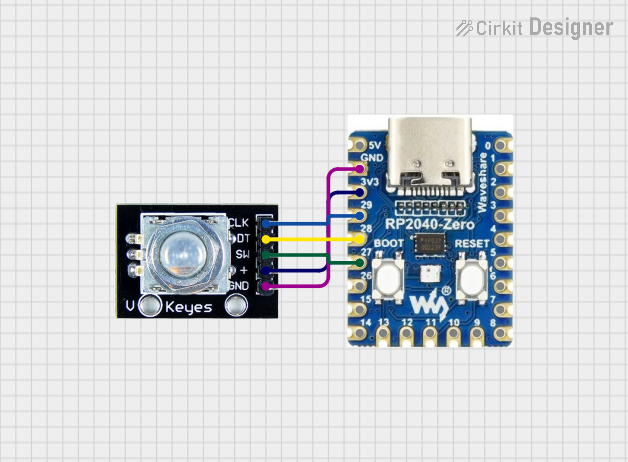
Circuit Documentation
Summary
This circuit involves an RP2040 Zero microcontroller connected to a rotary encoder. The rotary encoder is used to read rotational input and a button press, which are then processed by the microcontroller. The state of the rotary encoder and button press are printed to the serial monitor.
Component List
RP2040 Zero
- Description: A microcontroller board based on the RP2040 chip.
- Pins: 5V, GND, 3V3, 29, 28, 27, 26, 15, 14, 13, 12, 11, 10, 9, 8, 7, 6, 5, 4, 3, 2, 1, 0
Rotary Encoder
- Description: A rotary encoder with a button switch.
- Pins: clk, dt, sw, gnd, +
Wiring Details
RP2040 Zero
- GND: Connected to Rotary Encoder gnd
- 3V3: Connected to Rotary Encoder +
- Pin 29: Connected to Rotary Encoder clk
- Pin 28: Connected to Rotary Encoder dt
- Pin 27: Connected to Rotary Encoder sw
Rotary Encoder
- gnd: Connected to RP2040 Zero GND
- +: Connected to RP2040 Zero 3V3
- clk: Connected to RP2040 Zero Pin 29
- dt: Connected to RP2040 Zero Pin 28
- sw: Connected to RP2040 Zero Pin 27
Code Documentation
/*
 * Rotary Encoder Test
 * This sketch reads the state of a rotary encoder connected to an RP2040 Zero
 * and prints the state to the serial monitor. The rotary encoder has three pins
 * connected to the microcontroller: clk (pin 29), dt (pin 28), and sw (pin 27).
 */

#define CLK_PIN 29
#define DT_PIN 28
#define SW_PIN 27

int lastClkState;
int currentClkState;
int counter = 0;

void setup() {
  Serial.begin(9600);
  pinMode(CLK_PIN, INPUT);
  pinMode(DT_PIN, INPUT);
  pinMode(SW_PIN, INPUT);
  lastClkState = digitalRead(CLK_PIN);
}

void loop() {
  currentClkState = digitalRead(CLK_PIN);
  if (currentClkState != lastClkState) {
    if (digitalRead(DT_PIN) != currentClkState) {
      counter++;
      if (counter > 256) counter = 0;
    } else {
      counter--;
      if (counter < 0) counter = 256;
    }
    Serial.println(counter);
  }
  lastClkState = currentClkState;
  if (digitalRead(SW_PIN) == LOW) {
    Serial.println("Button pressed");
    delay(500); // Debounce delay
  }
}
This code initializes the pins connected to the rotary encoder and reads their states in the loop function. The state of the rotary encoder is printed to the serial monitor, and if the button is pressed, a message is printed. The counter variable keeps track of the encoder's position.