
Arduino UNO-Based Automated Toll System with RFID and IR Sensors
View and Edit Project In Cirkit Designer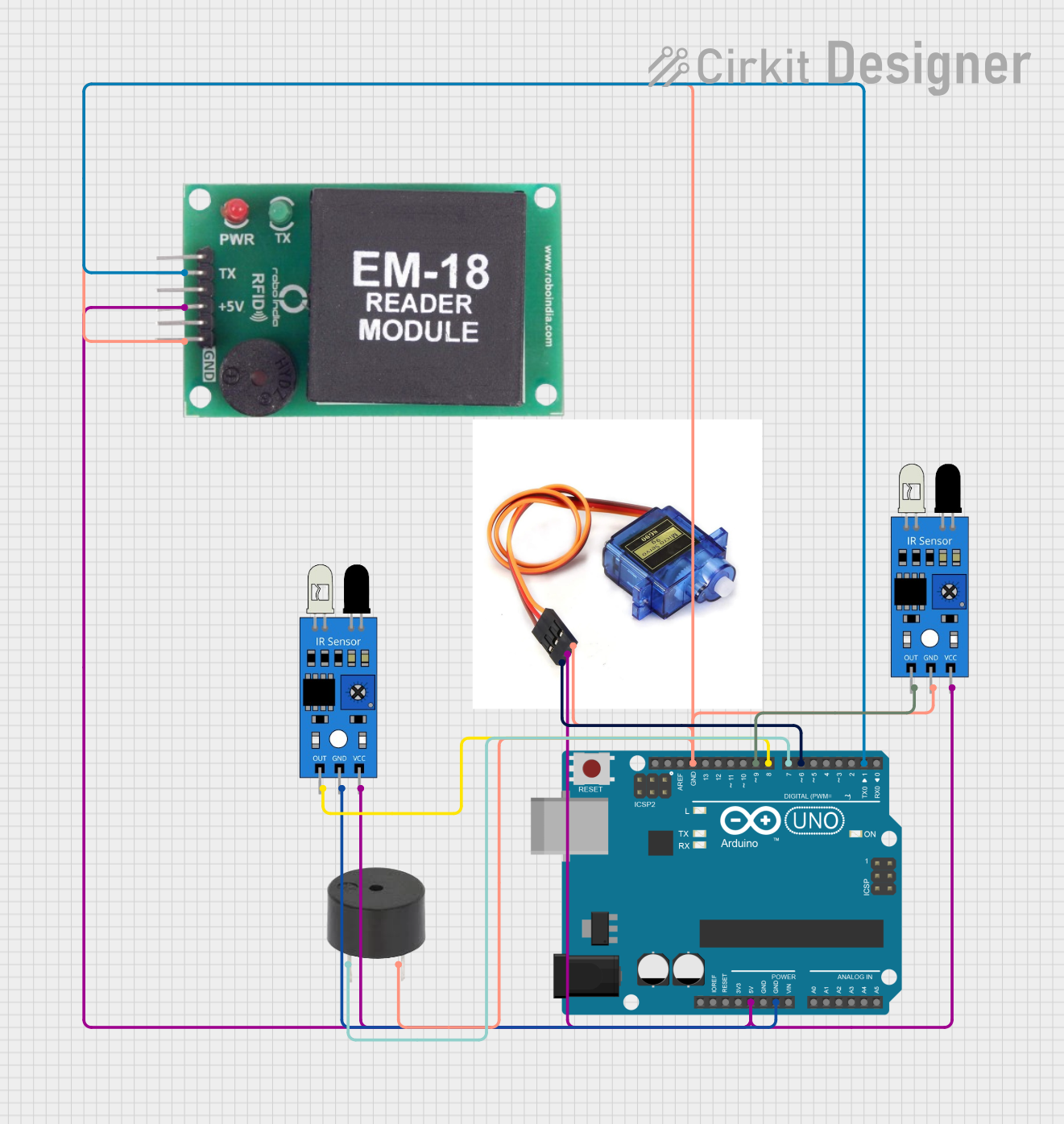
Circuit Documentation
Summary
This document provides a detailed overview of a toll system circuit that uses an Arduino UNO microcontroller, IR sensors, an RFID module, a servo motor, and a buzzer. The system detects vehicles using IR sensors, reads RFID tags to identify the vehicle type, deducts the appropriate toll amount, and controls a barrier using a servo motor. The system also includes a buzzer for audio feedback.
Component List
IR Sensor
- Description: Infrared sensor used to detect the presence of a vehicle.
- Pins: out, gnd, vcc
Servo Motor (SG90)
- Description: Servo motor used to control the barrier.
- Pins: Pin3, 5V, GND
Arduino UNO
- Description: Microcontroller used to control the entire system.
- Pins: UNUSED, IOREF, Reset, 3.3V, 5V, GND, Vin, A0, A1, A2, A3, A4, A5, SCL, SDA, AREF, D13, D12, D11, D10, D9, D8, D7, D6, D5, D4, D3, D2, D1, D0
Buzzer
- Description: Buzzer used for audio feedback.
- Pins: PIN, GND
EM-18 RFID Module
- Description: RFID module used to read RFID tags.
- Pins: TX, VCC, GND
Wiring Details
IR Sensor 1
- out connected to D8 on Arduino UNO
- gnd connected to GND on Arduino UNO
- vcc connected to 5V on Arduino UNO
IR Sensor 2
- out connected to D9 on Arduino UNO
- gnd connected to GND on Arduino UNO
- vcc connected to 5V on Arduino UNO
Servo Motor (SG90)
- Pin3 connected to D6 on Arduino UNO
- 5V connected to 5V on Arduino UNO
- GND connected to GND on Arduino UNO
Buzzer
- PIN connected to D7 on Arduino UNO
- GND connected to GND on Arduino UNO
EM-18 RFID Module
- TX connected to D1 on Arduino UNO
- VCC connected to 5V on Arduino UNO
- GND connected to GND on Arduino UNO
Documented Code
/*
 * This Arduino sketch controls a toll system using an IR sensor, RFID module,
 * servo motor, buzzer, and an LCD display. When an object is detected by the
 * IR sensor, the system scans for an RFID tag, deducts the appropriate amount
 * from the balance, and displays the information on the LCD. The servo motor
 * controls a barrier that opens when a valid RFID tag is detected.
 */

#include <Servo.h>
#include <Wire.h>
#include <LiquidCrystal_I2C.h>

// Pin definitions
const int irSensorPin1 = 8; // First IR sensor output connected to D8
const int irSensorPin2 = 9; // Second IR sensor output connected to D9
const int servoPin = 6;    // Servo control connected to D6
const int buzzerPin = 7;   // Buzzer control connected to D7
const int rfidPin = 1;     // RFID TX connected to D1

Servo myServo;

// Initialize the LCD (I2C address: 0x27, dimensions: 16x2)
LiquidCrystal_I2C lcd(0x27, 16, 2);

// RFID tag balances
float truckBalance = 100.0;
float carBalance = 50.0;
float busBalance = 75.0;

// Deduction amounts
const float truckDeduction = 10.0;
const float carDeduction = 5.0;
const float busDeduction = 7.5;

void setup() {
  // Initialize serial communication
  Serial.begin(9600);

  // Initialize IR sensor pins as input
  pinMode(irSensorPin1, INPUT);
  pinMode(irSensorPin2, INPUT);

  // Initialize buzzer pin as output
  pinMode(buzzerPin, OUTPUT);

  // Attach the servo to the servo pin
  myServo.attach(servoPin);

  // Initialize servo position
  myServo.write(0);

  // Initialize the LCD
  lcd.init();
  lcd.backlight();
  lcd.setCursor(0, 0);
  lcd.print("Toll System Ready");
  delay(2000);
  lcd.clear();
}

void loop() {
  // Read the IR sensor values
  int irValue1 = digitalRead(irSensorPin1);
  int irValue2 = digitalRead(irSensorPin2);

  // Check if the first IR sensor detects an object
  if (irValue1 == HIGH) {
    // Object detected by the first IR sensor
    digitalWrite(buzzerPin, LOW); // Turn on buzzer
    myServo.write(90);            // Move servo to 90 degrees

    lcd.clear();
    lcd.setCursor(0, 0);
    lcd.print("Scanning RFID...");

    // Read RFID data
    if (Serial.available() > 0) {
      String rfidData = "";
      while (Serial.available() > 0) {
        char c = Serial.read();
        rfidData += c;
      }
      // Print RFID data to serial monitor
      Serial.println("RFID Data: " + rfidData);

      lcd.clear();

      // Perform actions based on RFID tag
      if (rfidData.indexOf("380083394BC9") >= 0) {
        // Action for RFID tag 1 (Truck)
        lcd.setCursor(0, 0);
        lcd.print("Truck Detected");
        lcd.setCursor(0, 1);
        lcd.print("Curr: ");
        lcd.print(truckBalance);
        truckBalance -= truckDeduction;
        lcd.print(" Avail: ");
        lcd.print(truckBalance);
        delay(2000);
      } else if (rfidData.indexOf("3800833CCE49") >= 0) {
        // Action for RFID tag 2 (Car)
        lcd.setCursor(0, 0);
        lcd.print("Car Detected");
        lcd.setCursor(0, 1);
        lcd.print("Curr: ");
        lcd.print(carBalance);
        carBalance -= carDeduction;
        lcd.print(" Avail: ");
        lcd.print(carBalance);
        delay(2000);
      } else if (rfidData.indexOf("3800833C9017") >= 0) {
        // Action for RFID tag 3 (Bus)
        lcd.setCursor(0, 0);
        lcd.print("Bus Detected");
        lcd.setCursor(0, 1);
        lcd.print("Curr: ");
        lcd.print(busBalance);
        busBalance -= busDeduction;
        lcd.print(" Avail: ");
        lcd.print(busBalance);
        delay(2000);
      } else {
        lcd.setCursor(0, 0);
        lcd.print("Unknown Vehicle");
        delay(2000);
      }
    }
  }

  // Check if the second IR sensor detects an object
  if (irValue2 == HIGH) {
    // Object detected by the second IR sensor
    myServo.write(0); // Move servo to 0 degrees
    delay(2000);     // Wait for 2 seconds
    myServo.write(90); // Move servo to 90 degrees again
  }

  // No object detected by either sensor
  if (irValue1 == LOW && irValue2 == LOW) {
    digitalWrite(buzzerPin, HIGH); // Turn off buzzer
    myServo.write(0);              // Move servo to 0 degrees

    lcd.clear();
    lcd.setCursor(0, 0);
    lcd.print("Waiting...");
  }

  // Small delay to avoid bouncing
  delay(100);
}
This code initializes the components, reads sensor values, and performs actions based on the detected RFID tags. The servo motor controls the barrier, and the LCD displays the current status and balance information.