
Cirkit Designer
Your all-in-one circuit design IDE
Home /
Project Documentation
ESP32-S3 Powered Tri-Color E-Ink Display Demo
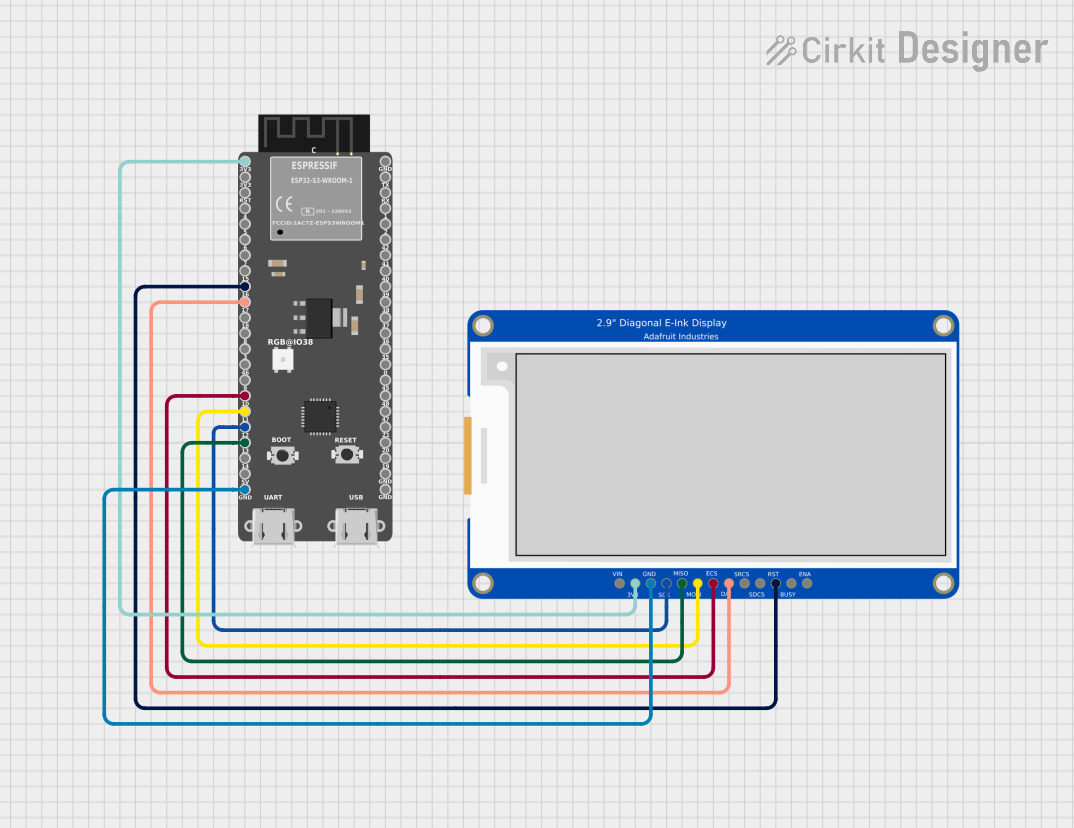
Circuit Documentation
Summary
This circuit features an ESP32-S3 microcontroller interfaced with a 2.9" Tri-Color E-Ink display. The ESP32-S3 is responsible for controlling the display and executing the code that generates visual output. The E-Ink display is used for rendering graphics and text in a tri-color format, allowing for dynamic visual presentations.
Component List
ESP32-S3
- Description: A powerful microcontroller with integrated Wi-Fi and Bluetooth capabilities, suitable for IoT applications.
- Purpose: Acts as the main control unit for the circuit, managing the display and handling user interactions.
2.9" Tri-Color E-Ink
- Description: A low-power display technology that retains images without power, featuring tri-color capabilities (black, white, and red).
- Purpose: Displays graphics and text generated by the ESP32-S3, providing a visual output for the user.
Wiring Details
ESP32-S3
- 3V3 connected to 3.3V of the E-Ink display
- GND connected to GND of the E-Ink display
- 16 connected to RESET of the E-Ink display
- 17 connected to DC of the E-Ink display
- 10 connected to DISPCS of the E-Ink display
- 11 connected to MOSI of the E-Ink display
- 12 connected to SCLK of the E-Ink display
- 13 connected to MISO of the E-Ink display
Documented Code
Main Code
#include <SPI.h>
#include "Adafruit_ThinkInk.h"

// -------- SPI pins (your wiring)
static const int EPD_SCK  = 12;
static const int EPD_MOSI = 11;
static const int EPD_MISO = 13;

// -------- Control pins (your wiring)
static const int EPD_CS   = 10;  // DISPCS
static const int EPD_DC   = 17;  // DC
static const int EPD_RST  = 16;  // RESET

// IMPORTANT: disable BUSY to avoid hanging in busy_wait()
static const int EPD_BUSY = -1;

// If you wired SRAMCS, put that GPIO here. Otherwise -1.
static const int SRAM_CS  = -1;

// 2.9" Tri-Color 296x128 with SSD1680 chipset:
ThinkInk_290_Tricolor_Z94 display(EPD_DC, EPD_RST, EPD_CS, SRAM_CS, EPD_BUSY, &SPI);

static const int W = 296;
static const int H = 128;

void drawHeartRED(int cx, int cy, int size) {
  int r = size / 3;

  display.fillCircle(cx - r, cy - r, r, EPD_RED);
  display.fillCircle(cx + r, cy - r, r, EPD_RED);

  for (int y = 0; y < size; y++) {
    int yy = (cy - r) + y;
    int half = (size - y) / 2;
    int x0 = cx - (r + half);
    int x1 = cx + (r + half);
    display.drawFastHLine(x0, yy, x1 - x0 + 1, EPD_RED);
  }
}

void makeDemoArtwork() {
  display.fillScreen(EPD_WHITE);

  // BW checkerboard
  for (int y = 0; y < H; y += 8) {
    for (int x = 0; x < W; x += 8) {
      if (((x ^ y) & 8) == 0) display.fillRect(x, y, 8, 8, EPD_BLACK);
    }
  }

  // white badge + border
  display.fillRect(10, 10, W - 20, H - 20, EPD_WHITE);
  display.drawRect(10, 10, W - 20, H - 20, EPD_BLACK);

  // left info card
  display.drawRect(18, 20, 184, 88, EPD_BLACK);
  display.drawLine(18, 54, 201, 54, EPD_BLACK);
  display.drawLine(110, 20, 110, 107, EPD_BLACK);

  display.setTextWrap(false);
  display.setTextSize(1);
  display.setTextColor(EPD_BLACK);

  display.setCursor(26, 28); display.print(F("TRI-COLOR"));
  display.setCursor(26, 40); display.print(F("SSD1680 DEMO"));
  display.setCursor(26, 62); display.print(F("296x128"));
  display.setCursor(26, 74); display.print(F("BLACK + RED"));

  // RED sun + rays
  int sunX = 238, sunY = 40;
  display.fillCircle(sunX, sunY, 14, EPD_RED);

  static const int dx[12] = { 0, 6, 10, 12, 10, 6, 0, -6, -10, -12, -10, -6 };
  static const int dy[12] = { -12, -10, -6, 0, 6, 10, 12, 10, 6, 0, -6, -10 };
  for (int a = 0; a < 12; a++) {
    display.drawLine(sunX + dx[a],   sunY + dy[a],
                     sunX + 2 * dx[a], sunY + 2 * dy[a],
                     EPD_RED);
  }

  // RED heart
  drawHeartRED(238, 92, 34);

  // RED stripes
  for (int i = 0; i < 3; i++) display.fillRect(26, 88 + i * 6, 166, 3, EPD_RED);
}

void setup() {
  Serial.begin(115200);
  while (!Serial) {
    delay(10);
  }
  Serial.println("Adafruit EPD full update test in red/black/white");
  display.begin(THINKINK_TRICOLOR);
}

void loop() {
  Serial.println("Banner demo");
  display.clearBuffer();
  display.setTextSize(3);
  display.setCursor((display.width() - 144) / 2, (display.height() - 24) / 2);
  display.setTextColor(EPD_BLACK);
  display.print("Tri");
  display.setTextColor(EPD_RED);
  display.print("Color");
  display.display();

  delay(2000);

  Serial.println("Color rectangle demo");
  display.clearBuffer();
  display.fillRect(display.width() / 3, 0, display.width() / 3,
                   display.height(), EPD_BLACK);
  display.fillRect((display.width() * 2) / 3, 0, display.width() / 3,
                   display.height(), EPD_RED);
  display.display();

  delay(2000);

  Serial.println("Text demo");
  // large block of text
  display.clearBuffer();
  display.setTextSize(1);
  testdrawtext(
      "Lorem ipsum dolor sit amet, consectetur adipiscing elit. Curabitur "
      "adipiscing ante sed nibh tincidunt feugiat. Maecenas enim massa, "
      "fringilla sed malesuada et, malesuada sit amet turpis. Sed porttitor "
      "neque ut ante pretium vitae malesuada nunc bibendum. Nullam aliquet "
      "ultrices massa eu hendrerit. Ut sed nisi lorem. In vestibulum purus a "
      "tortor imperdiet posuere. ",
      EPD_BLACK);
  display.display();

  delay(2000);

  display.clearBuffer();
  for (int16_t i = 0; i < display.width(); i += 4) {
    display.drawLine(0, 0, i, display.height() - 1, EPD_BLACK);
  }

  for (int16_t i = 0; i < display.height(); i += 4) {
    display.drawLine(display.width() - 1, 0, 0, i, EPD_RED);
  }
  display.display();

  delay(2000);

  display.clearBuffer();

  makeDemoArtwork();

  display.display();

  delay(2000);
}

void testdrawtext(const char *text, uint16_t color) {
  display.setCursor(0, 0);
  display.setTextColor(color);
  display.setTextWrap(true);
  display.print(text);
}
Documentation Code
This section is reserved for documentation purposes and does not contain executable code.
This documentation provides a comprehensive overview of the circuit, detailing the components used, their connections, and the code that drives the functionality of the system.