
Arduino Nano Guitar Tuner with I2C LCD Display and Sound Sensor
View and Edit Project In Cirkit Designer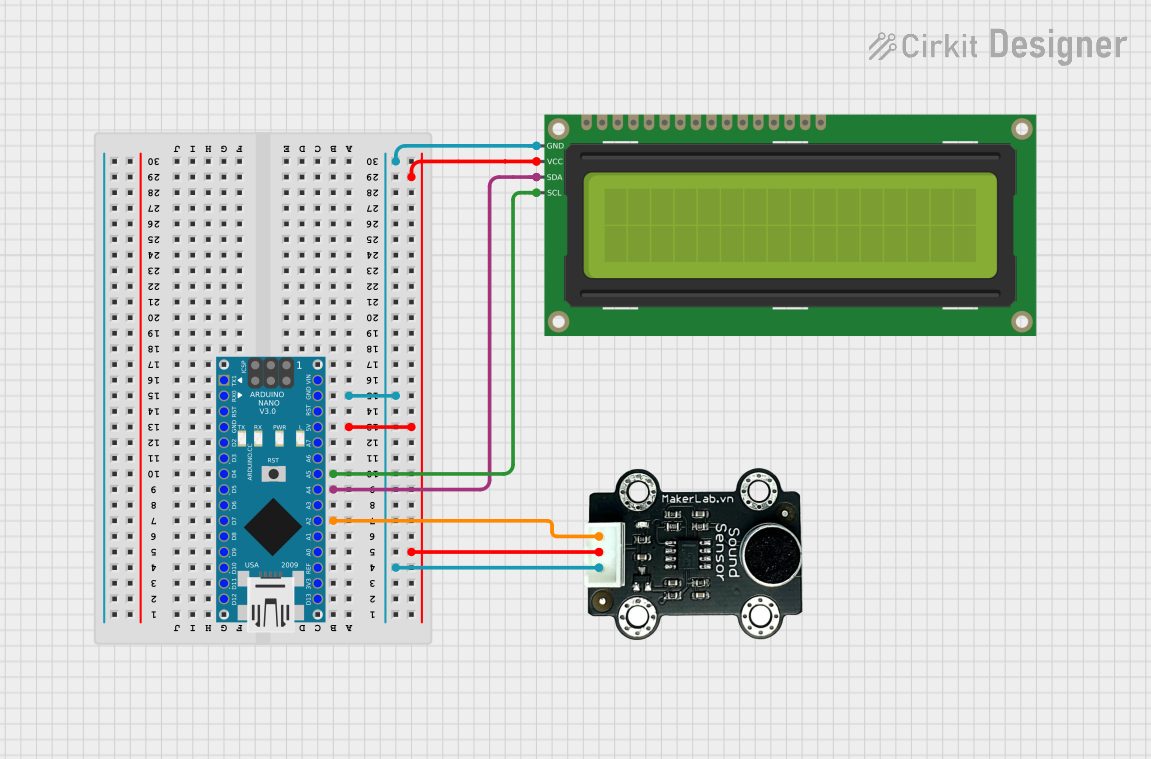
Circuit Documentation
Summary
This circuit is designed to detect the frequency of a sound signal using a sound sensor and display the detected frequency on a 16x2 I2C LCD. The core of the circuit is an Arduino Nano microcontroller, which reads the analog signal from the sound sensor, processes it to determine the frequency, and then displays the result on the LCD.
Component List
Arduino Nano
- Description: A small, complete, and breadboard-friendly board based on the ATmega328P.
- Pins: D1/TX, D0/RX, RESET, GND, D2, D3, D4, D5, D6, D7, D8, D9, D10, D11/MOSI, D12/MISO, VIN, 5V, A7, A6, A5, A4, A3, A2, A1, A0, AREF, 3V3, D13/SCK
16x2 I2C LCD
- Description: A 16x2 character LCD display with I2C interface.
- Pins: GND, VCC, SDA, SCL
MKE-S06 Sound Sensor
- Description: A sound sensor module that outputs an analog signal proportional to the sound level.
- Pins: SIG, 5V, GND
Wiring Details
Arduino Nano
- A2: Connected to SIG of the MKE-S06 Sound Sensor
- A4: Connected to SDA of the 16x2 I2C LCD
- A5: Connected to SCL of the 16x2 I2C LCD
- 5V: Connected to 5V of the MKE-S06 Sound Sensor and VCC of the 16x2 I2C LCD
- GND: Connected to GND of the MKE-S06 Sound Sensor and GND of the 16x2 I2C LCD
16x2 I2C LCD
- GND: Connected to GND of the Arduino Nano
- VCC: Connected to 5V of the Arduino Nano
- SDA: Connected to A4 of the Arduino Nano
- SCL: Connected to A5 of the Arduino Nano
MKE-S06 Sound Sensor
- SIG: Connected to A2 of the Arduino Nano
- 5V: Connected to 5V of the Arduino Nano
- GND: Connected to GND of the Arduino Nano
Code Documentation
//--------------------Code with lcd----------------------//

#include <Wire.h>
#include <LiquidCrystal_I2C.h>

#define LENGTH 512
byte rawData[LENGTH];

int count = 0;
const float sample_freq = 8919; // Sample Frequency in Hz
int len = LENGTH;
int i, k;
long sum, sum_old;
int thresh = 0;
float freq_per = 0;
byte pd_state = 0;

float freqarray[] = {82.41, 108.00, 143.83, 193.00, 241.94, 318.63}; // Guitar string frequencies in Hz
String stringNames[] = {"E2", "A2", "D3", "G3", "B3", "E4"};

// Initialize the LCD, set the LCD address to 0x27 for a 16 chars and 2 line display
LiquidCrystal_I2C lcd(0x27, 16, 2);

void setup() {
  Serial.begin(9600);
  lcd.init(); // Initialize the LCD
  lcd.backlight(); // Turn on the backlight
  lcd.print("Hello, Guitarist!"); // Initial message
  delay(2000); // Display initial message for 2 seconds
  lcd.clear();
  lcd.print("PLAY A STRING");
}

void loop() {
  if (count < LENGTH) {
    rawData[count] = analogRead(A2) >> 2;
    count++;
  } else {
    sum = 0;
    pd_state = 0;
    int period = 0;

    for (i = 0; i < len; i++) {
      // Autocorrelation
      sum_old = sum;
      sum = 0;
      for (k = 0; k < len - i; k++) sum += (rawData[k] - 128) * (rawData[k + i] - 128) / 256;

      // Peak Detect State Machine
      if (pd_state == 2 && (sum - sum_old) <= 0) {
        period = i;
        pd_state = 3;
      }
      if (pd_state == 1 && (sum > thresh) && (sum - sum_old) > 0) pd_state = 2;
      if (!i) {
        thresh = sum * 0.5;
        pd_state = 1;
      }
    }

    // Frequency identified in Hz
    if (thresh > 500 && period > 0) { // Ensure period is greater than 0
      freq_per = sample_freq / period;
      /*if (freq_per < 340.00){
        lcd.clear(); // Clear the display before printing new data
        lcd.setCursor(0, 0);
        lcd.print("Freq: ");
        lcd.print(freq_per);
      }*/

      // Find the closest string frequency
      float min_diff = 99;
      int closest_string = -1;
      for (int s = 0; s < 6; s++) {
        float diff = abs(freq_per - freqarray[s]);
        if (diff < min_diff) {
          min_diff = diff;
          closest_string = s;
        }
      }

      // Check if the detected frequency is close to the string frequency
      if (min_diff < 20 && freq_per < 343.00) { // Adjust the threshold as needed
        lcd.clear();
        lcd.setCursor(0,0);
        lcd.print(stringNames[closest_string]);
        lcd.setCursor(0,1);
        if (freq_per < freqarray[closest_string] - 1.0) { // Adjust the range as needed
          lcd.print("Tune UP");
        } else if (freq_per > freqarray[closest_string] + 1.0) { // Adjust the range as needed
          lcd.print("Tune DOWN");
        } else {
          lcd.print("Perfect!");
        }
      } else {
        //lcd.print("No string detected");
        //let it be empty and retain the previous result.
      }
    }
    count = 0;
  }
}
This code initializes the LCD and sound sensor, reads the analog signal from the sound sensor, processes it to determine the frequency, and displays the result on the LCD. The code uses autocorrelation to detect the frequency and compares it to predefined guitar string frequencies to determine the closest match.