
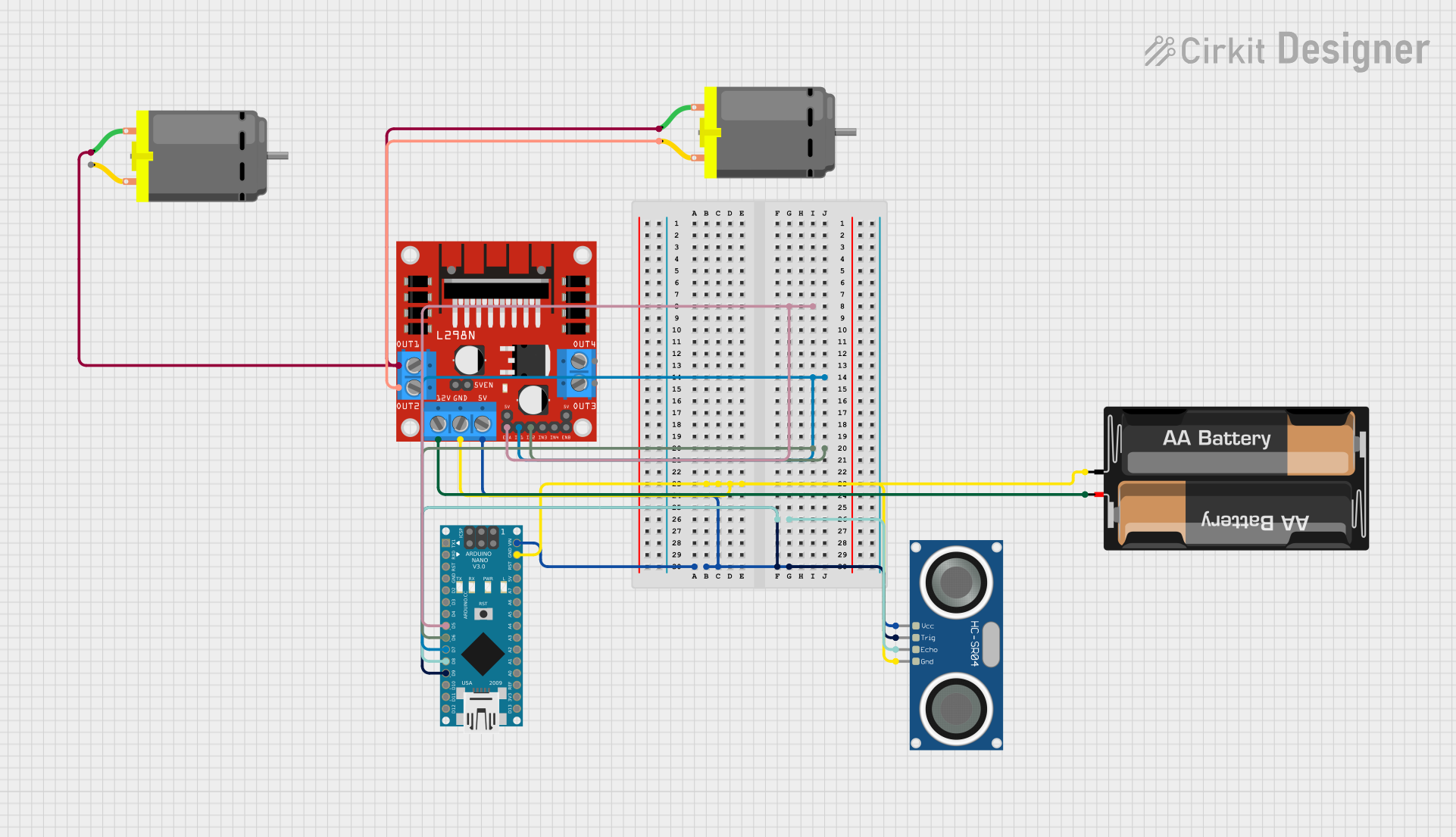
Circuit Documentation
Summary
This circuit is designed to control a DC motor using an Arduino Nano microcontroller in conjunction with an L298N DC motor driver. The motor's operation is influenced by the distance measurements taken from an HC-SR04 Ultrasonic Sensor. The motor is powered by a 2 x AA Battery Mount, and the Arduino Nano controls the motor driver by sending PWM signals and direction controls based on the sensor's readings.
Component List
Arduino Nano
- Microcontroller board based on the ATmega328P
- It has a variety of digital and analog I/O pins.
DC Motor (x2)
- Electric motor that converts DC electrical power into mechanical power.
2 x AA Battery Mount
- A battery holder for two AA batteries, providing power to the circuit.
L298N DC Motor Driver
- An integrated circuit that allows for controlling the speed and direction of two DC motors.
HC-SR04 Ultrasonic Sensor
- A sensor that measures distance by emitting ultrasonic waves and measuring the time taken for the echo to return.
Wiring Details
Arduino Nano
- D5 connected to L298N DC motor driver ENA (PWM control)
- D7 connected to L298N DC motor driver IN1 (Direction control)
- D6 connected to L298N DC motor driver IN2 (Direction control)
- GND connected to common ground
- D8 connected to HC-SR04 Ultrasonic Sensor ECHO (Echo signal)
- VIN connected to HC-SR04 Ultrasonic Sensor VCC (Power) and L298N DC motor driver 5V (Power)
- D9 connected to HC-SR04 Ultrasonic Sensor TRIG (Trigger signal)
DC Motor
- pin 1 of one motor connected to L298N DC motor driver OUT1
- pin 2 of the same motor connected to L298N DC motor driver OUT2
- pin 1 of the other motor connected to L298N DC motor driver OUT3 (Not mentioned in the net list, assuming OUT3 is used for the second motor)
2 x AA Battery Mount
- + connected to L298N DC motor driver 12V (Power)
- - connected to common ground
L298N DC Motor Driver
- ENA connected to Arduino Nano D5 (PWM control)
- IN1 connected to Arduino Nano D7 (Direction control)
- IN2 connected to Arduino Nano D6 (Direction control)
- GND connected to common ground
- 5V connected to Arduino Nano VIN (Power)
- OUT1 and OUT2 connected to one DC Motor
- OUT3 and OUT4 connected to the other DC Motor (OUT4 not mentioned in the net list, assuming it is used for the second motor)
- 12V connected to 2 x AA Battery Mount +
HC-SR04 Ultrasonic Sensor
- VCC connected to Arduino Nano VIN (Power)
- TRIG connected to Arduino Nano D9 (Trigger signal)
- ECHO connected to Arduino Nano D8 (Echo signal)
- GND connected to common ground
Documented Code
// Define pins
const int trigPin = 9;
const int echoPin = 8;
const int in1Pin = 7;    // IN1 pin on L298N motor driver
const int in2Pin = 6;    // IN2 pin on L298N motor driver
const int enablePin = 5; // ENA pin on L298N motor driver (for PWM)

long duration;
int distance;

void setup() {
  // Set pin modes
  pinMode(trigPin, OUTPUT);
  pinMode(echoPin, INPUT);
  pinMode(in1Pin, OUTPUT);
  pinMode(in2Pin, OUTPUT);
  pinMode(enablePin, OUTPUT);  // Set the enable pin as output

  // Stop the motor initially
  digitalWrite(in1Pin, LOW);
  digitalWrite(in2Pin, LOW);
  analogWrite(enablePin, 0);  // Motor speed is 0 (OFF)

  // Begin serial communication for debugging
  Serial.begin(9600);
}

void loop() {
  // Send ultrasonic pulse
  digitalWrite(trigPin, LOW);
  delayMicroseconds(2);
  digitalWrite(trigPin, HIGH);
  delayMicroseconds(10);
  digitalWrite(trigPin, LOW);

  // Receive echo
  duration = pulseIn(echoPin, HIGH);

  // Calculate distance in cm
  distance = duration * 0.034 / 2;

  // Display the distance on the Serial Monitor
  Serial.print("Current Distance: ");
  Serial.print(distance);
  Serial.println(" cm");

  if (distance > 5) {
    // If distance is greater than 5 cm, turn the motor ON
    digitalWrite(in1Pin, HIGH);  // Set IN1 to HIGH
    digitalWrite(in2Pin, LOW);   // Set IN2 to LOW (forward direction)
    analogWrite(enablePin, 255); // Set motor speed to maximum (255)
    Serial.println("Motor ON");
  } else {
    // If distance is 5 cm or less, turn the motor OFF
    digitalWrite(in1Pin, LOW);   // Turn off IN1
    digitalWrite(in2Pin, LOW);   // Turn off IN2
    analogWrite(enablePin, 0);   // Set motor speed to 0 (OFF)
    Serial.println("Motor OFF");
  }

  delay(100);  // Short delay for stability
}
This code is responsible for controlling the motor based on the distance measured by the ultrasonic sensor. It sets up the necessary pins and initializes the motor in an off state. In the main loop, it sends out an ultrasonic pulse and waits for the echo to calculate the distance to an object. If the distance is greater than 5 cm, the motor is turned on and runs at full speed. If the distance is less than or equal to 5 cm, the motor is turned off.