
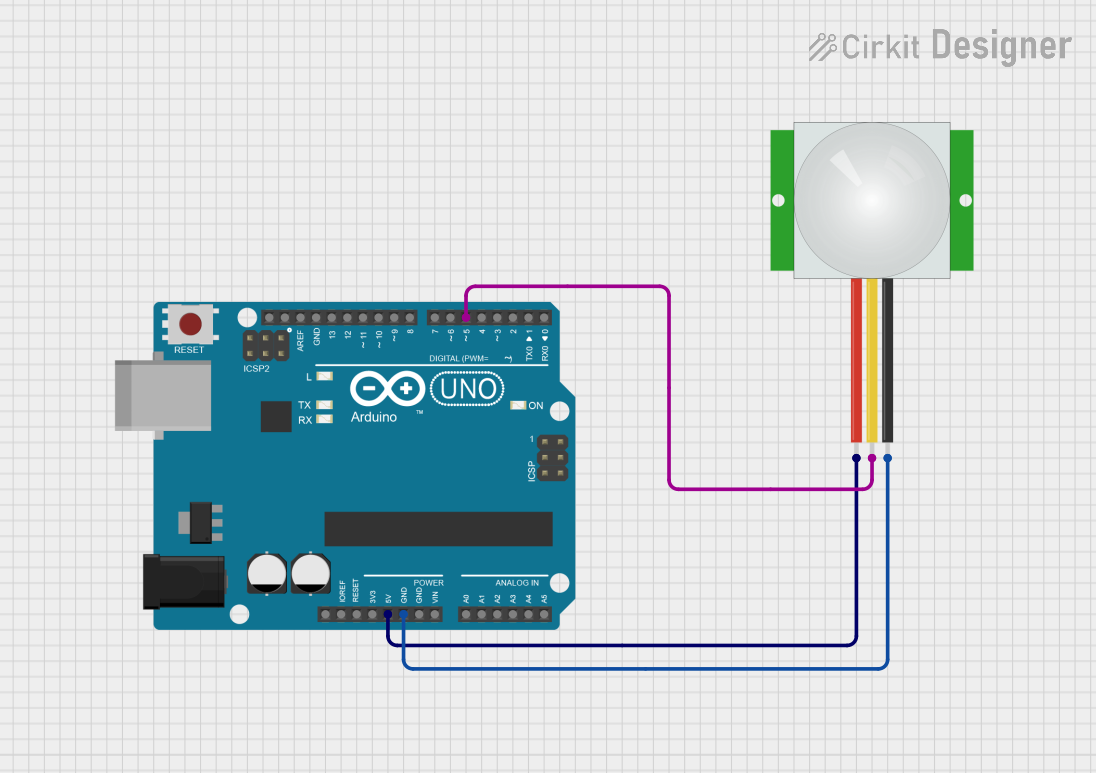
Circuit Documentation
Summary of the Circuit
This circuit consists of an Arduino UNO microcontroller board interfaced with a PIR (Passive Infrared) sensor. The PIR sensor is used to detect motion through changes in infrared levels emitted by objects in its field of view. The Arduino UNO is responsible for processing the signal from the PIR sensor and executing programmed responses to motion detection.
Component List
Arduino UNO
- Description: A microcontroller board based on the ATmega328P. It has 14 digital input/output pins, 6 analog inputs, a USB connection, a power jack, an ICSP header, and a reset button.
- Purpose: Acts as the central processing unit of the circuit, reading sensor inputs and controlling outputs.
PIR Sensor
- Description: A motion sensor module that detects changes in the infrared light radiating from objects in its field of view.
- Purpose: To sense motion by detecting changes in infrared levels from objects in its vicinity.
Wiring Details
Arduino UNO
- 5V: Provides power to the PIR sensor.
- GND: Common ground with the PIR sensor.
- D5: Receives the signal from the PIR sensor indicating motion detection.
PIR Sensor
- VDD: Connected to the 5V output from the Arduino UNO to power the sensor.
- GND: Connected to the ground (GND) on the Arduino UNO to complete the power circuit.
- SIG: Sends the motion detection signal to digital pin D5 on the Arduino UNO.
Documented Code
The code for the Arduino UNO is written in Arduino's programming language (based on C/C++) and is used to initialize the microcontroller and define the behavior of the circuit upon detecting motion with the PIR sensor.
void setup() {
  // Initialize digital pin D5 as an input from the PIR sensor
  pinMode(5, INPUT);
}

void loop() {
  // Read the signal from the PIR sensor
  int sensorValue = digitalRead(5);

  // Implement logic based on the sensor value
  // For example, if motion is detected (sensorValue is HIGH), perform an action
  if (sensorValue == HIGH) {
    // Action to be taken when motion is detected
  }
}
Note: The provided code is a template and does not contain specific actions to be taken upon motion detection. The user should implement the desired behavior within the if statement in the loop function.