
Arduino UNO and L293D Bluetooth-Controlled Robotic Arm with Servo and Geared Motors
View and Edit Project In Cirkit Designer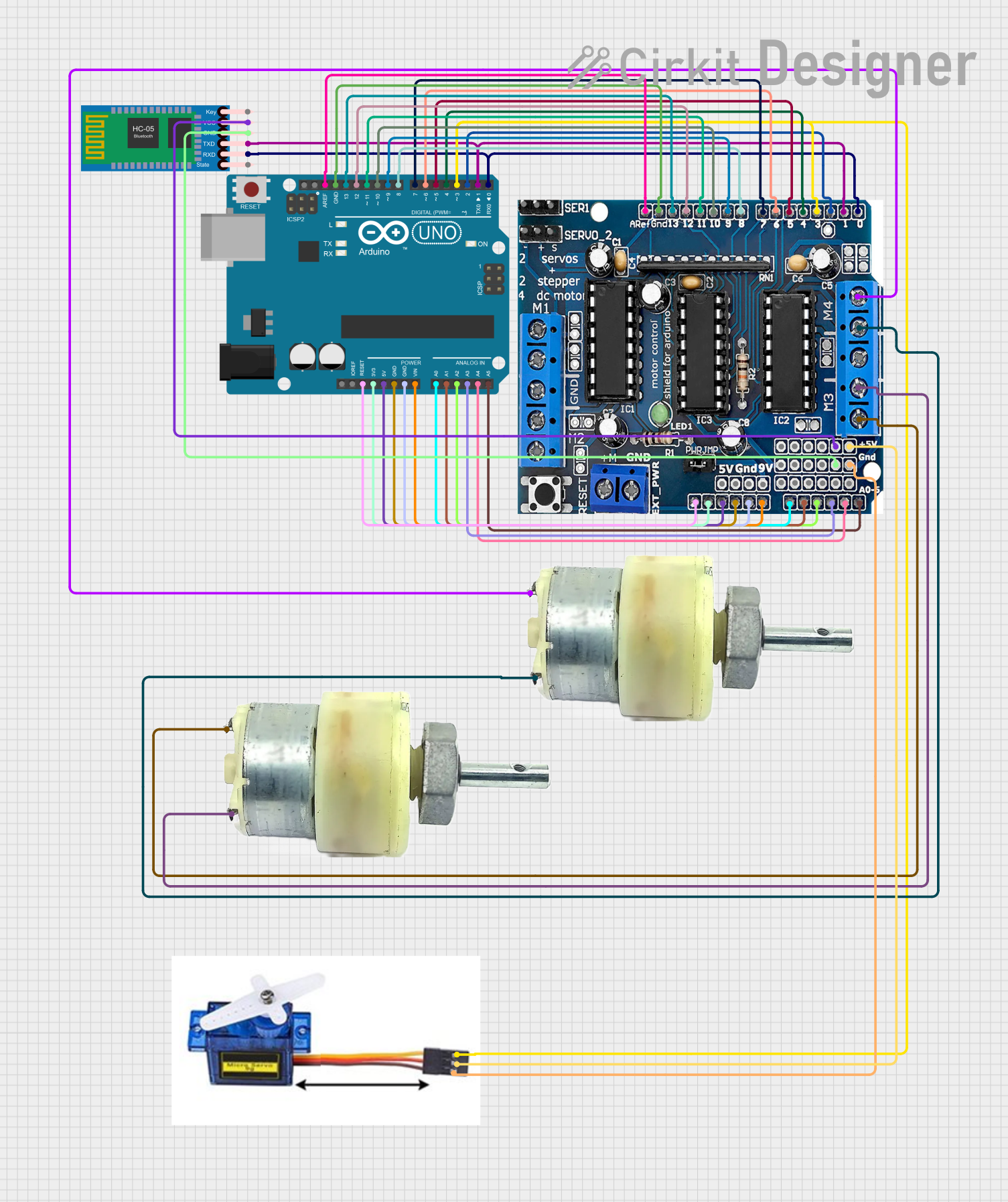
Circuit Documentation
Summary
This circuit is designed to control a robotic system using an Arduino UNO microcontroller. The system includes a motor driver (L293D), two 12V geared motors, a 9G servo motor, and an HC-05 Bluetooth module. The Arduino UNO is programmed to receive commands via Bluetooth and control the motors and servo accordingly.
Component List
L293D Motor Driver
- Description: A quadruple high-current half-H driver designed to drive inductive loads such as relays, solenoids, DC and stepping motors.
- Pins: 5V, GND, +, Servo1, Servo2, RX/DO, TX/D1, 9V, A0, A1, A2, A3, A4/SDA, A5/SCL, VIN, 3.3V, RESET, D2, D3, D4, D5, D6, D7, D8, D9, D10, D11, D12, D13
Arduino UNO
- Description: A microcontroller board based on the ATmega328P. It has 14 digital input/output pins, 6 analog inputs, a 16 MHz quartz crystal, a USB connection, a power jack, an ICSP header, and a reset button.
- Pins: UNUSED, IOREF, Reset, 3.3V, 5V, GND, Vin, A0, A1, A2, A3, A4, A5, SCL, SDA, AREF, D13, D12, D11, D10, D9, D8, D7, D6, D5, D4, D3, D2, D1, D0
12V Geared Motor
- Description: A DC motor with a gearbox attached to the shaft, providing higher torque at lower speeds.
- Pins: Terminal 1, Terminal 2
HC-05 Bluetooth Module
- Description: A Bluetooth module used for wireless communication.
- Pins: Key, VCC, TXD, RXD, State, GND
Servo Motor 9G
- Description: A small servo motor used for precise control of angular position.
- Pins: VCC 5V, PMW, GND
Wiring Details
L293D Motor Driver
- 5V: Connected to HC-05 Bluetooth Module (VCC) and Servo Motor 9G (VCC 5V)
- GND: Connected to HC-05 Bluetooth Module (GND), Servo Motor 9G (GND), 12V Geared Motor (Terminal 2), and Arduino UNO (GND)
- +: Connected to 12V Geared Motor (Terminal 1)
- RX/DO: Connected to HC-05 Bluetooth Module (RXD) and Arduino UNO (D0)
- TX/D1: Connected to HC-05 Bluetooth Module (TXD) and Arduino UNO (D1)
- A0: Connected to Arduino UNO (A0)
- A1: Connected to Arduino UNO (A1)
- A2: Connected to Arduino UNO (A2)
- A3: Connected to Arduino UNO (A3)
- A4/SDA: Connected to Arduino UNO (A4)
- A5/SCL: Connected to Arduino UNO (A5)
- VIN: Connected to Arduino UNO (Vin)
- 3.3V: Connected to Arduino UNO (3.3V)
- RESET: Connected to Arduino UNO (Reset)
- D2: Connected to Arduino UNO (D2)
- D3: Connected to Servo Motor 9G (PMW) and Arduino UNO (D3)
- D4: Connected to Arduino UNO (D4)
- D5: Connected to Arduino UNO (D5)
- D6: Connected to Arduino UNO (D6)
- D7: Connected to Arduino UNO (D7)
- D8: Connected to Arduino UNO (D8)
- D9: Connected to Arduino UNO (D9)
- D10: Connected to Arduino UNO (D10)
- D11: Connected to Arduino UNO (D11)
- D12: Connected to Arduino UNO (D12)
- D13: Connected to Arduino UNO (D13)
Arduino UNO
- GND: Connected to L293D Motor Driver (GND)
- A0: Connected to L293D Motor Driver (A0)
- A1: Connected to L293D Motor Driver (A1)
- A2: Connected to L293D Motor Driver (A2)
- A3: Connected to L293D Motor Driver (A3)
- A4: Connected to L293D Motor Driver (A4/SDA)
- A5: Connected to L293D Motor Driver (A5/SCL)
- Vin: Connected to L293D Motor Driver (VIN)
- 3.3V: Connected to L293D Motor Driver (3.3V)
- Reset: Connected to L293D Motor Driver (RESET)
- D0: Connected to HC-05 Bluetooth Module (RXD) and L293D Motor Driver (RX/DO)
- D1: Connected to HC-05 Bluetooth Module (TXD) and L293D Motor Driver (TX/D1)
- D2: Connected to L293D Motor Driver (D2)
- D3: Connected to Servo Motor 9G (PMW) and L293D Motor Driver (D3)
- D4: Connected to L293D Motor Driver (D4)
- D5: Connected to L293D Motor Driver (D5)
- D6: Connected to L293D Motor Driver (D6)
- D7: Connected to L293D Motor Driver (D7)
- D8: Connected to L293D Motor Driver (D8)
- D9: Connected to L293D Motor Driver (D9)
- D10: Connected to L293D Motor Driver (D10)
- D11: Connected to L293D Motor Driver (D11)
- D12: Connected to L293D Motor Driver (D12)
- D13: Connected to L293D Motor Driver (D13)
- AREF: Connected to L293D Motor Driver (GND)
12V Geared Motor
- Terminal 1: Connected to L293D Motor Driver (+)
- Terminal 2: Connected to L293D Motor Driver (GND)
HC-05 Bluetooth Module
- VCC: Connected to L293D Motor Driver (5V)
- GND: Connected to L293D Motor Driver (GND)
- RXD: Connected to Arduino UNO (D0) and L293D Motor Driver (RX/DO)
- TXD: Connected to Arduino UNO (D1) and L293D Motor Driver (TX/D1)
Servo Motor 9G
- VCC 5V: Connected to L293D Motor Driver (5V)
- PMW: Connected to Arduino UNO (D3) and L293D Motor Driver (D3)
- GND: Connected to L293D Motor Driver (GND)
Documented Code
#include <PS4BT.h>
#include <usbhub.h>
#include <Servo.h>

// USB and Bluetooth setup
USB Usb;
BTD Btd(&Usb);
PS4BT PS4(&Btd);

// Motor driver pins
#define IN1 8
#define IN2 9
#define IN3 10
#define IN4 11
#define IN5 4
#define IN6 5
#define IN7 6
#define IN8 7

// Servo motor pin
#define CLAW_PIN 3

// Servo motor object
Servo claw;

void setup() {
  Serial.begin(115200);

  // Initialize USB Host Shield
  if (Usb.Init() == -1) {
    Serial.println("USB Host Shield initialization failed.");
    while (1); // Halt
  }
  Serial.println("USB Host Shield initialized.");
  Serial.println("Press the PS button on the controller to connect.");

  // Motor setup
  pinMode(IN1, OUTPUT);
  pinMode(IN2, OUTPUT);
  pinMode(IN3, OUTPUT);
  pinMode(IN4, OUTPUT);
  pinMode(IN5, OUTPUT);
  pinMode(IN6, OUTPUT);
  pinMode(IN7, OUTPUT);
  pinMode(IN8, OUTPUT);

  // Initialize servo
  claw.attach(CLAW_PIN);
  claw.write(90); // Neutral position
}

void loop() {
  Usb.Task(); // Keep USB task running

  if (PS4.connected()) {
    handleMovement();
    handleClaw();
  }
}

void handleMovement() {
  int yAxis = PS4.getAnalogHat(LeftHatY); // Forward/Backward
  int xAxis = PS4.getAnalogHat(LeftHatX); // Left/Right

  if (yAxis > 137) { // Forward
    moveForward();
  } else if (yAxis < 117) { // Backward
    moveBackward();
  } else if (xAxis < 117) { // Turn Left
    turnLeft();
  }