
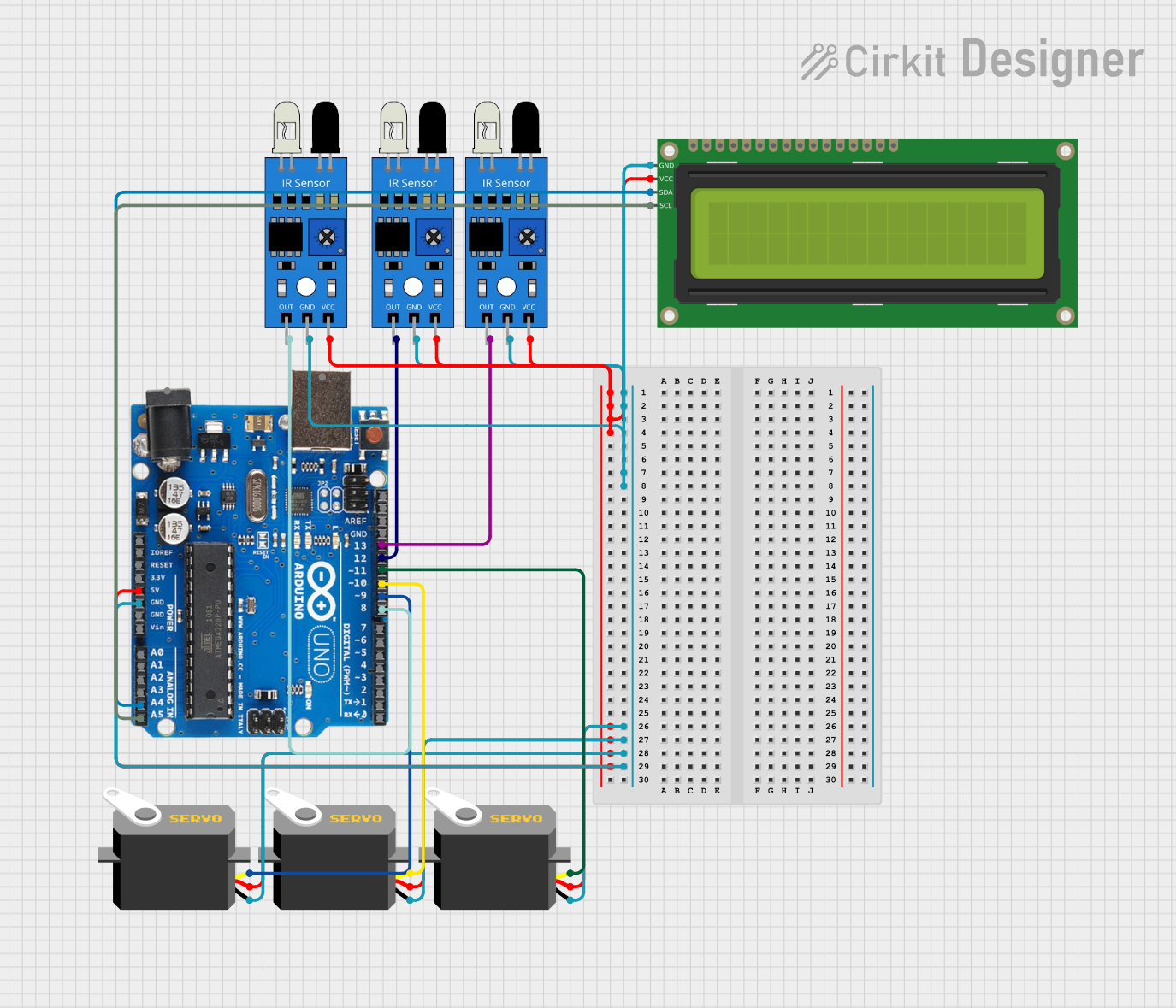
Circuit Documentation
Summary
This circuit is designed to control a robotic arm using an Arduino Uno R3. The system includes multiple IR sensors for object detection, servos for movement, and an I2C LCD for displaying status messages. The Arduino Uno R3 is programmed to read sensor inputs, control servo motors, and display information on the LCD.
Component List
Arduino Uno R3
- Description: A microcontroller board based on the ATmega328P.
- Pins: D8, D9, D10, D11, D12, D13, GND, AREF, SDA, SCL, D0/RX, D1/Tx, D2, D3, D4, D5, 6, D7, A5/SCL, A4/SDA, A3, A2, A1, A0, Vin, 5V, 3.3V, RESET, IOREF, NONE, USB Jack, Power Jack
IR Sensor
- Description: Infrared sensor for object detection.
- Pins: out, gnd, vcc
Servo
- Description: Servo motor for precise control of angular position.
- Pins: gnd, vcc, pulse
16x2 I2C LCD
- Description: 16x2 character LCD with I2C interface.
- Pins: GND, VCC, SDA, SCL
Wiring Details
Arduino Uno R3
- 5V: Connected to VCC of all IR sensors, servos, and the I2C LCD.
- GND: Connected to GND of all IR sensors, servos, and the I2C LCD.
- D8: Connected to the out pin of IR sensor 3.
- D9: Connected to the pulse pin of Servo 1.
- D10: Connected to the pulse pin of Servo 2.
- D11: Connected to the pulse pin of Servo 3.
- D12: Connected to the out pin of IR sensor 2.
- D13: Connected to the out pin of IR sensor 1.
- A5/SCL: Connected to the SCL pin of the I2C LCD.
- A4/SDA: Connected to the SDA pin of the I2C LCD.
IR Sensor 1
- vcc: Connected to 5V of Arduino Uno R3.
- gnd: Connected to GND of Arduino Uno R3.
- out: Connected to D13 of Arduino Uno R3.
IR Sensor 2
- vcc: Connected to 5V of Arduino Uno R3.
- gnd: Connected to GND of Arduino Uno R3.
- out: Connected to D12 of Arduino Uno R3.
IR Sensor 3
- vcc: Connected to 5V of Arduino Uno R3.
- gnd: Connected to GND of Arduino Uno R3.
- out: Connected to D8 of Arduino Uno R3.
Servo 1
- vcc: Connected to 5V of Arduino Uno R3.
- gnd: Connected to GND of Arduino Uno R3.
- pulse: Connected to D9 of Arduino Uno R3.
Servo 2
- vcc: Connected to 5V of Arduino Uno R3.
- gnd: Connected to GND of Arduino Uno R3.
- pulse: Connected to D10 of Arduino Uno R3.
Servo 3
- vcc: Connected to 5V of Arduino Uno R3.
- gnd: Connected to GND of Arduino Uno R3.
- pulse: Connected to D11 of Arduino Uno R3.
16x2 I2C LCD
- VCC: Connected to 5V of Arduino Uno R3.
- GND: Connected to GND of Arduino Uno R3.
- SDA: Connected to A4/SDA of Arduino Uno R3.
- SCL: Connected to A5/SCL of Arduino Uno R3.
Code Documentation
#include <Servo.h>
#include <Wire.h>
#include <LiquidCrystal_I2C.h>

// Pin Definitions
const int IR_SENSOR1_PIN = 12; // IR sensor 1 connected to pin 12
const int IR_SENSOR2_PIN = 13; // IR sensor 2 connected to pin 13
bool sensor1Enabled = true;    // Variable to track if sensor 1 is enabled
bool sensor2Enabled = true;    // Variable to track if sensor 2 is enabled

// Define the servo objects
Servo servo1;  // Claw servo
Servo servo2;  // Body servo
Servo servo3;  // Base servo

// LCD Initialization (I2C address 0x27, 16 columns, 2 rows)
LiquidCrystal_I2C lcd(0x27, 16, 2);

void setup() {
  // Attach the servos to their respective pins
  servo1.attach(9);   // Attach servo1 (claw) to pin 9
  servo2.attach(10);  // Attach servo2 (body) to pin 10
  servo3.attach(11);  // Attach servo3 (base) to pin 11

  // Set motor control pins as output
  pinMode(2, OUTPUT);  // Motor 1 direction pin
  pinMode(5, OUTPUT);  // Motor 1 speed pin
  pinMode(4, OUTPUT);  // Motor 2 direction pin
  pinMode(6, OUTPUT);  // Motor 2 speed pin

  // Set the IR sensor pin mode to input
  pinMode(IR_SENSOR1_PIN, INPUT);
  pinMode(IR_SENSOR2_PIN, INPUT);

  // Initialize LCD
  lcd.init();         // Use init() instead of begin()
  lcd.backlight();    // Turn on the backlight
  lcd.setCursor(0, 0);
  lcd.print("GROUP 7");
  lcd.setCursor(0, 1);
  lcd.print("FINAL PROJECT");
  delay(5000);        // Display welcome message for 5 seconds
  lcd.clear();

  // Initial servo movements with delays
  moveServoSlowly(servo3, 80, 5);  // Move base (servo3) to 80 degrees slowly
  delay(3000);  // Wait for 3 seconds before completing the setup

  moveServoSlowly(servo1, 130, 20);  // Move claw (servo1) to 130 degrees slowly
  delay(3000);  // Wait for 3 seconds before moving the next servo

  moveServoSlowly(servo2, 30, 20);  // Move body (servo2) to 40 degrees slowly
  delay(3000);  // Wait for 3 seconds before moving the next servo

  // Continue with further movements
  moveServoSlowly(servo3, 20, 5);  // Move base (servo3) to 20 degrees slowly
  delay(3000);

  moveServoSlowly(servo2, 120, 20);  // Move body (servo2) to 110 degrees slowly
  delay(3000);

  moveServoSlowly(servo1, 190, 20);  // Move claw (servo1) to 190 degrees slowly
  delay(3000);

  moveServoSlowly(servo2, 30, 20);  // Move body (servo2) back to 40 degrees slowly
  delay(4000);

  moveServoSlowly(servo3, 50, 5);  // Move base (servo3) to 50 degrees slowly
  delay(3000);

  moveServoSlowly(servo2, 120, 20);  // Move body (servo2) to 110 degrees slowly
  delay(3000);

  moveServoSlowly(servo1, 130, 20);  // Move claw (servo1) back to 130 degrees slowly
  delay(1000);

  moveServoSlowly(servo2, 30, 20);  // Move body (servo2) back to 40 degrees slowly
  delay(3000);

  moveServoSlowly(servo3, 80, 5);  // Move base (servo3) to 80 degrees slowly
  delay(3000);

  Move_Forward(80);  // Move motors forward at speed 60
}

void loop() {
  // Read the states of the IR sensors
  int sensor1State = digitalRead(IR_SENSOR1_PIN); // IR sensor 1 state
  int sensor2State = digitalRead(IR_SENSOR2_PIN); // IR sensor 2 state

  // Handle sensor 1 if enabled and detected
  if (sensor1Enabled && sensor1State == LOW) {
    sensor1Enabled = false;  // Disable sensor 1 temporarily while servo movement is in progress

    // Display the status of sensor 1
    lcd.setCursor(0, 0);  // Set cursor to the first row
    lcd.clear();          // Clear previous data
    lcd.print("DETECTED");

    Stop