
Circuit Documentation
Summary of the Circuit
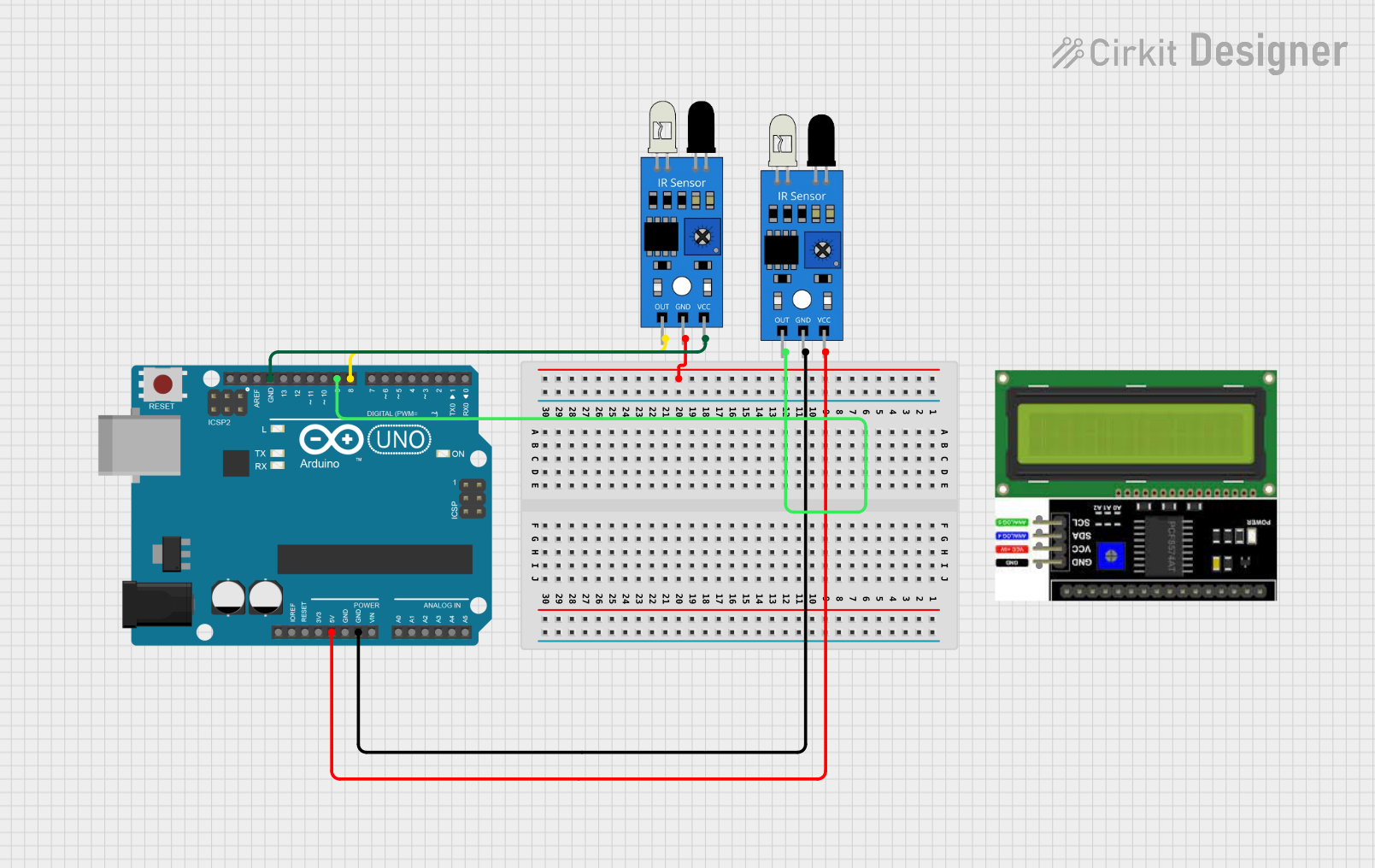
This circuit is designed to detect motion using infrared (IR) sensors and an Arduino UNO microcontroller. When motion is detected by the IR sensors, the built-in LED on the Arduino UNO (pin D13) is turned off, and a message is printed to the serial monitor. Conversely, when motion is no longer detected, the built-in LED is turned on, and a different message is printed to the serial monitor. The circuit utilizes two IR sensors and an I2C LCD display, although the display is not integrated into the current code.
Component List
Arduino UNO
- Description: A microcontroller board based on the ATmega328P.
- Pins: UNUSED, IOREF, Reset, 3.3V, 5V, GND, Vin, A0-A5, SCL, SDA, AREF, D0-D13.
IR Sensor
- Description: An infrared sensor capable of detecting motion.
- Pins: out, gnd, vcc.
LCD I2C Display
- Description: A liquid crystal display that communicates over the I2C bus.
- Pins: GND, VCC, SDA, SCL.
Wiring Details
Arduino UNO
- 5V: Provides power to the IR sensors.
- GND: Common ground for the circuit.
- D9: Connected to the output of one IR sensor for motion detection.
- D8: Connected to the output of the second IR sensor for motion detection (not used in the current code).
IR Sensor 1
- out: Connected to Arduino UNO pin D9.
- gnd: Connected to Arduino UNO GND.
- vcc: Connected to Arduino UNO 5V.
IR Sensor 2
- out: Connected to Arduino UNO pin D8 (not used in the current code).
- gnd: Connected to Arduino UNO GND.
- vcc: Connected to Arduino UNO 5V.
LCD I2C Display
- GND: (Connection details not provided)
- VCC: (Connection details not provided)
- SDA: (Connection details not provided)
- SCL: (Connection details not provided)
Documented Code
/*
  IR Sensor Motion Detection with Arduino UNO

  This sketch is designed to use an IR sensor connected to pin D9 of an Arduino UNO
  to detect motion. When motion is detected, the built-in LED on pin D13 will turn off,
  and "Motion Detected!" will be printed to the serial monitor. When motion is no longer
  detected, the built-in LED will turn on, and "Motion Ended!" will be printed to the
  serial monitor.

  The serial communication is initiated at a baud rate of 115200 to allow for fast data
  transfer. The built-in LED is used as an indicator for motion detection status.

  Circuit connections:
  - IR sensor output to Arduino pin D9
  - IR sensor GND to Arduino GND
  - IR sensor VCC to Arduino 5V
  - Built-in LED on Arduino pin D13 (no external LED required)
*/

int IRSensor = 9; // connect IR sensor module to Arduino pin D9
int LED = 13; // use built-in LED connected to Arduino pin D13

void setup(){
  Serial.begin(115200); // Init Serial at 115200 Baud Rate.
  Serial.println("Serial Working"); // Test to check if serial is working or not
  pinMode(IRSensor, INPUT); // Set IR Sensor pin as INPUT
  pinMode(LED, OUTPUT); // Set LED Pin as OUTPUT
}

void loop(){
  int sensorStatus = digitalRead(IRSensor); // Read the IR sensor pin
  if (sensorStatus == HIGH) // Check if the pin is HIGH
  {
    digitalWrite(LED, LOW); // Turn off the built-in LED
    Serial.println("Motion Detected!"); // Print "Motion Detected!" on the serial monitor window
  }
  else {
    digitalWrite(LED, HIGH); // Turn on the built-in LED
    Serial.println("Motion Ended!"); // Print "Motion Ended!" on the serial monitor window
  }
}
This code is associated with the Arduino UNO microcontroller and is designed to detect motion using an IR sensor. The code is well-commented, explaining the purpose of each section and the connections required for the circuit to function correctly.