
Circuit Documentation
Summary
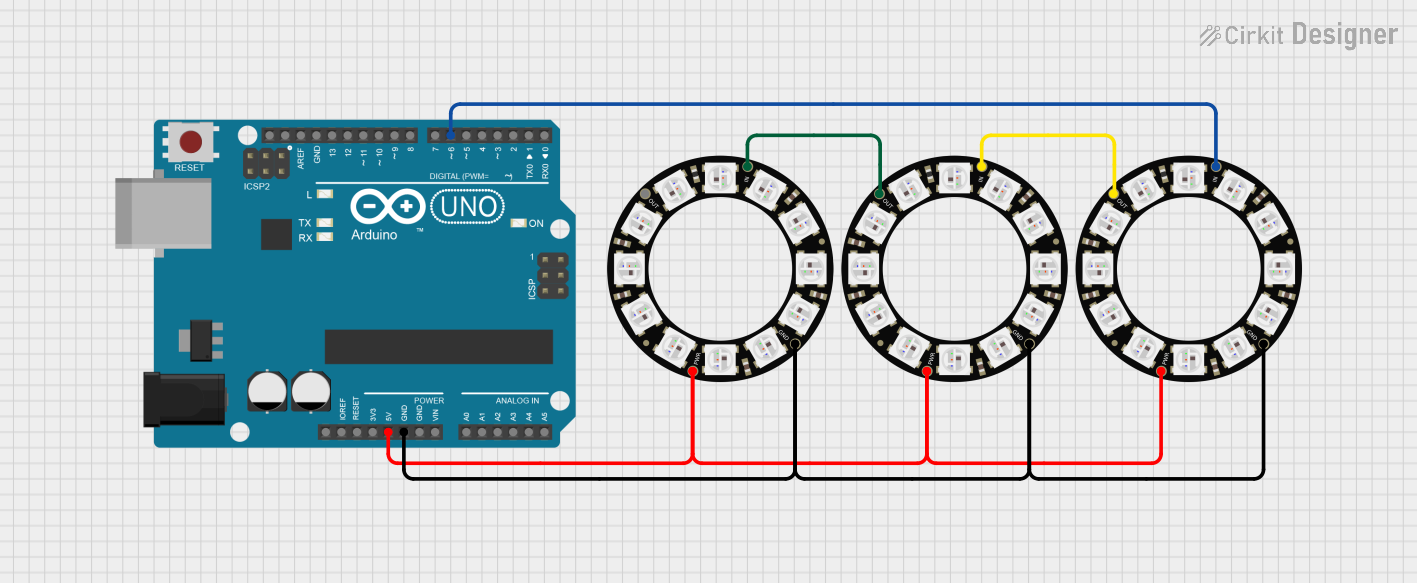
This circuit features an Arduino UNO microcontroller connected to three Adafruit 12 NeoPixel Rings. The NeoPixel Rings are powered by the Arduino and are controlled via a digital pin. The setup allows for the sequential lighting of the NeoPixels in green, creating a visually appealing effect.
Component List
Arduino UNO
- Description: A microcontroller board based on the ATmega328P. It is used for controlling the NeoPixel Rings and executing the programmed logic.
- Purpose: Acts as the main controller for the circuit, managing the power and data signals to the NeoPixel Rings.
Adafruit 12 NeoPixel Ring (x3)
- Description: A ring of 12 individually addressable RGB LEDs.
- Purpose: Provides visual output by lighting up in various colors based on the control signals received from the Arduino.
Wiring Details
Arduino UNO
5V: Connected to the VDD pins of all three NeoPixel Rings.
GND: Connected to the GND pins of all three NeoPixel Rings.
D6: Connected to the IN pin of the third NeoPixel Ring.
Adafruit 12 NeoPixel Ring (1)
VDD: Connected to the 5V pin of the Arduino UNO.
GND: Connected to the GND pin of the Arduino UNO.
IN: Connected to the OUT pin of the second NeoPixel Ring.
Adafruit 12 NeoPixel Ring (2)
VDD: Connected to the 5V pin of the Arduino UNO.
GND: Connected to the GND pin of the Arduino UNO.
IN: Connected to the OUT pin of the first NeoPixel Ring.
Adafruit 12 NeoPixel Ring (3)
VDD: Connected to the 5V pin of the Arduino UNO.
GND: Connected to the GND pin of the Arduino UNO.
IN: Connected to the D6 pin of the Arduino UNO.
Documented Code
#include <Adafruit_NeoPixel.h>

// Data pin
#define PIN        6
// Total pixels in your three-ring chain
#define NUMPIXELS 36

Adafruit_NeoPixel pixels(NUMPIXELS, PIN, NEO_GRB + NEO_KHZ800);

void setup() {
  pixels.begin();
  pixels.clear();   // turn everything off
  pixels.show();
}

void loop() {
  // light one green at a time
  for (int i = 0; i < NUMPIXELS; i++) {
    // pixels.clear();
    pixels.setPixelColor(i, pixels.Color(0,255,0));
    pixels.show();
    delay(100);
  }

  // everyone off, 1 s pause, then restart
  pixels.clear();
  pixels.show();
  delay(1000);
}
This documentation provides a comprehensive overview of the circuit, detailing the components used, their connections, and the code that drives the functionality of the NeoPixel Rings.