
Voice and Touch-Controlled Wheelchair with Obstacle Detection
View and Edit Project In Cirkit Designer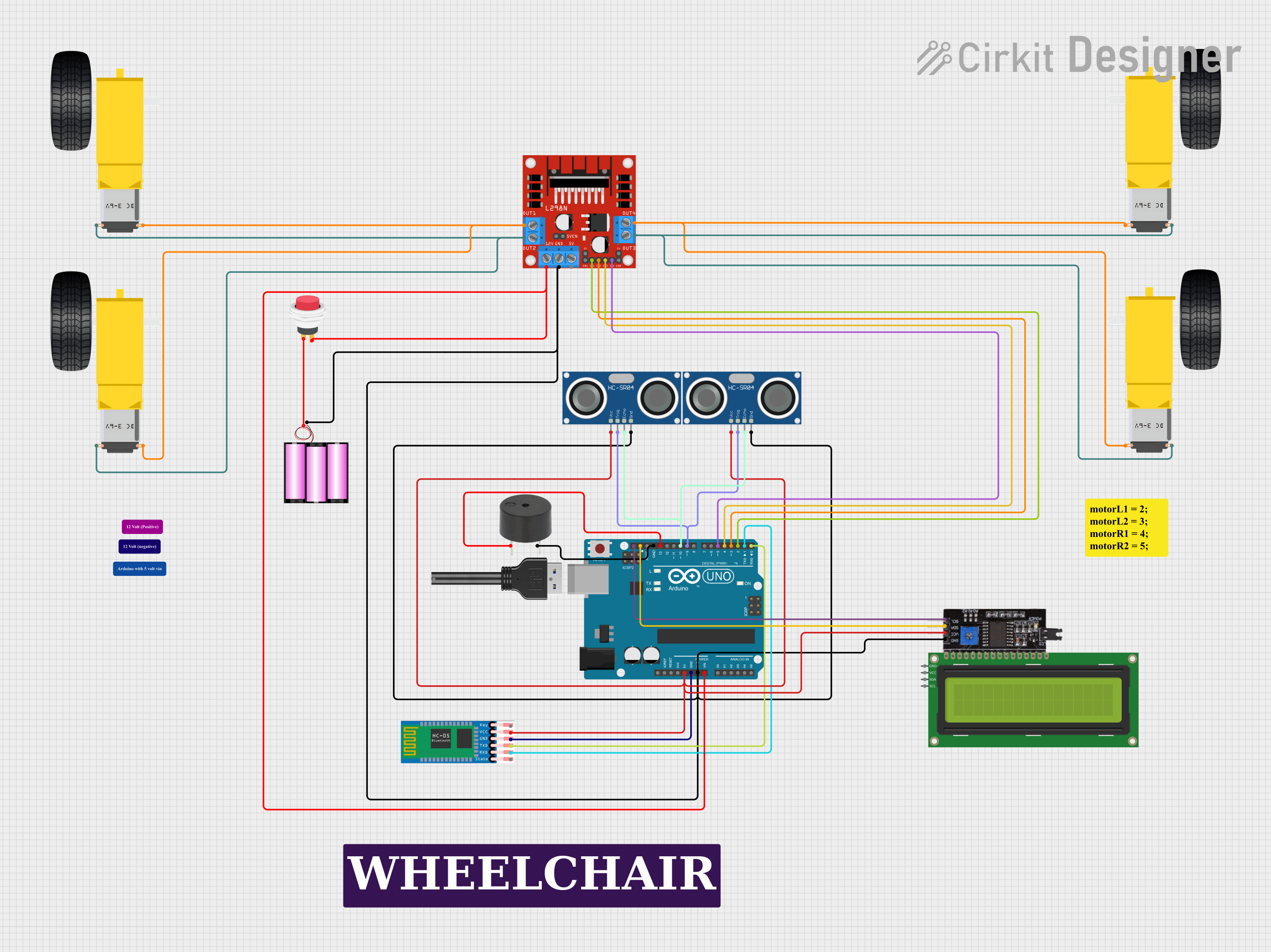
Circuit Documentation
Summary
This circuit is designed to control a wheelchair using voice commands received via Bluetooth and a touch switch. It features obstacle detection using ultrasonic sensors and provides an audible indication through a buzzer when an obstacle is detected. The core of the circuit is an Arduino UNO microcontroller, which interfaces with an L298N DC motor driver to control four gearmotors, two HC-SR04 ultrasonic sensors, an HC-05 Bluetooth module, a buzzer, and an I2C module connected to a 16x2 I2C LCD for display purposes.
Component List
- L298N DC Motor Driver: A module used to drive DC motors with directional and speed control, interfacing with the Arduino UNO.
- Arduino UNO: A microcontroller board based on the ATmega328P, used for processing inputs and controlling outputs.
- HC-05 Bluetooth Module: A wireless Bluetooth transceiver module for communication with Bluetooth-enabled devices.
- 12V Battery: Provides power to the circuit.
- 2Pin Push Switch: A switch used to manually control the power flow in the circuit.
- HC-SR04 Ultrasonic Sensors: Ultrasonic distance sensors used for obstacle detection.
- Buzzer: An audible alert device that sounds when an obstacle is detected within a certain range.
- Gearmotor DC Wheels: Four DC gearmotors used to drive the wheels of the wheelchair.
- I2C Module: An interface module used to simplify the connection between the Arduino UNO and the I2C LCD.
- 16x2 I2C LCD: A liquid crystal display that shows information, likely related to the wheelchair's status or commands received.
Wiring Details
L298N DC Motor Driver
- OUT1, OUT2: Connected to the right gearmotors.
- OUT3, OUT4: Connected to the left gearmotors.
- 12V: Connected to the 12V battery through a 2Pin Push Switch.
- GND: Common ground with the battery, Arduino UNO, and ultrasonic sensors.
- ENA, ENB: Likely connected internally for enabling the motor driver (not specified in the net list).
- IN1, IN2, IN3, IN4: Control inputs from the Arduino UNO digital pins D2, D3, D4, and D5 respectively.
Arduino UNO
- Vin: Connected to the 12V battery through a 2Pin Push Switch.
- GND: Common ground with the battery, motor driver, and ultrasonic sensors.
- 5V: Powers the HC-05 Bluetooth module, I2C module, and ultrasonic sensors.
- D0, D1: Serial communication with the HC-05 Bluetooth module (RX and TX).
- D2, D3, D4, D5: Control signals to the L298N motor driver.
- D9, D10: Control signals for the ultrasonic sensors' TRIG and ECHO pins.
- D13: Connected to the buzzer.
HC-05 Bluetooth Module
- VCC: Powered by the Arduino UNO 5V output.
- GND: Common ground with the Arduino UNO.
- TXD, RXD: Serial communication with the Arduino UNO digital pins D0 and D1.
HC-SR04 Ultrasonic Sensors
- VCC: Powered by the Arduino UNO 5V output.
- GND: Common ground with the Arduino UNO and motor driver.
- TRIG, ECHO: Connected to the Arduino UNO digital pins D9 and D10.
Buzzer
- PIN: Connected to the Arduino UNO digital pin D13.
- GND: Common ground with the Arduino UNO.
Gearmotor DC Wheels
- Right Gearmotors: Connected to the L298N motor driver OUT1 and OUT2.
- Left Gearmotors: Connected to the L298N motor driver OUT3 and OUT4.
I2C Module
- SCL, SDA: I2C communication with the Arduino UNO.
- VCC: Powered by the Arduino UNO 5V output.
- GND: Common ground with the Arduino UNO.
16x2 I2C LCD
- GND, VCC, SDA, SCL: Likely connected to the I2C module (not specified in the net list).
Documented Code
// Voice & Touch Control Wheelchair with Obstacle Sensor and Indicator
// This code controls a wheelchair using voice commands via Bluetooth and a touch switch.
// It also uses ultrasonic sensors to detect obstacles and a buzzer to indicate them.

#include <AFMotor.h>

// Motor driver pins
#define IN1 3
#define IN2 4
#define IN3 5
#define IN4 6

// Ultrasonic sensor pins
#define TRIG 9
#define ECHO 10

// Buzzer pin
#define BUZZER 13

// Bluetooth commands
char command;

// Motor objects
AF_DCMotor motor1(1, MOTOR12_1KHZ);
AF_DCMotor motor2(2, MOTOR12_1KHZ);
AF_DCMotor motor3(3, MOTOR34_1KHZ);
AF_DCMotor motor4(4, MOTOR34_1KHZ);

void setup() {
  Serial.begin(9600); // Bluetooth baud rate
  pinMode(TRIG, OUTPUT);
  pinMode(ECHO, INPUT);
  pinMode(BUZZER, OUTPUT);
  pinMode(IN1, OUTPUT);
  pinMode(IN2, OUTPUT);
  pinMode(IN3, OUTPUT);
  pinMode(IN4, OUTPUT);
}

void loop() {
  if (Serial.available() > 0) {
    command = Serial.read();
    Stop(); // Initialize with motors stopped
    switch (command) {
      case 'F':
        forward();
        break;
      case 'B':
        back();
        break;
      case 'L':
        left();
        break;
      case 'R':
        right();
        break;
    }
  }
  checkObstacle();
}

void forward() {
  motor1.setSpeed(255);
  motor1.run(FORWARD);
  motor2.setSpeed(255);
  motor2.run(FORWARD);
  motor3.setSpeed(255);
  motor3.run(FORWARD);
  motor4.setSpeed(255);
  motor4.run(FORWARD);
}

void back() {
  motor1.setSpeed(255);
  motor1.run(BACKWARD);
  motor2.setSpeed(255);
  motor2.run(BACKWARD);
  motor3.setSpeed(255);
  motor3.run(BACKWARD);
  motor4.setSpeed(255);
  motor4.run(BACKWARD);
}

void left() {
  motor1.setSpeed(255);
  motor1.run(BACKWARD);
  motor2.setSpeed(255);
  motor2.run(BACKWARD);
  motor3.setSpeed(255);
  motor3.run(FORWARD);
  motor4.setSpeed(255);
  motor4.run(FORWARD);
}

void right() {
  motor1.setSpeed(255);
  motor1.run(FORWARD);
  motor2.setSpeed(255);
  motor2.run(FORWARD);
  motor3.setSpeed(255);
  motor3.run(BACKWARD);
  motor4.setSpeed(255);
  motor4.run(BACKWARD);
}

void Stop() {
  motor1.setSpeed(0);
  motor1.run(RELEASE);
  motor2.setSpeed(0);
  motor2.run(RELEASE);
  motor3.setSpeed(0);
  motor3.run(RELEASE);
  motor4.setSpeed(0);
  motor4.run(RELEASE);
}

void checkObstacle() {
  long duration, distance;
  digitalWrite(TRIG, LOW);
  delayMicroseconds(2);
  digitalWrite(TRIG, HIGH);
  delayMicroseconds(10);
  digitalWrite(TRIG, LOW);
  duration = pulseIn(ECHO, HIGH);
  distance = (duration / 2) / 29.1;
  if (distance < 20) {
    digitalWrite(BUZZER, HIGH);
    Stop();
  } else {
    digitalWrite(BUZZER, LOW);
  }
}
This code is responsible for the operation of the wheelchair, including motor control and obstacle detection. It initializes the motors, sets up the ultrasonic sensors, and reads Bluetooth commands to control the wheelchair's movement. The checkObstacle function uses the ultrasonic sensors to detect obstacles and activates the buzzer if an obstacle is within 20 cm.