
Circuit Documentation
Summary of the Circuit
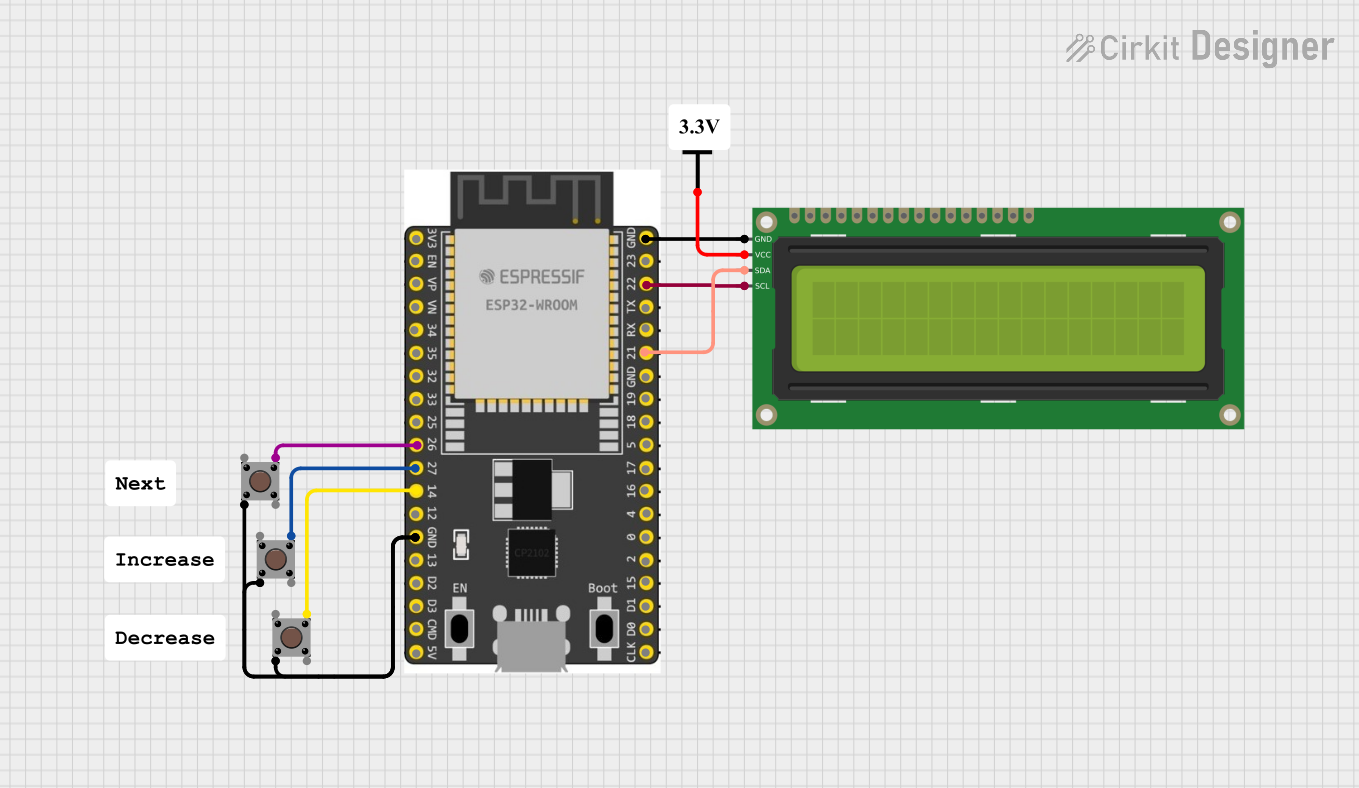
This circuit is designed around the ESP32 Wroom Dev Kit, which serves as the central microcontroller unit. The circuit includes multiple pushbuttons and a 16x2 I2C LCD for user interaction. The pushbuttons are interfaced with the ESP32 to provide input signals, while the LCD displays information. The ESP32 is programmed to handle the inputs from the pushbuttons and control the output displayed on the LCD. The circuit is powered by a Vcc source, ensuring that all components receive the necessary voltage for operation.
Component List
ESP 32 Wroom Dev Kit
- Microcontroller development board based on the ESP32 chip.
- Provides a wide range of GPIO pins for interfacing with other components.
- Features include Wi-Fi and Bluetooth connectivity.
Pushbutton
- A simple switch mechanism for control or input.
- Typically used to provide a digital signal to a microcontroller.
16x2 I2C LCD
- An alphanumeric liquid crystal display.
- Capable of displaying 16 characters per line across 2 lines.
- Uses the I2C communication protocol for interfacing with the microcontroller.
Vcc
- Represents the power supply for the circuit.
- Provides the necessary voltage to power the components.
Wiring Details
ESP 32 Wroom Dev Kit
- GPIO 26: Connected to Pushbutton (Pin 3 (out))
- GPIO 27: Connected to Pushbutton (Pin 3 (out))
- GPIO 14: Connected to Pushbutton (Pin 3 (out))
- GND: Connected to all Pushbuttons (Pin 2 (in)) and 16x2 I2C LCD (GND)
- GPIO 22: Connected to 16x2 I2C LCD (SCL)
- GPIO 21: Connected to 16x2 I2C LCD (SDA)
Pushbutton
- Pin 3 (out): Connected to ESP 32 Wroom Dev Kit (GPIO 26, GPIO 27, or GPIO 14)
- Pin 2 (in): Connected to ESP 32 Wroom Dev Kit (GND)
16x2 I2C LCD
- GND: Connected to ESP 32 Wroom Dev Kit (GND)
- VCC: Connected to Vcc (Vcc)
- SDA: Connected to ESP 32 Wroom Dev Kit (GPIO 21)
- SCL: Connected to ESP 32 Wroom Dev Kit (GPIO 22)
Vcc
- Vcc: Provides power to 16x2 I2C LCD (VCC)
Documented Code
sketch.ino
void setup() {
  // put your setup code here, to run once:

}

void loop() {
  // put your main code here, to run repeatedly:

}
documentation.txt
(No additional documentation provided)