
Arduino Uno-Based Soil and pH Monitoring System with OLED Display
View and Edit Project In Cirkit Designer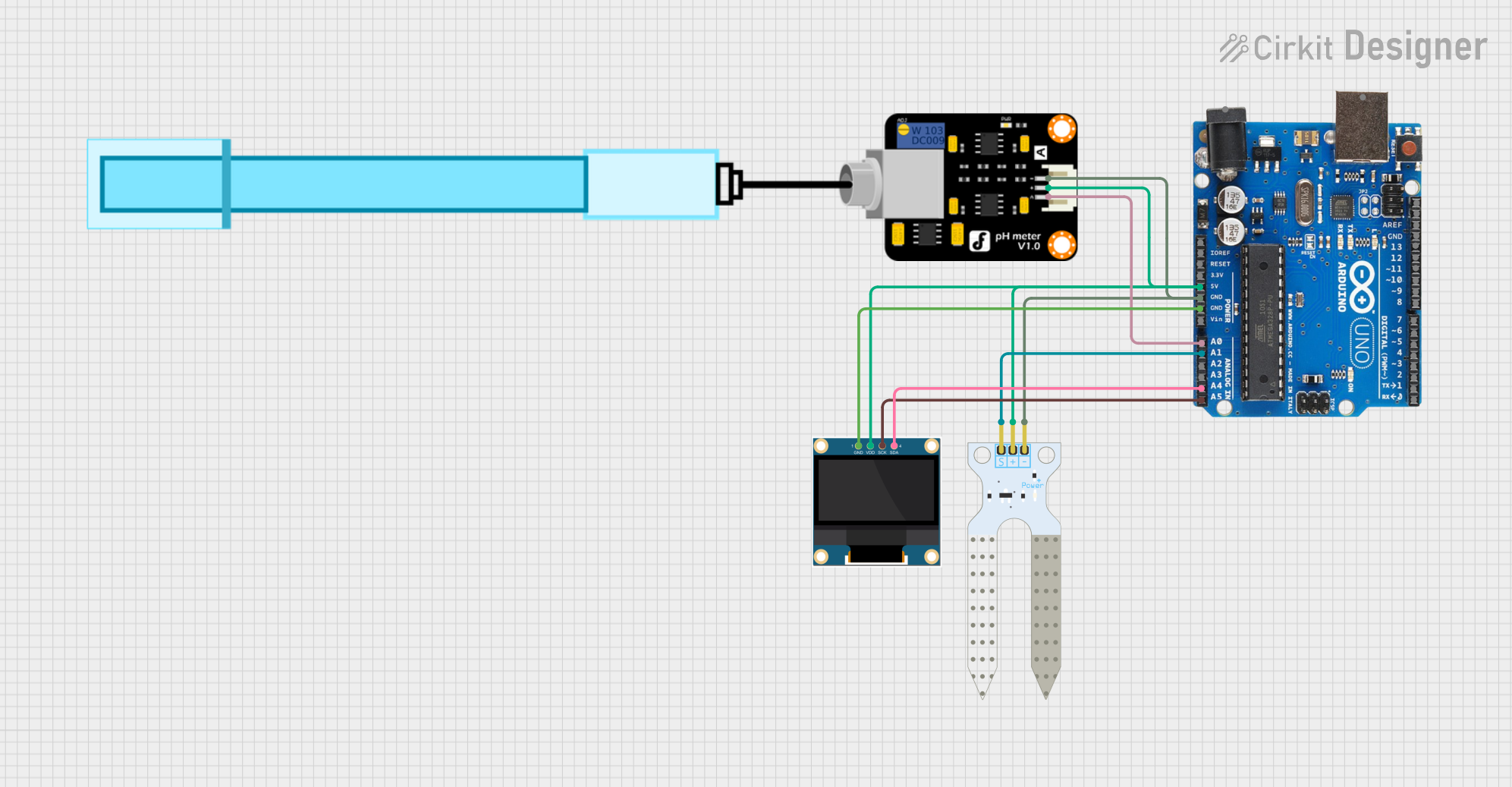
Circuit Documentation
Summary
This circuit is designed to monitor pH levels and soil moisture using an Arduino Uno R3. The data from the sensors is displayed on a 0.96" OLED screen. The circuit includes a pH meter, a soil moisture sensor, and an OLED display, all connected to the Arduino Uno R3.
Component List
Arduino Uno R3
- Description: A microcontroller board based on the ATmega328P.
- Pins: D8, D9, D10, D11, D12, D13, GND, AREF, SDA, SCL, D0/RX, D1/Tx, D2, D3, D4, D5, 6, D7, A5/SCL, A4/SDA, A3, A2, A1, A0, Vin, 5V, 3.3V, RESET, IOREF, NONE, USB Jack, Power Jack
PH Meter
- Description: A sensor used to measure the pH level of a solution.
- Pins: Signal, VCC, GND
Soil Moisture Sensor
- Description: A sensor used to measure the moisture content in the soil.
- Pins: VCC, GND, SIG
0.96" OLED
- Description: A small OLED display used to show sensor readings.
- Pins: GND, VDD, SCK, SDA
Wiring Details
Arduino Uno R3
- A5/SCL: Connected to SCK of the 0.96" OLED
- A4/SDA: Connected to SDA of the 0.96" OLED
- A1: Connected to SIG of the Soil Moisture Sensor
- A0: Connected to Signal of the PH Meter
- GND: Connected to GND of the 0.96" OLED, PH Meter, and Soil Moisture Sensor
- 5V: Connected to VDD of the 0.96" OLED, VCC of the PH Meter, and VCC of the Soil Moisture Sensor
PH Meter
- Signal: Connected to A0 of the Arduino Uno R3
- GND: Connected to GND of the Arduino Uno R3 and Soil Moisture Sensor
- VCC: Connected to 5V of the Arduino Uno R3
Soil Moisture Sensor
- SIG: Connected to A1 of the Arduino Uno R3
- GND: Connected to GND of the Arduino Uno R3 and PH Meter
- VCC: Connected to 5V of the Arduino Uno R3
0.96" OLED
- SCK: Connected to A5/SCL of the Arduino Uno R3
- SDA: Connected to A4/SDA of the Arduino Uno R3
- GND: Connected to GND of the Arduino Uno R3
- VDD: Connected to 5V of the Arduino Uno R3
Code Documentation
#include <Wire.h>
#include <Adafruit_GFX.h>
#include <Adafruit_SSD1306.h>

// Inisialisasi OLED (alamat I2C default: 0x3C)
#define SCREEN_WIDTH 128
#define SCREEN_HEIGHT 64
Adafruit_SSD1306 display(SCREEN_WIDTH, SCREEN_HEIGHT, &Wire, -1);

// Pin untuk sensor
const int pH_Pin = A0;
const int Soil_Pin = A1;

void setup() {
  // Inisialisasi Serial Monitor
  Serial.begin(9600);

  // Inisialisasi OLED
  if (!display.begin(SSD1306_I2C_ADDRESS, 0x3C)) {
    Serial.println(F("OLED tidak ditemukan, periksa koneksi!"));
    for (;;);
  }
  display.clearDisplay();
  display.setTextSize(1);
  display.setTextColor(SSD1306_WHITE);

  // Tampilkan pesan awal
  display.setCursor(0, 0);
  display.println("Inisialisasi...");
  display.display();
  delay(2000);
}

void loop() {
  // Baca data dari sensor
  float pH_Value = analogRead(pH_Pin) * (5.0 / 1023.0); // Konversi ADC ke tegangan
  int Soil_Value = analogRead(Soil_Pin); // Nilai kelembapan tanah

  // Tampilkan data di Serial Monitor
  Serial.print("pH: ");
  Serial.println(pH_Value);
  Serial.print("Soil Moisture: ");
  Serial.println(Soil_Value);

  // Tampilkan data di OLED
  display.clearDisplay();
  display.setCursor(0, 0);
  display.println("Sensor Readings:");
  display.setCursor(0, 15);
  display.print("pH: ");
  display.println(pH_Value);
  display.setCursor(0, 30);
  display.print("Soil: ");
  display.println(Soil_Value);
  display.display();

  delay(1000);
}
This code initializes the OLED display and reads data from the pH meter and soil moisture sensor. The sensor readings are displayed on both the Serial Monitor and the OLED display.