
Arduino UNO Based Obstacle Detection and Directional Audio Alert System
View and Edit Project In Cirkit Designer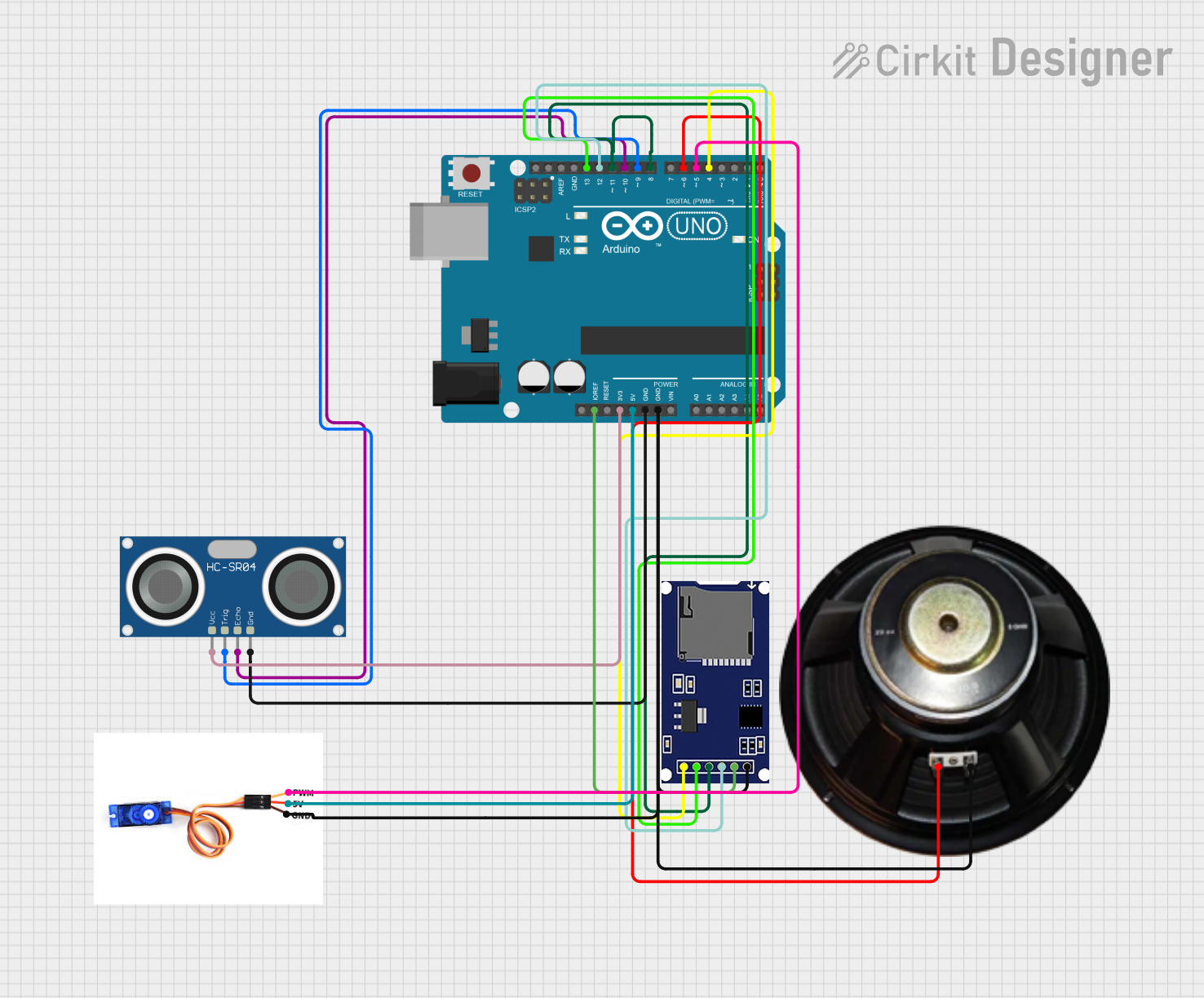
Circuit Documentation
Summary of the Circuit
This circuit is designed to interact with the physical environment using an Arduino UNO as the central processing unit. It features an HC-SR04 Ultrasonic Sensor for distance measurement, an SG90 servo motor for directional movement, a speaker for audio output, and an SD module for audio file storage and playback. The primary function of the circuit is to detect objects at a specific distance (2 meters) using the ultrasonic sensor. Upon detection, the speaker will output a verbal warning, and the servo motor will pivot to check for clear paths on either side. The speaker will then instruct on which direction to turn based on the sensor readings from the servo's adjusted positions.
Component List
Arduino UNO
- Microcontroller board based on the ATmega328P
- Provides I/O pins and power supply pins for interfacing with other components
HC-SR04 Ultrasonic Sensor
- Measures distances by emitting ultrasonic waves and measuring the time taken for the echo to return
- Operates on a 5V supply
SG90 Servo Motor
- A small and lightweight servo motor capable of precise control
- Operates on a 5V supply and receives PWM signals for positioning
Speaker
- An audio output device used to play sounds or verbal instructions
- Requires a digital signal for operation
SD Module
- A storage module for SD cards
- Used to store audio files that are played through the speaker
Wiring Details
Arduino UNO
IOREFconnected to SD moduleVCC3.3Vconnected to HC-SR04 Ultrasonic SensorVCC5Vconnected to SG90 servo motor5VGNDconnected to HC-SR04 Ultrasonic SensorGND, SG90 servo motorGND, Speaker-, and SD moduleGNDD13connected to SD moduleSCKD12connected to SD moduleMISOD11connected to SD moduleMOSID10connected to HC-SR04 Ultrasonic SensorECHOD9connected to HC-SR04 Ultrasonic SensorTRIGD6connected to Speaker+D5connected to SG90 servo motorPWMD4connected to SD moduleCS
HC-SR04 Ultrasonic Sensor
VCCconnected to Arduino UNO3.3VTRIGconnected to Arduino UNOD9ECHOconnected to Arduino UNOD10GNDconnected to Arduino UNOGND
SG90 Servo Motor
PWMconnected to Arduino UNOD55Vconnected to Arduino UNO5VGNDconnected to Arduino UNOGND
Speaker
+connected to Arduino UNOD6-connected to Arduino UNOGND
SD Module
CSconnected to Arduino UNOD4SCKconnected to Arduino UNOD13MOSIconnected to Arduino UNOD11MISOconnected to Arduino UNOD12VCCconnected to Arduino UNOIOREFGNDconnected to Arduino UNOGND
Documented Code
/*
 * This Arduino sketch controls a servo motor and a speaker using an ultrasonic
 * sensor. When the sensor detects an object exactly 2 meters away, the speaker
 * will say "roadblocks detected, stop". The servo motor will then check its
 * right and left to determine which direction is clear of obstacles. The
 * speaker will then announce "turn right" or "turn left" based on the clear
 * direction.
 */

#include <Servo.h>
#include <SD.h>
#include <TMRpcm.h>
#include <SPI.h>

#define TRIG_PIN 9
#define ECHO_PIN 10
#define SERVO_PIN 5
#define SPEAKER_PIN 6
#define SD_ChipSelectPin 4

TMRpcm tmrpcm;
Servo myServo;

void setup() {
  pinMode(TRIG_PIN, OUTPUT);
  pinMode(ECHO_PIN, INPUT);
  pinMode(SPEAKER_PIN, OUTPUT);
  myServo.attach(SERVO_PIN);
  Serial.begin(9600);

  // Initialize SD card
  if (!SD.begin(SD_ChipSelectPin)) {
    Serial.println("SD card initialization failed");
    return;
  }
  Serial.println("SD card initialized");

  // Initialize TMRpcm
  tmrpcm.speakerPin = SPEAKER_PIN; // Pin connected to the speaker or amplifier
  // ... other setup code ...
}

void loop() {
  long duration, distance;
  digitalWrite(TRIG_PIN, LOW);
  delayMicroseconds(2);
  digitalWrite(TRIG_PIN, HIGH);
  delayMicroseconds(10);
  digitalWrite(TRIG_PIN, LOW);
  duration = pulseIn(ECHO_PIN, HIGH);
  distance = (duration / 2) / 29.1;

  if (distance == 200) { // 2 meters
    speak("roadblocks detected, stop");
    delay(1000);
    int rightDistance = checkDirection(90); // Check right
    int leftDistance = checkDirection(0); // Check left
    if (rightDistance > leftDistance) {
      speak("turn right");
    } else {
      speak("turn left");
    }
  }
  delay(500);
}

int checkDirection(int angle) {
  myServo.write(angle);
  delay(1000);
  long duration, distance;
  digitalWrite(TRIG_PIN, LOW);
  delayMicroseconds(2);
  digitalWrite(TRIG_PIN, HIGH);
  delayMicroseconds(10);
  digitalWrite(TRIG_PIN, LOW);
  duration = pulseIn(ECHO_PIN, HIGH);
  distance = (duration / 2) / 29.1;
  return distance;
}

void speak(const char* message) {
  Serial.println(message);
  if (strcmp(message, "roadblocks detected, stop") == 0) {
    tmrpcm.play("stop.wav"); // Play "stop.wav" from the SD card
  } else if (strcmp(message, "turn right") == 0) {
    tmrpcm.play("turnright.wav"); // Play "right.wav" from the SD card
  } else if (strcmp(message, "turn left") == 0) {
    tmrpcm.play("turnleft.wav"); // Play "left.wav" from the SD card
  }
}
This code is responsible for the operation of the circuit. It initializes the components, reads the distance from the ultrasonic sensor, and controls the servo and speaker based on the sensor's readings. The speak function plays audio files from the SD card corresponding to the detected situation.