
Arduino UNO-Based Temperature-Controlled Fan with LCD Display
View and Edit Project In Cirkit Designer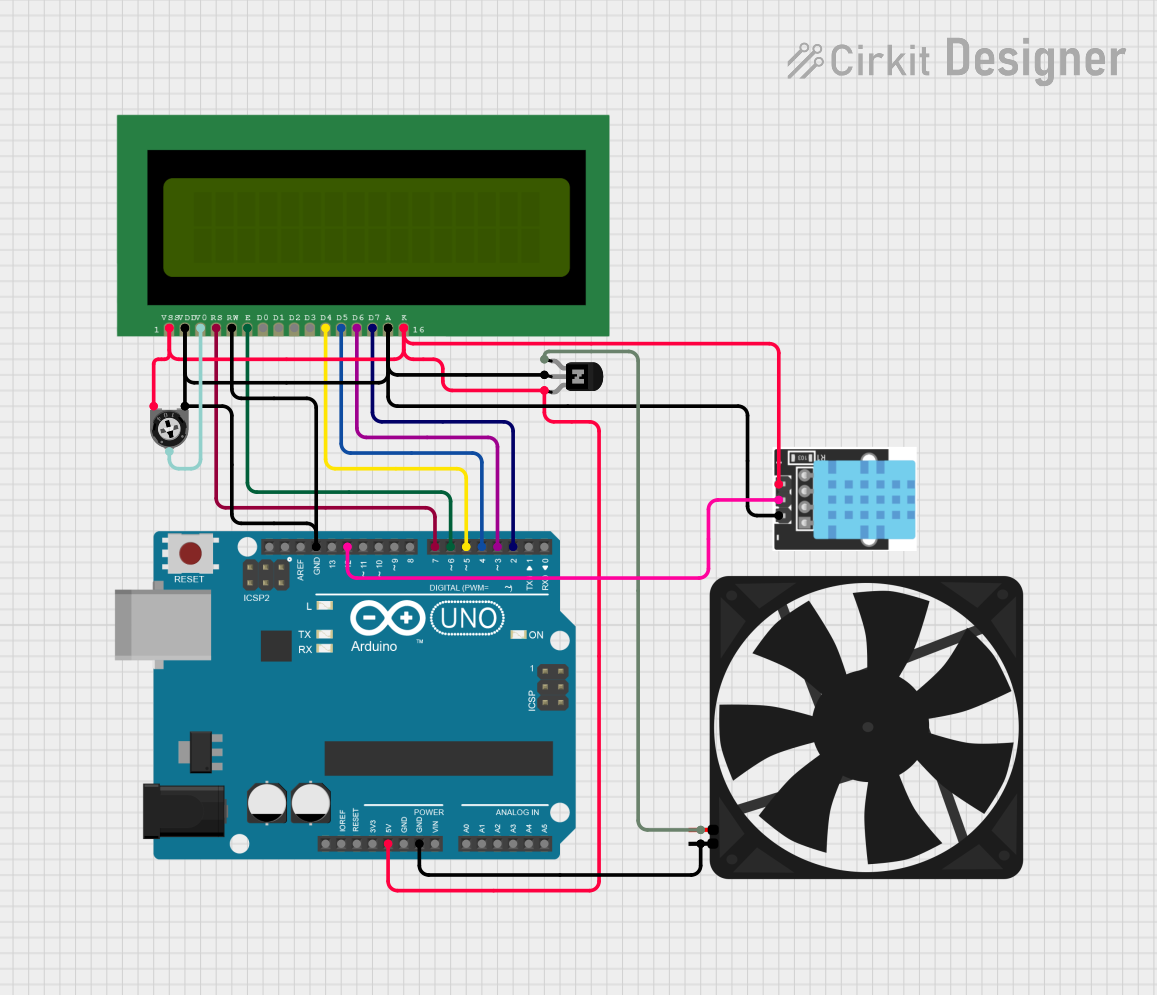
Circuit Documentation
Summary
This circuit is designed to control a fan based on temperature readings from a DHT11 temperature-humidity sensor. The temperature data is displayed on an LCD 16x2 screen, and the fan speed is adjusted accordingly using an NPN transistor. An Arduino UNO microcontroller is used to read the sensor data, control the LCD, and adjust the fan speed.
Component List
Arduino UNO
- Description: A microcontroller board based on the ATmega328P.
- Pins: UNUSED, IOREF, Reset, 3.3V, 5V, GND, Vin, A0, A1, A2, A3, A4, A5, SCL, SDA, AREF, D13, D12, D11, D10, D9, D8, D7, D6, D5, D4, D3, D2, D1, D0
LCD 16x2 (Wokwi Compatible)
- Description: A 16x2 character LCD display.
- Pins: VSS, VDD, V0, RS, RW, E, D0, D1, D2, D3, D4, D5, D6, D7, A, K
KY-015 DHT11 Temperature-Humidity Sensor Module
- Description: A sensor module for measuring temperature and humidity.
- Pins: VCC, GND, DOUT
Fan
- Description: A simple DC fan.
- Pins: GND, 5V
NPN Transistor (CBE)
- Description: A transistor used to control the fan.
- Pins: collector, base, emitter
Trimmer Potentiometer
- Description: A variable resistor used to adjust the contrast of the LCD.
- Pins: leg1, wiper, leg2
- Properties: Resistance: 10,000 Ohms
Wiring Details
Arduino UNO
5V: Connected to the following:
- Trimmer Potentiometer (leg2)
- KY-015 DHT11 Temperature-Humidity Sensor Module (VCC)
- LCD 16x2 (VSS)
- LCD 16x2 (K)
- NPN Transistor (emitter)
GND: Connected to the following:
- Fan (GND)
- Trimmer Potentiometer (leg1)
- KY-015 DHT11 Temperature-Humidity Sensor Module (GND)
- LCD 16x2 (VDD)
- LCD 16x2 (A)
- LCD 16x2 (RW)
- NPN Transistor (base)
D12: Connected to KY-015 DHT11 Temperature-Humidity Sensor Module (DOUT)
D7: Connected to LCD 16x2 (RS)
D6: Connected to LCD 16x2 (E)
D5: Connected to LCD 16x2 (D4)
D4: Connected to LCD 16x2 (D5)
D3: Connected to LCD 16x2 (D6)
D2: Connected to LCD 16x2 (D7)
LCD 16x2 (Wokwi Compatible)
- VSS: Connected to Arduino UNO (5V)
- VDD: Connected to Arduino UNO (GND)
- V0: Connected to Trimmer Potentiometer (wiper)
- RS: Connected to Arduino UNO (D7)
- RW: Connected to Arduino UNO (GND)
- E: Connected to Arduino UNO (D6)
- D4: Connected to Arduino UNO (D5)
- D5: Connected to Arduino UNO (D4)
- D6: Connected to Arduino UNO (D3)
- D7: Connected to Arduino UNO (D2)
- A: Connected to Arduino UNO (GND)
- K: Connected to Arduino UNO (5V)
KY-015 DHT11 Temperature-Humidity Sensor Module
- VCC: Connected to Arduino UNO (5V)
- GND: Connected to Arduino UNO (GND)
- DOUT: Connected to Arduino UNO (D12)
Fan
- GND: Connected to Arduino UNO (GND)
- 5V: Connected to NPN Transistor (collector)
NPN Transistor (CBE)
- collector: Connected to Fan (5V)
- base: Connected to Arduino UNO (GND)
- emitter: Connected to Arduino UNO (5V)
Trimmer Potentiometer
- leg1: Connected to Arduino UNO (GND)
- wiper: Connected to LCD 16x2 (V0)
- leg2: Connected to Arduino UNO (5V)
Code Documentation
//Sumit.in

#include <DHT.h>
#include<LiquidCrystal.h>

const int rs = 7, en = 6, d4 = 5, d5 = 4, d6 = 3, d7 = 2, ct=9;
LiquidCrystal lcd(rs, en, d4, d5, d6, d7);

#define DHTPIN 12     // what pin we're connected to
#define DHTTYPE DHT11   // DHT 11
#define pwm 9

byte degree[8] =
{
  0b00011,
  0b00011,
  0b00000,
  0b00000,
  0b00000,
  0b00000,
  0b00000,
  0b00000
};

// Initialize DHT sensor for normal 16mhz Arduino
DHT dht(DHTPIN, DHTTYPE);

void setup() {
  lcd.begin(16, 2);
  lcd.createChar(1, degree);
  lcd.clear();
  lcd.print("   Fan Speed  ");
  lcd.setCursor(0,1);
  lcd.print("  Controlling ");
  delay(2000);
  analogWrite(pwm, 255);
  lcd.clear();
  lcd.print("Hello Sir ");
  delay(1000);
  Serial.begin(9600);
  dht.begin();
}

void loop() {
  // Wait a few seconds between measurements.
  delay(2000);

  // Reading temperature or humidity takes about 250 milliseconds!
  // Sensor readings may also be up to 2 seconds 'old' (its a very slow sensor)
  float h = dht.readHumidity();
  // Read temperature as Celsius
  float t = dht.readTemperature();
  // Read temperature as Fahrenheit
  float f = dht.readTemperature(true);

  // Check if any reads failed and exit early (to try again).
  if (isnan(h) || isnan(t) || isnan(f)) {
    Serial.println("Failed to read from DHT sensor!");
    return;
  }

  // Compute heat index
  // Must send in t in Fahrenheit!
  float hi = dht.computeHeatIndex(f, h);

  Serial.print("Humidity: ");
  Serial.print(h);
  Serial.print(" %\t");
  Serial.print("temperature: ");
  Serial.print(t);
  Serial.print(" *C ");
  Serial.print(f);
  Serial.print(" *F\t");
  Serial.print("Heat index: ");
  Serial.print(hi);
  Serial.println(" *F");

  if(t <24 ) {
    lcd.setCursor(0,0);
    lcd.print("temp: ");
    lcd.print(t);   // Printing tempature on LCD
    lcd.print(" C");
    lcd.setCursor(0,1);
    analogWrite(9,0);
    lcd.print("Fan OFF            ");
    delay(100);
  } else if(t>=24 && t<=26) {
    lcd.setCursor(0,0);
    lcd.print("temp: ");
    lcd.print(t);   // Printing tempature on LCD
    lcd.print(" C");
    lcd.setCursor(0,1);
    analogWrite(pwm, 100);
    lcd.print("Fan Speed: 20%   ");
    delay(100);
  } else if(t>=26.1 && t<=28) {
    lcd.setCursor(0,0);
    lcd.print("temp: ");
    lcd.print(t);   // Printing tempature on LCD
    lcd.print(" C");
    lcd.setCursor(0,1);
    analogWrite(pwm, 132);
    lcd.print("Fan Speed: 40%   ");
    delay(100);
  } else if(t>=28.1 && t<=28.9) {
    lcd.setCursor(0,0);
    lcd.print("temp: ");
    lcd.print(t);   // Printing tempature on LCD
    lcd.print(" C");
    lcd.setCursor(0,1);
    analogWrite(pwm, 153);
    lcd.print("Fan Speed: 60%   ");
    delay(100);
  } else if(t==29) {
    lcd.setCursor(0,0);
    lcd.print("temp: ");
    lcd.print(t);   // Printing tempature on LCD
    lcd.print(" C