
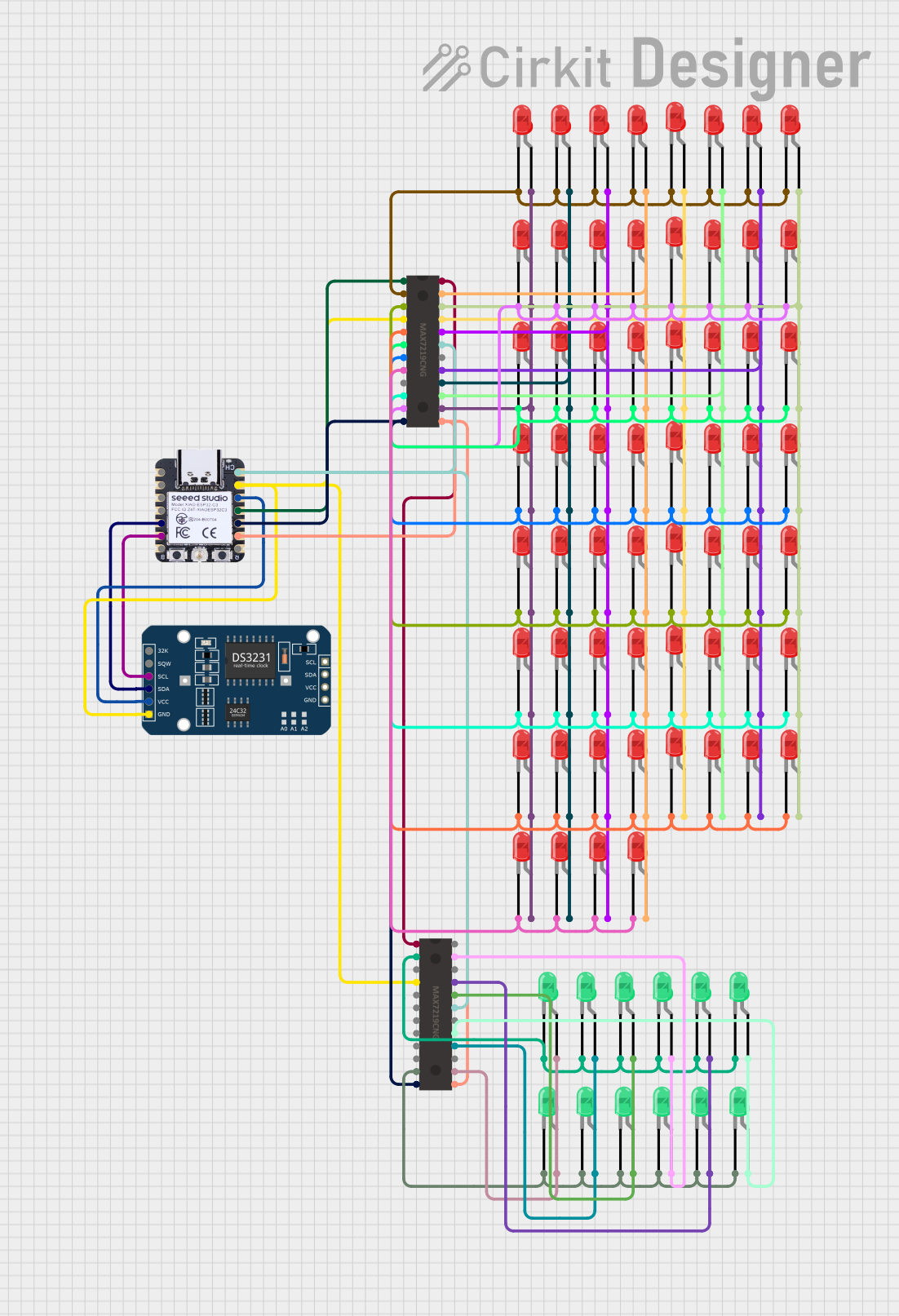
Circuit Documentation
Summary
This circuit is designed to function as a digital clock using an ESP32 microcontroller, a DS3231 RTC module, and two MAX7219 LED drivers. The circuit also includes multiple LEDs to display the time. The ESP32 microcontroller communicates with the DS3231 RTC module via I2C to get the current time and controls the MAX7219 LED drivers to display the time on the LEDs.
Component List
XIAO ESP32C3
- Description: Microcontroller
- Pins: GPIO2/A0/D0, GPIO3/A1/D1, GPIO4/A2/D2, GPIO5/A3/D3, GPIO6/SDA/D4, GPIO7/SCL/D5, GPIO21/Tx/D6, 5V, GND, 3V3, GPIO10/MOSI/D10, GPIO9/MISO/D9, GPIO8/SCK/D8, GPIO20/Rx/D7
DS3231 RTC
- Description: Real-Time Clock Module
- Pins: 32K, SQW, SCL, SDA, VCC, GND
MAX7219
- Description: LED Driver
- Pins: DOUT, SEG D, SEG DP, SEG E, SEG C, V+, ISET, SEG G, SEG B, SEG F, SEG A, CLK, LOAD(CSn), DIG 1, DIG 5, GND, DIG 7, DIG 3, DIG 2, DIG 6, DIG 4, DIG 0, DIN
LED: Two Pin (red)
- Description: Red LED
- Pins: cathode, anode
LED: Two Pin (green)
- Description: Green LED
- Pins: cathode, anode
Wiring Details
XIAO ESP32C3
- GPIO6/SDA/D4 connected to DS3231 RTC SDA
- GPIO7/SCL/D5 connected to DS3231 RTC SCL
- 5V connected to MAX7219 V+ (both instances)
- GND connected to DS3231 RTC GND, MAX7219 GND (both instances)
- 3V3 connected to DS3231 RTC VCC
- GPIO10/MOSI/D10 connected to MAX7219 DIN (first instance)
- GPIO9/MISO/D9 connected to MAX7219 LOAD(CSn) (both instances)
- GPIO8/SCK/D8 connected to MAX7219 CLK (both instances)
DS3231 RTC
- SDA connected to XIAO ESP32C3 GPIO6/SDA/D4
- SCL connected to XIAO ESP32C3 GPIO7/SCL/D5
- VCC connected to XIAO ESP32C3 3V3
- GND connected to XIAO ESP32C3 GND
MAX7219 (First Instance)
- V+ connected to XIAO ESP32C3 5V
- GND connected to XIAO ESP32C3 GND
- DIN connected to XIAO ESP32C3 GPIO10/MOSI/D10
- LOAD(CSn) connected to XIAO ESP32C3 GPIO9/MISO/D9
- CLK connected to XIAO ESP32C3 GPIO8/SCK/D8
- DOUT connected to MAX7219 DIN (second instance)
- SEG D connected to LED: Two Pin (red) anode (multiple instances)
- SEG DP connected to LED: Two Pin (red) anode (multiple instances)
- SEG E connected to LED: Two Pin (red) anode (multiple instances)
- SEG C connected to LED: Two Pin (red) anode (multiple instances)
- SEG G connected to LED: Two Pin (red) anode (multiple instances)
- SEG B connected to LED: Two Pin (red) anode (multiple instances)
- SEG F connected to LED: Two Pin (red) anode (multiple instances)
- SEG A connected to LED: Two Pin (red) anode (multiple instances)
- DIG 1 connected to LED: Two Pin (red) cathode (multiple instances)
- DIG 5 connected to LED: Two Pin (red) cathode (multiple instances)
- DIG 7 connected to LED: Two Pin (red) cathode (multiple instances)
- DIG 3 connected to LED: Two Pin (red) cathode (multiple instances)
- DIG 2 connected to LED: Two Pin (red) cathode (multiple instances)
- DIG 6 connected to LED: Two Pin (red) cathode (multiple instances)
- DIG 4 connected to LED: Two Pin (red) cathode (multiple instances)
- DIG 0 connected to LED: Two Pin (red) cathode (multiple instances)
MAX7219 (Second Instance)
- V+ connected to XIAO ESP32C3 5V
- GND connected to XIAO ESP32C3 GND
- DIN connected to MAX7219 DOUT (first instance)
- LOAD(CSn) connected to XIAO ESP32C3 GPIO9/MISO/D9
- CLK connected to XIAO ESP32C3 GPIO8/SCK/D8
- SEG D connected to LED: Two Pin (green) anode (multiple instances)
- SEG E connected to LED: Two Pin (green) anode (multiple instances)
- SEG C connected to LED: Two Pin (green) anode (multiple instances)
- SEG G connected to LED: Two Pin (green) anode (multiple instances)
- SEG B connected to LED: Two Pin (green) anode (multiple instances)
- SEG A connected to LED: Two Pin (green) anode (multiple instances)
- DIG 1 connected to LED: Two Pin (green) cathode (multiple instances)
- DIG 0 connected to LED: Two Pin (green) cathode (multiple instances)
LED: Two Pin (red)
- anode connected to MAX7219 SEG D, SEG DP, SEG E, SEG C, SEG G, SEG B, SEG F, SEG A (first instance)
- cathode connected to MAX7219 DIG 1, DIG 5, DIG 7, DIG 3, DIG 2, DIG 6, DIG 4, DIG 0 (first instance)
LED: Two Pin (green)
- anode connected to MAX7219 SEG D, SEG E, SEG C, SEG G, SEG B, SEG A (second instance)
- cathode connected to MAX7219 DIG 1, DIG 0 (second instance)
Code Documentation
#include <Wire.h>
#include <RTClib.h>
#include <LedControl.h>

// Initialize RTC
RTC_DS3231 rtc;

// Initialize MAX7219
LedControl lc = LedControl(10, 8, 9, 2); // DIN, CLK, LOAD, number of devices

void setup() {
  // Initialize I2C communication
  Wire.begin();

  // Initialize RTC
  rtc.begin();

  // Initialize MAX7219
  for (int i = 0; i < 2; i++) {
    lc.shutdown(i, false);
    lc.setIntensity(i, 8);
    lc.clearDisplay(i);
  }
}

void loop() {
  // Get the current time
  DateTime now = rtc.now();

  int minute = now.minute();
  int hour = now.hour() % 12; // Convert 24-hour format to 12-hour format

  // Clear previous display
  lc.clearDisplay(0);
  lc.clearDisplay(1);

  // Light up the minute LED on the first MAX7219
  lc.setLed(0, minute / 8, minute % 8, true);

  // Light up the hour LED on the second MAX7219
  lc.setLed(1, hour / 8, hour % 8, true);

  delay(1000); // Update every second
}
This code initializes the RTC and MAX7219 LED drivers, retrieves the current time from the RTC, and updates the LEDs to display the current hour and minute. The display is updated every second.