
Arduino UNO with Adafruit HTU21D-F Sensor for Temperature and Humidity Monitoring
View and Edit Project In Cirkit Designer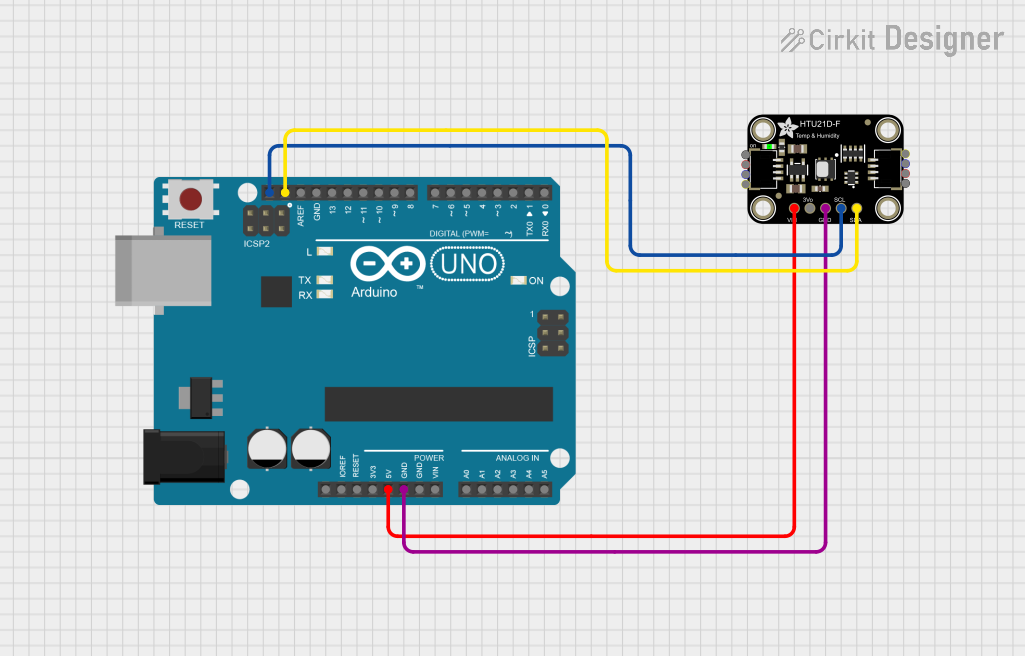
Circuit Documentation
Summary
This document provides a detailed overview of a simple circuit designed to interface an Arduino UNO with an Adafruit HTU21D-F Temperature & Humidity Sensor. The Arduino UNO acts as the central processing unit, reading temperature and humidity data from the HTU21D-F sensor and outputting the information to the Serial Monitor. The sensor communicates with the Arduino over the I2C protocol, utilizing the SCL and SDA lines for clock and data transmission, respectively.
Component List
Arduino UNO
- Description: A microcontroller board based on the ATmega328P.
- Purpose: Acts as the central processing unit for the circuit, reading sensor data and handling communication.
- Pins: UNUSED, IOREF, Reset, 3.3V, 5V, GND, Vin, A0-A5, SCL, SDA, AREF, D0-D13.
Adafruit HTU21D-F Temperature & Humidity Sensor
- Description: A high precision temperature and humidity sensor.
- Purpose: Measures the temperature and humidity of the environment and sends this data to the Arduino.
- Pins: VCC, 3.3V, GND, SCL, SDA.
Wiring Details
Arduino UNO
- 5V - Provides power to the HTU21D-F sensor.
- GND - Common ground with the HTU21D-F sensor.
- SCL - I2C clock line connected to the HTU21D-F sensor.
- SDA - I2C data line connected to the HTU21D-F sensor.
Adafruit HTU21D-F Temperature & Humidity Sensor
- VCC - Connected to the 5V output from the Arduino UNO.
- GND - Connected to the ground (GND) on the Arduino UNO.
- SCL - Connected to the SCL pin on the Arduino UNO for I2C communication.
- SDA - Connected to the SDA pin on the Arduino UNO for I2C communication.
Documented Code
/*
  This Arduino sketch interfaces with the Adafruit HTU21D-F Temperature & Humidity Sensor.
  It reads temperature in Celsius and relative humidity in percentage, then outputs the
  values to the Serial Monitor every 500 milliseconds.
*/

#include <Wire.h>
#include "Adafruit_HTU21DF.h"

// Create an instance of the Adafruit_HTU21DF class
Adafruit_HTU21DF htu = Adafruit_HTU21DF();

void setup() {
  // Start the serial communication
  Serial.begin(9600);

  // Initialize the HTU21D-F sensor
  if (!htu.begin()) {
    Serial.println("Couldn't find sensor!");
    while (1); // Hang if sensor is not detected
  }
}

void loop() {
  // Read temperature (Celsius) from the sensor
  float temp = htu.readTemperature();
  // Read relative humidity (%) from the sensor
  float rel_hum = htu.readHumidity();

  // Print the temperature and humidity to the Serial Monitor
  Serial.print("Temp: "); Serial.print(temp); Serial.print(" C");
  Serial.print("\t\t");
  Serial.print("Humidity: "); Serial.print(rel_hum); Serial.println(" %");

  // Wait for 500 milliseconds before reading again
  delay(500);
}
This code is designed to run on the Arduino UNO and interfaces with the Adafruit HTU21D-F sensor to read temperature and humidity data. The data is then printed to the Serial Monitor in a human-readable format. The sensor is initialized in the setup() function, and readings are taken and printed in the loop() function every 500 milliseconds.