
Arduino UNO Based Distance Measurement Display with LED Indicators
View and Edit Project In Cirkit Designer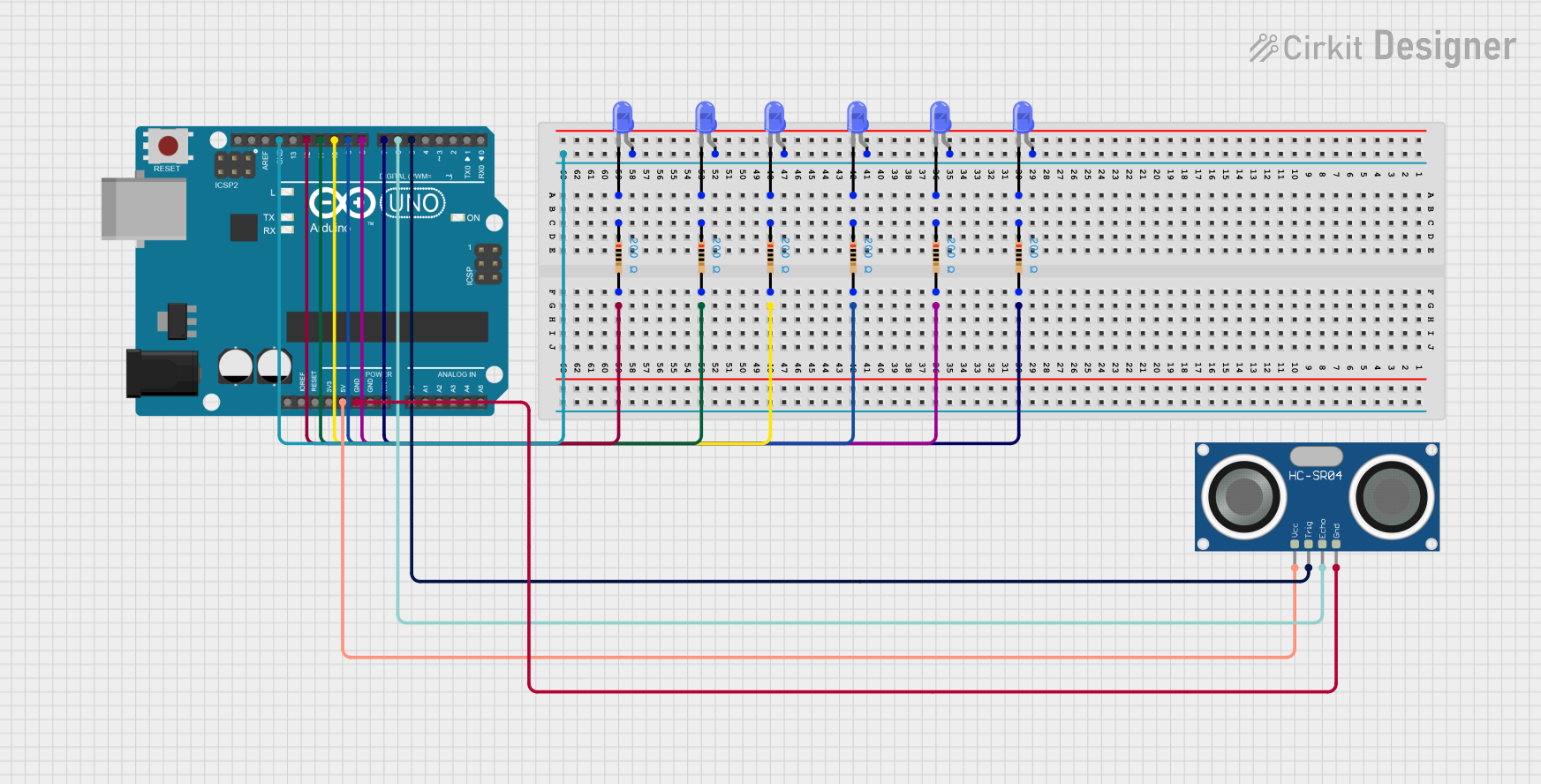
Circuit Documentation
Summary of the Circuit
This circuit consists of an HC-SR04 Ultrasonic Sensor interfaced with an Arduino UNO microcontroller to potentially measure distance via ultrasonic waves. The circuit also includes a series of blue LEDs, each paired with a resistor, possibly indicating status or providing a visual output that could be related to the sensor readings. The Arduino UNO controls the LEDs and communicates with the ultrasonic sensor.
Component List
HC-SR04 Ultrasonic Sensor
- Pins: VCC, TRIG, ECHO, GND
- Description: An ultrasonic distance sensor capable of measuring distances by emitting and receiving ultrasonic waves.
LED: Two Pin (blue)
- Pins: cathode, anode
- Description: A blue light-emitting diode used for indication or display purposes.
Resistor
- Pins: pin1, pin2
- Description: A passive two-terminal electrical component that implements electrical resistance as a circuit element.
- Properties: Resistance value of 200 Ohms.
Arduino UNO
- Pins: UNUSED, IOREF, Reset, 3.3V, 5V, GND, Vin, A0, A1, A2, A3, A4, A5, SCL, SDA, AREF, D13, D12, D11, D10, D9, D8, D7, D6, D5, D4, D3, D2, D1, D0
- Description: A microcontroller board based on the ATmega328P, widely used for building digital devices and interactive objects that can sense and control objects in the physical and digital world.
Wiring Details
HC-SR04 Ultrasonic Sensor
- VCC connected to Arduino UNO 5V
- GND connected to Arduino UNO GND
- TRIG connected to Arduino UNO D5
- ECHO connected to Arduino UNO D6
LEDs (blue)
- Anode of each LED connected to Arduino UNO GND
- Cathode of each LED connected to one end of a resistor (pin1)
Resistors
- Other end of each resistor (pin2) connected to a digital pin on the Arduino UNO (D7, D8, D9, D10, D11, D12)
Documented Code
Arduino UNO Code (sketch.ino)
void setup() {
  // put your setup code here, to run once:

}

void loop() {
  // put your main code here, to run repeatedly:

}
Additional Documentation (documentation.txt)
No additional documentation provided in the code input.