
Arduino-Controlled Interactive LED and Sound System with Motion Detection
View and Edit Project In Cirkit Designer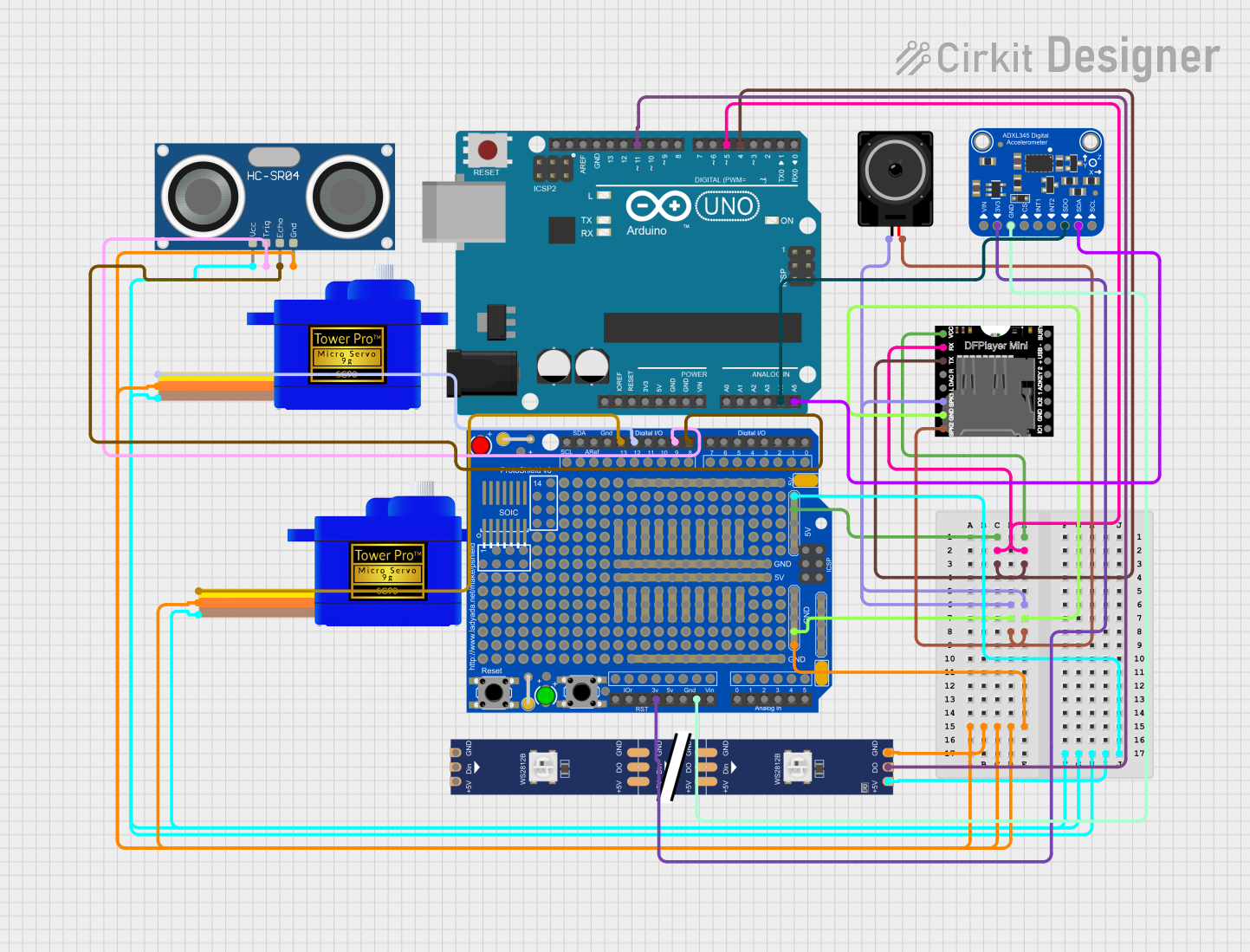
Circuit Documentation
Summary
This circuit integrates various components to perform multiple functions. It includes an Arduino UNO as the central microcontroller, interfaced with an Adafruit ADXL345 accelerometer, an HC-SR04 ultrasonic sensor, two SG90 servomotors, a DFPlayer Mini MP3 player, an Adafruit Proto Shield R3 for prototyping, a loudspeaker, and a WS2812 RGB LED strip. The Arduino UNO manages sensor data processing, controls the servomotors and LED strip, and communicates with the DFPlayer Mini to play sounds. The circuit is designed to react to distance measurements and motion detection.
Component List
Arduino UNO
- Microcontroller board based on the ATmega328P
- Features digital I/O pins, analog input pins, and various power pins
Adafruit ADXL345
- A small, thin, low power, 3-axis accelerometer with high resolution (13-bit) measurement
- Can measure the static acceleration of gravity in tilt-sensing applications, as well as dynamic acceleration resulting from motion or shock
HC-SR04 Ultrasonic Sensor
- An ultrasonic distance sensor capable of measuring the range to an object by using ultrasonic sound waves
Servomotor SG90 (2 units)
- A small and lightweight servo motor capable of precise control
- Used for angular positioning
DFPlayer Mini
- A small and low-cost MP3 module that can directly play MP3 files from a microSD card
- Interfaces with the Arduino via serial communication
Adafruit Proto Shield R3
- A prototyping shield designed to sit on top of the Arduino UNO
- Provides a convenient way to build custom circuits
Loudspeaker
- An electroacoustic transducer used to produce sound in response to an electrical audio signal input
WS2812 RGB LED Strip
- A strip of individually addressable RGB LEDs
- Controlled via a single data line from a microcontroller
Wiring Details
Arduino UNO
A4connected to Adafruit ADXL345SDO/ADDRA5connected to Adafruit ADXL345SDA/SDIOD11connected to WS2812 RGB LED stripDOD5connected to DFPlayer MiniRXD4connected to DFPlayer MiniTX
Adafruit ADXL345
3.3VandGNDconnected to Adafruit Proto Shield R33.3VandGNDSDO/ADDRandSDA/SDIOconnected to Arduino UNOA4andA5
HC-SR04 Ultrasonic Sensor
VCCandGNDconnected to Adafruit Proto Shield R3+5VandGNDTRIGconnected to Adafruit Proto Shield R3D9ECHOconnected to Adafruit Proto Shield R3D8
Servomotor SG90
- Both servomotors have their
VCCconnected to Adafruit Proto Shield R3+5V - Both servomotors have their
GNDconnected to Adafruit Proto Shield R3GND - One servomotor's
SIGconnected to Adafruit Proto Shield R3D12 - The other servomotor's
SIGconnected to Adafruit Proto Shield R3D13
DFPlayer Mini
VCCandGNDconnected to Adafruit Proto Shield R3+5VandGNDRXconnected to Arduino UNOD5TXconnected to Arduino UNOD4SPK1andSPK2connected to Loudspeakerpin1andpin2
Loudspeaker
pin1andpin2connected to DFPlayer MiniSPK1andSPK2
WS2812 RGB LED Strip
5VandGNDconnected to Adafruit Proto Shield R3+5VandGNDDINconnected to Arduino UNOD11
Documented Code
#include <Adafruit_NeoPixel.h>
#include <Servo.h>
#include <Wire.h>
#include <SoftwareSerial.h>  // Used for communication with DFPlayer Mini
#include <DFRobotDFPlayerMini.h>

// RGB LED strip and servomotor settings
#define LED_PIN 11      // Data pin for the RGB LED strip is Pin 11
#define NUMPIXELS 14    // Assuming there are 14 LEDs (adjust according to your strip)
Adafruit_NeoPixel strip = Adafruit_NeoPixel(NUMPIXELS, LED_PIN, NEO_GRB + NEO_KHZ800);  // Create RGB LED strip object

const int trigPin = 9;         // Ultrasonic sensor Trig pin
const int echoPin = 8;         // Ultrasonic sensor Echo pin

Servo servo1;  // Define the first servomotor object
Servo servo2;  // Define the second servomotor object

int currentAngle1 = 0;  // Current angle of servomotor 1
int currentAngle2 = 0;  // Current angle of servomotor 2

// DFPlayer Mini settings
SoftwareSerial mySoftwareSerial(5, 4); // RX, TX are on Pin 5 and Pin 4
DFRobotDFPlayerMini myDFPlayer;

// ADXL345 accelerometer address and registers
#define ADXL345_ADDRESS 0x53
#define POWER_CTL 0x2D
#define DATA_FORMAT 0x31
#define DATAX0 0x32

void setup() {
  // Set pin modes
  pinMode(trigPin, OUTPUT);  // Ultrasonic sensor Trig pin as output
  pinMode(echoPin, INPUT);   // Ultrasonic sensor Echo pin as input

  // Connect two servomotors to Pin 12 and Pin 13
  servo1.attach(12);  // First servomotor connected to Pin 12
  servo2.attach(13);  // Second servomotor connected to Pin 13

  strip.begin();  // Initialize RGB LED strip
  strip.show();   // Initialize all pixels to 'off'

  Serial.begin(9600);  // Initialize serial communication at 9600 baud for debugging
  mySoftwareSerial.begin(9600); // DFPlayer serial communication speed
  if (!myDFPlayer.begin(mySoftwareSerial)) {  // Initialize DFPlayer Mini
    Serial.println(F("DFPlayer Mini init failed!"));
    while(true);
  }

  Serial.println(F("DFPlayer Mini online."));
  myDFPlayer.volume(10);  // Set volume, range is 0-30

  Wire.begin();  // Start I2C for accelerometer

  // Initialize accelerometer
  setupADXL345();

  Serial.println("System Initialized.");
}

void loop() {
    long duration, distance;
    digitalWrite(trigPin, LOW);    // Ensure Trig pin is low
    delayMicroseconds(2);          // Wait for 2 microseconds
    digitalWrite(trigPin, HIGH);   // Send ultrasonic signal
    delayMicroseconds(10);         // Last for 10 microseconds
    digitalWrite(trigPin, LOW);    // Stop signal

    duration = pulseIn(echoPin, HIGH);  // Read Echo pin, return duration
    distance = (duration * 0.034) / 2;  // Convert time to distance (cm)

    // Print distance data to the serial monitor
    Serial.print("Distance: ");
    Serial.print(distance);
    Serial.println(" cm");

    // Control RGB LED strip color mapping, mapping range adjusted to 0-150cm
    if (distance <= 150) {
      int redValue = map(distance, 0, 150, 255, 0);    // The closer the distance, the more red
      int greenValue = map(distance, 0, 150, 0, 255);  // The farther the distance, the more green
      int blueValue = map(distance, 0, 150, 255, 0);   // The farther the distance, the more blue
      uint32_t color = strip.Color(redValue, greenValue, blueValue);  // Generate RGB color

      // Update the color of all pixels
      for (int i = 0; i < NUMPIXELS; i++) {
        strip.setPixelColor(i, color);  // Set the color of each pixel
      }
      strip.show();  // Send updated color data
    } else {
      // Turn off the strip if over 150cm
      for (int i = 0; i < NUMPIXELS; i++) {
        strip.setPixelColor(i, strip.Color(0, 0, 0));  // Turn off the strip
      }
      strip.show();
    }

    // Control two servomotors, move when distance is less than 20
    int targetAngle1 = (distance < 20) ? 90 : 0;  // Target angle 1
    int targetAngle2 = (distance < 20) ? 45 : 30;  // Target angle 2

    // Only update if the target angle is different from the current angle
    if (abs(currentAngle1