
Arduino UNO Task Reminder System with RTC DS3231 and I2C LCD
View and Edit Project In Cirkit Designer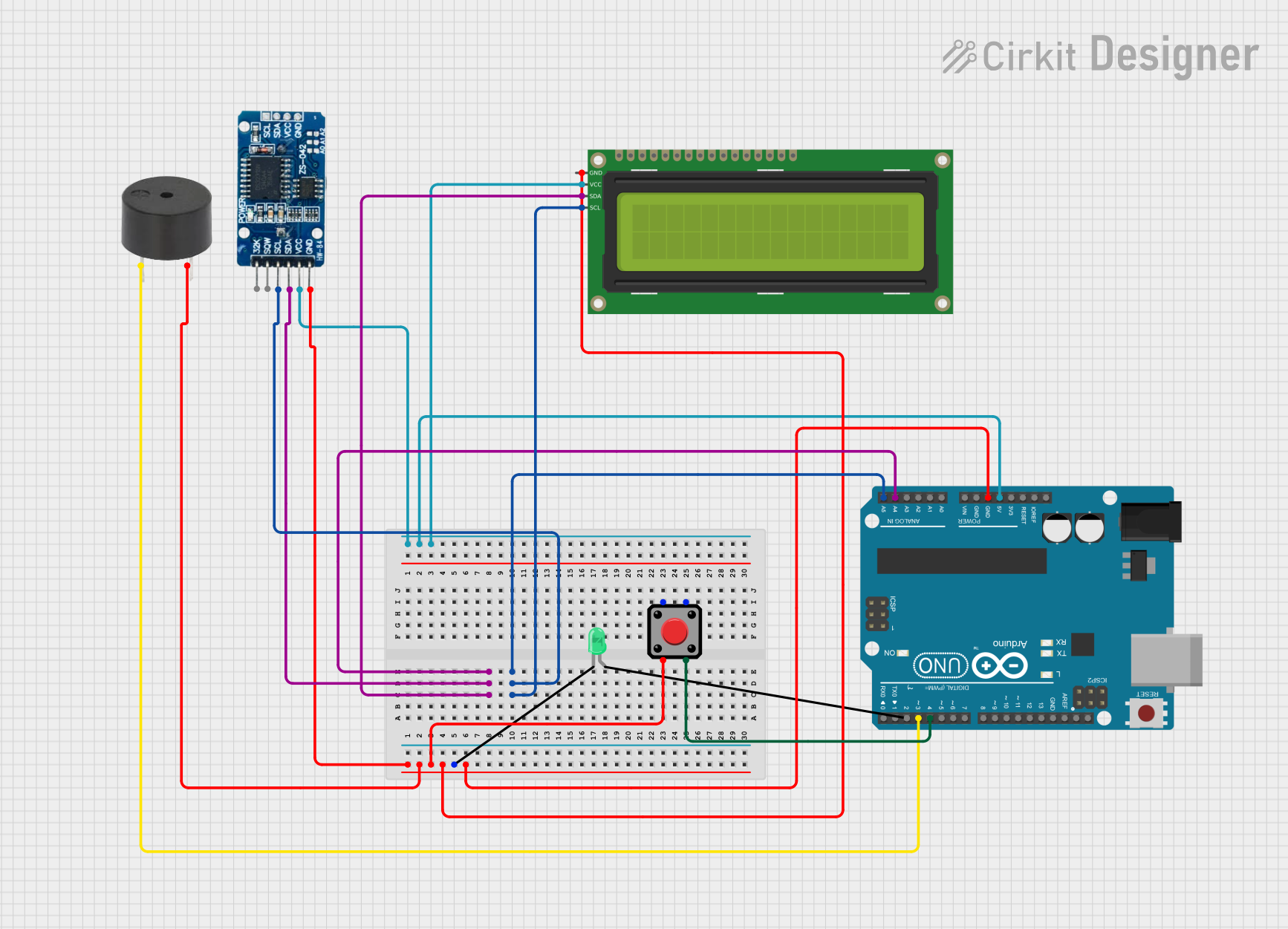
Circuit Documentation
Summary
This circuit is a Task Reminder System that uses an Arduino UNO microcontroller to manage tasks and remind the user at specific times. The system includes an RTC DS3231 for real-time clock functionality, a 16x2 I2C LCD for displaying task information, a pushbutton for user interaction, a buzzer for audible alerts, and an LED for visual alerts.
Component List
RTC DS3231
- Description: Real-Time Clock module
- Pins: 32K, SQW, SCL, SDA, VCC, GND
- Purpose: Keeps track of the current time and date.
16x2 I2C LCD
- Description: 16x2 character LCD with I2C interface
- Pins: GND, VCC, SDA, SCL
- Purpose: Displays task information and system messages.
Arduino UNO
- Description: Microcontroller board based on the ATmega328P
- Pins: UNUSED, IOREF, Reset, 3.3V, 5V, GND, Vin, A0, A1, A2, A3, A4, A5, SCL, SDA, AREF, D13, D12, D11, D10, D9, D8, D7, D6, D5, D4, D3, D2, D1, D0
- Purpose: Central control unit for the task reminder system.
LED: Two Pin (green)
- Description: Green LED
- Pins: Cathode, Anode
- Purpose: Provides visual alerts for active tasks.
Buzzer
- Description: Piezoelectric buzzer
- Pins: PIN, GND
- Purpose: Provides audible alerts for active tasks.
Pushbutton
- Description: Momentary pushbutton switch
- Pins: Pin 2, Pin 1, Pin 3, Pin 4
- Purpose: Allows the user to dismiss active tasks.
Wiring Details
RTC DS3231
- SDA: Connected to Arduino UNO A4
- SCL: Connected to Arduino UNO A5
- GND: Connected to Arduino UNO GND
- VCC: Connected to Arduino UNO 5V
16x2 I2C LCD
- SDA: Connected to Arduino UNO A4
- SCL: Connected to Arduino UNO A5
- GND: Connected to Arduino UNO GND
- VCC: Connected to Arduino UNO 5V
Arduino UNO
- A4: Connected to RTC DS3231 SDA and 16x2 I2C LCD SDA
- A5: Connected to RTC DS3231 SCL and 16x2 I2C LCD SCL
- GND: Connected to RTC DS3231 GND, 16x2 I2C LCD GND, LED Cathode, Buzzer GND, and Pushbutton Pin 2
- 5V: Connected to RTC DS3231 VCC and 16x2 I2C LCD VCC
- D3: Connected to Buzzer PIN
- D4: Connected to Pushbutton Pin 3
LED: Two Pin (green)
- Cathode: Connected to Arduino UNO GND
- Anode: Not connected (assumed to be controlled by the Arduino in the code)
Buzzer
- PIN: Connected to Arduino UNO D3
- GND: Connected to Arduino UNO GND
Pushbutton
- Pin 2: Connected to Arduino UNO GND
- Pin 3: Connected to Arduino UNO D4
Code Documentation
#include <Wire.h>
#include <RTClib.h>
#include <LiquidCrystal_I2C.h>

RTC_DS3231 rtc;
LiquidCrystal_I2C lcd(0x27, 16, 2);  // Change the I2C address if necessary

const int buzzerPin = 3;
const int ledPin = 2;
const int buttonPin = 4;
bool taskActive = false;
bool taskDismissed[10];  // Array to track dismissed tasks
int lastTaskIndex = -1;  // Track the last active task

const int numTasks = 10;  // Number of tasks per day

// Task times (hours and minutes) in 24-hour format
int taskHours[numTasks] = {7, 8, 9, 10, 11, 12, 14, 16, 18, 20};
int taskMinutes[numTasks] = {30, 0, 30, 0, 30, 0, 0, 0, 0, 30};

// Task descriptions
String tasks[numTasks] = {
  "Breakfast",
  "Take Medication",
  "Morning Walk",
  "Snack Time",
  "Read a Book",
  "Lunch",
  "Afternoon Nap",
  "Exercise",
  "Dinner",
  "Prepare for Bed"
};

int lastDay = -1;  // Keep track of the last day to reset tasks

void setup() {
  Serial.begin(9600);
  Serial.println("Initializing Task Reminder System...");

  pinMode(buzzerPin, OUTPUT);
  pinMode(ledPin, OUTPUT);
  pinMode(buttonPin, INPUT_PULLUP);

  if (!rtc.begin()) {
    Serial.println("Couldn't find RTC");
    while (1); // Halt if RTC doesn't start
  }

  lcd.init();
  lcd.begin(16,2);
  lcd.backlight();
  lcd.setCursor(0, 0);
  lcd.print("Task Reminder Sys");
  delay(2000);

  for (int i = 0; i < numTasks; i++) {
    taskDismissed[i] = false;
  }

  Serial.println("System Initialized!");
}

void loop() {
  DateTime now = rtc.now();
  Serial.print("Current Time: ");
  Serial.print(now.hour());
  Serial.print(":");
  Serial.println(now.minute());

  if (now.day() != lastDay) {
    lastDay = now.day();
    resetTaskDismissal();
  }

  for (int i = 0; i < numTasks; i++) {
    if (!taskDismissed[i] && now.hour() == taskHours[i] && now.minute() == taskMinutes[i]) {
      taskActive = true;
      triggerTaskAlert(i);
    }
  }

  // Check if the task is active and if the button is pressed to dismiss it
  static unsigned long lastDebounceTime = 0;
  const unsigned long debounceDelay = 50; // Adjust as needed
  if (taskActive && (millis() - lastDebounceTime) > debounceDelay) {
    if (digitalRead(buttonPin) == LOW) {
      lastDebounceTime = millis();
      taskActive = false;
      taskDismissed[lastTaskIndex] = true;
      dismissTask();
    }
  }
}

void triggerTaskAlert(int taskIndex) {
  lastTaskIndex = taskIndex;
  digitalWrite(ledPin, HIGH);
  tone(buzzerPin, 1000);
  displayTaskReminder(taskIndex);
  Serial.print("Task Alert: ");
  Serial.println(tasks[taskIndex]);
}

void displayTaskReminder(int taskIndex) {
  lcd.clear();
  lcd.setCursor(0, 0);
  lcd.print(tasks[taskIndex]);
  lcd.setCursor(0, 1);
  lcd.print("Press Btn to Dismiss");
  Serial.println("Reminder Displayed on LCD");
}

void resetTaskDismissal() {
  for (int i = 0; i < numTasks; i++) {
    taskDismissed[i] = false;
  }
  Serial.println("Task Dismissal Reset");
}

void dismissTask() {
  digitalWrite(ledPin, LOW);
  noTone(buzzerPin);
  displayDismissedMessage();
  Serial.println("Task Dismissed");
}

void displayDismissedMessage() {
  lcd.clear();
  lcd.setCursor(0, 0);
  lcd.print("Task Dismissed.");
  Serial.println("Dismissed Message Displayed on LCD");
}
This code initializes the Task Reminder System, sets up the RTC, LCD, and I/O pins, and continuously checks the current time to trigger task alerts. The user can dismiss active tasks using the pushbutton.