
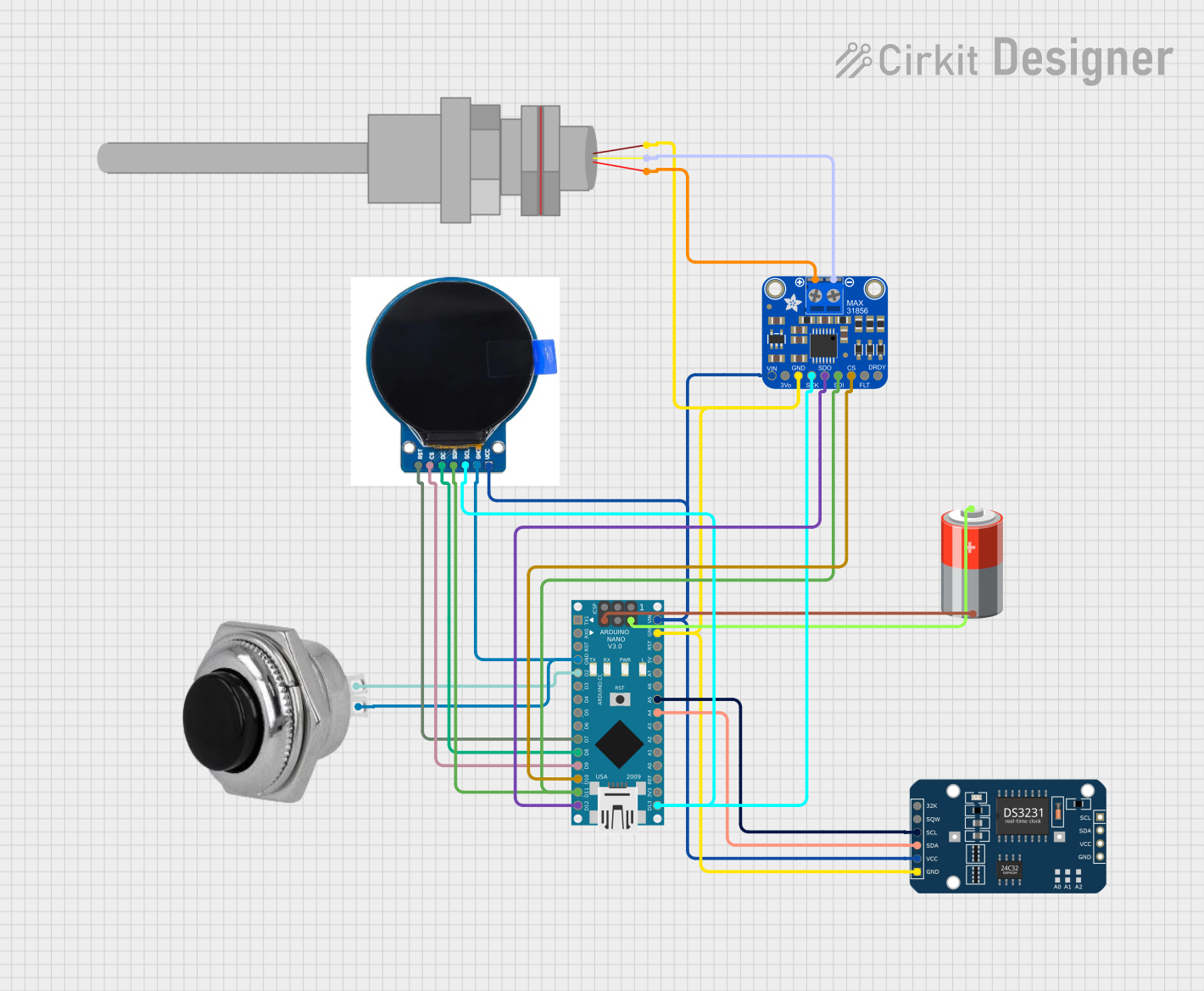
Circuit Documentation
Summary
This circuit is designed to read temperature data from a MAX31865 sensor, display the temperature on a TFT screen, and log the data with timestamps using an RTC (Real-Time Clock). A momentary switch is used to control logging and display a temperature graph. The circuit is powered by a 5V battery and is controlled by an Arduino Nano microcontroller.
Component List
Arduino Nano
- Description: A small, complete, and breadboard-friendly board based on the ATmega328P.
- Pins: D1/TX, D0/RX, RESET, GND, D2, D3, D4, D5, D6, D7, D8, D9, D10, D11/MOSI, D12/MISO, VIN, 5V, A7, A6, A5, A4, A3, A2, A1, A0, AREF, 3V3, D13/SCK
Round TFT Display
- Description: A round TFT display for visual output.
- Pins: RST, CS, DC, SDA, SCL, GND, VCC
DS3231 RTC
- Description: A high-accuracy real-time clock module.
- Pins: 32K, SQW, SCL, SDA, VCC, GND
Black Momentary Switch 32 mm
- Description: A momentary push-button switch.
- Pins: In, Out
PT100
- Description: A platinum resistance temperature detector.
- Pins: -, +
5V Battery
- Description: A 5V power source.
- Pins: +, -
Adafruit MAX31856 Thermocouple Amp
- Description: A thermocouple amplifier for reading temperature.
- Pins: VIN, 3.3V, GND, SCK, THERM+, SDO, THERM-, SDI, !CS, !FAULT, DRDY
Wiring Details
Arduino Nano
GND connected to:
- Round TFT Display GND
- Black Momentary Switch Out
- Adafruit MAX31856 Thermocouple Amp GND
- DS3231 RTC GND
- PT100 -
- 5V Battery -
D2 connected to:
- Black Momentary Switch In
D7 connected to:
- Round TFT Display RST
D8 connected to:
- Round TFT Display DC
D9 connected to:
- Round TFT Display CS
D10 connected to:
- Adafruit MAX31856 Thermocouple Amp !CS
D11/MOSI connected to:
- Adafruit MAX31856 Thermocouple Amp SDI
- Round TFT Display SDA
D12/MISO connected to:
- Adafruit MAX31856 Thermocouple Amp SDO
D13/SCK connected to:
- Adafruit MAX31856 Thermocouple Amp SCK
- Round TFT Display SCL
VIN connected to:
- Adafruit MAX31856 Thermocouple Amp VIN
- Round TFT Display VCC
- DS3231 RTC VCC
5V connected to:
- 5V Battery +
A5 connected to:
- DS3231 RTC SCL
A4 connected to:
- DS3231 RTC SDA
Round TFT Display
GND connected to:
- Arduino Nano GND
- Black Momentary Switch Out
RST connected to:
- Arduino Nano D7
DC connected to:
- Arduino Nano D8
CS connected to:
- Arduino Nano D9
SDA connected to:
- Adafruit MAX31856 Thermocouple Amp SDI
- Arduino Nano D11/MOSI
SCL connected to:
- Adafruit MAX31856 Thermocouple Amp SCK
- Arduino Nano D13/SCK
VCC connected to:
- Adafruit MAX31856 Thermocouple Amp VIN
- DS3231 RTC VCC
- Arduino Nano VIN
DS3231 RTC
GND connected to:
- Arduino Nano GND
- Adafruit MAX31856 Thermocouple Amp GND
- PT100 -
SCL connected to:
- Arduino Nano A5
SDA connected to:
- Arduino Nano A4
VCC connected to:
- Adafruit MAX31856 Thermocouple Amp VIN
- Round TFT Display VCC
- Arduino Nano VIN
Black Momentary Switch 32 mm
In connected to:
- Arduino Nano D2
Out connected to:
- Arduino Nano GND
- Round TFT Display GND
PT100
- connected to:
- Adafruit MAX31856 Thermocouple Amp THERM-
- Arduino Nano GND
- DS3231 RTC GND
+ connected to:
- Adafruit MAX31856 Thermocouple Amp THERM+
5V Battery
+ connected to:
- Arduino Nano 5V
- connected to:
- Arduino Nano GND
Adafruit MAX31856 Thermocouple Amp
VIN connected to:
- Round TFT Display VCC
- DS3231 RTC VCC
- Arduino Nano VIN
GND connected to:
- DS3231 RTC GND
- PT100 -
- Arduino Nano GND
SCK connected to:
- Round TFT Display SCL
- Arduino Nano D13/SCK
THERM+ connected to:
- PT100 +
SDO connected to:
- Arduino Nano D12/MISO
THERM- connected to:
- PT100 -
SDI connected to:
- Round TFT Display SDA
- Arduino Nano D11/MOSI
!CS connected to:
- Arduino Nano D10
Code Documentation
/*
 * This Arduino sketch reads temperature from a MAX31865 sensor, displays it
 * on a TFT screen, and logs the data with timestamps using an RTC. A button
 * is used to control logging and display a temperature graph.
 */

#include <Adafruit_MAX31865.h>
#include <TFT_eSPI.h>
#include <SPI.h>
#include <RTClib.h>

#define MAX31865_CS_PIN 10
Adafruit_MAX31865 max31865(MAX31865_CS_PIN);
#define RREF 4300.0
#define TFT_CS 9
#define TFT_DC 8
#define TFT_RST 7
TFT_eSPI tft = TFT_eSPI();
RTC_DS3231 rtc;
#define MAX_LOG_ENTRIES 100
struct LogEntry {
  float temperature;
  DateTime timestamp;
};
LogEntry temperatureLog[MAX_LOG_ENTRIES];
unsigned int logIndex = 0;
#define BUTTON_PIN 2
bool isLogging = false;
unsigned int buttonPressCount = 0;
unsigned long lastButtonPressTime = 0;
const unsigned long debounceDelay = 50;
const unsigned long pressTimeout = 1000;

void setup() {
  Serial.begin(9600);
  while (!Serial) delay(10);
  if (!max31865.begin(MAX31865_3WIRE)) {
    Serial.println("MAX31865 not found. Check wiring!");
    while (1);
  }
  if (!rtc.begin()) {
    Serial.println("Couldn't find RTC. Check wiring!");
    while (1);
  }
  if (rtc.lostPower()) {
    Serial.println("RTC lost power, setting the time...");
    rtc.adjust(DateTime(F(__DATE__), F(__TIME__)));
  }
  tft.init();
  tft.setRotation(0);
  tft.fillScreen(TFT_CYAN);
  tft.setTextColor(TFT_BLACK, TFT_CYAN);
  tft.setTextSize(2);
  tft.setCursor(10, 60);
  tft.println("PT1000 Temp:");
  for (int i = 0; i < MAX_LOG_ENTRIES; i++) {
    temperatureLog[i].temperature = NAN;
  }
  pinMode(BUTTON_PIN, INPUT_PULLUP);
}

void loop() {
  handleButtonPress();
  float temperature = max31865.temperature(RREF, 1000.0);
  DateTime now = rtc.now();
  tft.fillScreen(TFT_CYAN);
  tft.setCursor(10, 60);
  tft.setTextSize(2);
  tft.println("PT1000 Temp:");
  tft.setTextSize(3);
  tft.setCursor(30, 100);
  tft.print(temperature, 1);
  tft.println(" °C");
  if (isLogging) {
    logTemperature(temperature, now);
  }
  delay(1000);
}

void handleButtonPress() {
  static bool lastButtonState = HIGH;
  bool currentButtonState = digitalRead(BUTTON_PIN);
  unsigned long